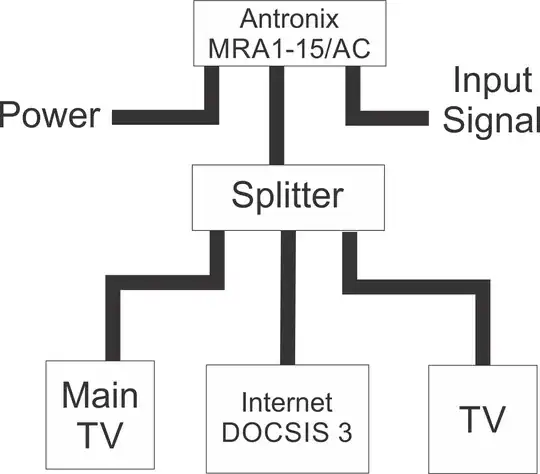
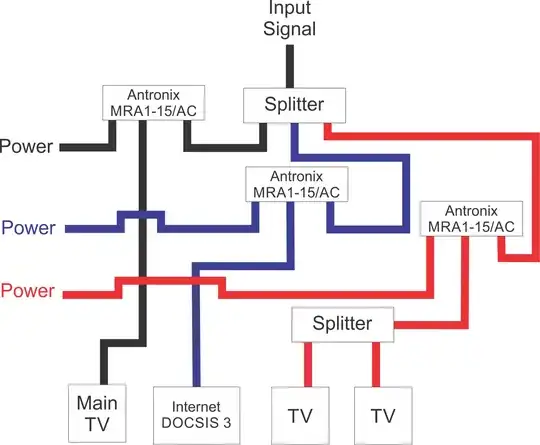
Before going crazy adding amplifiers you might want to spend a little time investigating the current wiring/splitting situation in your house, if you haven't already.
Every splitter and every foot of cable contribute to signal loss:
- Verify that you have only the bare minimum number of splitters in your system (in this case it seems like you can get away with 1).
- Make sure you don't have any unnecessary long bundles of cable, or cable splices. Sometimes people will buy a long amount of cable and then just coil it all up in the basement instead of trimming it.
- Make sure all your existing cables are in good condition: no nicks in the jacket, hard kinks (a bend is fine but a hard kink can break the interior insulation). Make sure all connections are secure. If any cable or connector seems questionable, replace it.
- Make sure the splitter only has as many outputs as you need. A 4-way splitter will drop the signal on each leg more than a 3-way, no matter how many devices are plugged in.
If you're trying to troubleshoot signal strength, you may be able to use the config page on your DOCSIS modem, which should display the signal strength ("power level" in dBmV and "signal-to-noise ratio" in dB).
I think it's unlikely you'll really need 3 amplifiers in your house, especially if the cable company has verified that their own amplifier is providing a sufficient signal to your property. Typically the utility company is responsible for getting a usable signal as far as the exterior wall. If the above suggestions don't yield anything, you might want to call them back and ask them.
Edit based on additional cable modem signal info
The signal numbers you've posted all look perfectly within spec according to several websites, e.g. What cable modem signal levels are considered good?. I am not a cable tech and there may be other signal issues in play but as a rough cut you seem to be getting a decent signal. I don't think an amp will help.
I assume you're using a site like Speedtest.net to measure your internet speed and you're not getting what you think you should?
There are a couple reasons this might happen:
- Poor signal to cable modem (I think we can probably rule this out, but who knows)
- Poor wifi signal, if you're using wifi. Make sure you do these test with a hardwired ethernet cable if possible, to remove that variable.
- Competition between other internet users in your area. Peak internet usage is between 7-9pm. Try running a test late at night or early in the morning to see if you get a different result.
- Unsupported cable modem: is your cable modem provided by your utility or did you buy it yourself? Is it an approved model? You mention "DOCSIS 3" in your post so I assume you've thought about this, but make sure you have an approved modem that supports your utility's network.
- Some other issue with your cable provider
To test whether your house's wiring / splitters are the problem, try moving the cable modem to be directly connected to the utility-installed amplifier (i.e. remove all the household wiring and splitters), and see if you get different speed or signal numbers.