12

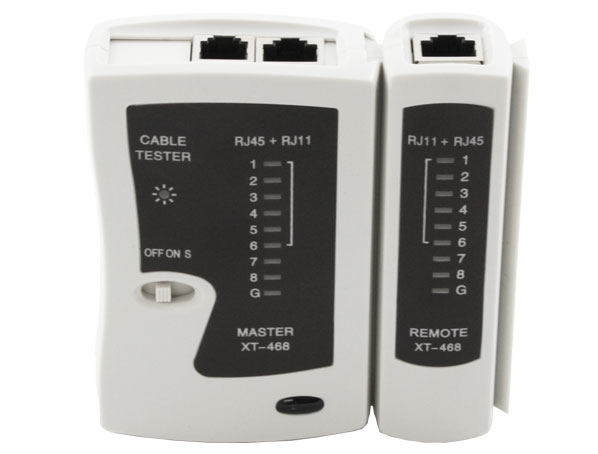
My home office is at the end of a 15-20m ethernet cable that a friend ran 15 years ago, and it recently stopped working. I tested it with a cheap continuity tester, hoping to discover a fault near one end, or that there were still 4 good conductors that I could reuse.

To my surprise, the cable tester shows continuity on all 8 wires, and no shorts. I've tried wiggling the ends of the cable while watching the tester, and even replaced one of the crimps where the insulation stopped short of the plug in case the lack of strain relief had cause a break.

I'm pretty sure the problem is the cable but can't prove it. I've tried swapping cables at the router, and the problem follows the cable, not the router port. Also my office machine works when connected via powerline ethernet (although that's a little unreliable, so I don't want to stick with it). I can't think of anything else that could be causing a problem.

Is there anything else I can do, or do I have to replace the cable? It's not terribly expensive, there's just a lot of stuff to move to get to it!

Robin Bennett
  • 619
  • 4
  • 10
  • 3
    "*the problem follows the cable*" Does this mean if you use a different cable, the problem goes away? If so, then yes that's clearly the issue and you need to replace the cable (and probably your cheap cable tester, too). There's no substitute for empirical testing. – TylerH Sep 22 '21 at 16:09
  • 1
    Frankly, there's not much to a continuity tester (with a battery, a couple of probe wires and a small light bulb you could build your own), so even cheap ones are likely to work. If they fail, they'd _probably_ fail to showing a good cable as bad. Did you wiggle each end of the cable as you tested on each wire? Sometimes, there can be a slight break that will work in one position but not in another. – FreeMan Sep 22 '21 at 16:10
  • 1
    I would cut a few inches (cm) from both ends and crimp new connector and check if it works. – Rodo Sep 22 '21 at 16:11
  • @FreeMan - the reason I bought a tester was that I can't get to both ends of the cable at the same time, it's in a different building. I did try wiggling the ends, and even re-crimped one end where there was no strain relief because the insulation stopped short of the plug. – Robin Bennett Sep 22 '21 at 16:22
  • Electrical interference can cause issues with ethernet. If there is a high current device using power and the cord/wiring runs parallel to the ethernet it can cause issues. I'm not sure if it would not work at all, but it would make connections flaky. Does the computer or router have link lights that show a cable is connected? – JPhi1618 Sep 22 '21 at 17:22
  • If re-doing the ends doesn't fix it, you might want to run two cables while you're replacing it, if they fit. Does the cable run outdoors without any protection, or is it in some sort of conduit? – Andrew Morton Sep 22 '21 at 17:50
  • 2
    Different building? Look at the lettering on the cable, is it a type rated for outdoors? Also, is there isolation between the 8 conductors? (you can check this at either end). – Harper - Reinstate Monica Sep 22 '21 at 18:07
  • 6
    I just noticed "15 years", "between buildings" and "installed by a friend". Can you show us pictures? Is it indoor Cat3 strung up on tree branches by any chance? :O – jay613 Sep 22 '21 at 18:11
  • @Harper-ReinstateMonica I don't think so. The full text is "ALCATEL UTP FLEX CATEGORY 5e ISO11801 PATCHCABLE 4PR 7x0.2 LU430 489932M" – Robin Bennett Sep 22 '21 at 19:53
  • does the cable have a proper lan jack at each end? – jsotola Sep 23 '21 at 02:07
  • 3
    That sounds like an ordinary premade patch cable (soft jacket, stranded conductors, 8P8C plugs on each end), almost certainly not rated for outdoor use. I'm amazed that it worked for so many years. (Mostly thanks to the steel cable support. If it had to carry its own weight, it would have stretched and failed in a few weeks.) – TooTea Sep 23 '21 at 08:01
  • 3
    @RobinBennett Do you genuinely need Ethernet? A decent wifi repeater in your roof space will cover that range, no problems at all. Of course you'll only get wifi speeds out of it, but that's enough for most people unless you have a supercomputer in your garden office and a huge server in your house. :) – Graham Sep 23 '21 at 09:40
  • @Graham wifi can be problematic in case of crowding or interference or bad weather, a good cable avoids all that. – htmlcoderexe Sep 24 '21 at 10:47
  • try enforcing slower speed, that is 100 if you have 1000 or 10 if you have 100. Or perhaps, have you upgraded the computer recently? – Agent_L Sep 24 '21 at 10:47
  • So ... summarizing: You should either install a fiber link among the wisteria, the whole thing including an armored outdoor cable and media converters will cost less than $100. Or you should use wireless. NOT a "repeater" (those are terrible) but install a wifi mesh network using a pair of Asus home routers with directional antennas attached. You can't do that with Google, Eero, etc but Asus has a nice mesh function and their routers have several ethernet ports and an antenna port and they're CHEAP. This will cost more like $300 but you don't have to string anything outside. – jay613 Sep 24 '21 at 14:24
  • @jay613 - why fibre rather than an outdoor rated cable? I'm not a botanist but I doubt wisteria causes much interference. – Robin Bennett Sep 24 '21 at 15:05
  • 1
    Fiber because it has far greater bandwidth, which may not be needed today but buys you some future proofing. The effort to string it up and bring it into two buildings from the outside is high, the material cost is relatively trivial. If one day you need the extra bandwidth, you have it. Note, I have no crystal ball. It's just as possible you'll go 100% 5G. It's just that for the relatively difficult install you're doing and the trivial extra cost, you should buy the versatility. – jay613 Sep 24 '21 at 16:02
  • @RobinBennett: "why fibre rather than an outdoor rated cable?" – One major advantage is that it immediately eliminates all the potential (pun very much intended) problems with creating an electrical connection between two locations that were never meant to be electrically connected, including but not limited to, different earth / ground levels in the two buildings, electrical faults migrating from one building to the other, lightning strikes into the cable, etc. Running a cable between two buildings brings with it a non-negligible amount of danger and thus regulatory requirements. – Jörg W Mittag Sep 25 '21 at 14:58
  • 1
    By the way, the answer to your title question "Can an ethernet cable look OK to a cheap cable tester but still have a problem?" is "Yes, of course, why do you think a professional Ethernet tester costs north of ten thousand dollars?" – Jörg W Mittag Sep 25 '21 at 15:05

6 Answers6

30

Yes, absolutely.

However, if it was working (at high speed) previously, then stopped, that is a little strange, but not unheard of either. If the cable is old and has been run over by office chairs or what have you, it very well may have developed cracks in the copper that cause intermittent disconnections when the cable is nudged one way or another.

If the cable doesn't work in practice it really doesn't matter what the tester says.

whatsisname
  • 1,969
  • 2
  • 14
  • 21
  • 2
    Exactly. A tester is a great tool to catch obvious problems with a cable, but it doesn't guarantee anything. – Mast Sep 25 '21 at 09:38
17

This is where better networking gear would come in handy.

This answer will likely not help you in the slightest right now. It's just something to think about next time you need to buy some networking gear.

There are many ways a cable can go bad without compromising DC continuity. We're talking about a highly optimized transmission line for signals with a bandwidth in the hundreds of MHz. Anything that messes with its signal propagation properties will make it unable to support a fast connection:

  • partial untwisting of a pair due to mechanical damage (cable stepped on, kinked, …)
  • water inside the jacket
  • strong electromagnetic interference from a neighboring power cable

(In these cases, one can often get a slow connection going by disabling autonegotiation on both ends and forcing 10Mbps Ethernet instead of GbE, but that's likely just as useful as no cable at all.)

The industry standard way to diagnose a flaky cable is using a time-domain reflectometer (TDR). That's just something that sends a pulse down the cable, waiting for it to be reflected by a break in the cable and measuring the time before the echo comes back. It can be an expensive standalone instrument, but more commonly it's just a built-in feature in advanced Ethernet switches.

Such a switch will then happily tell you "pair A is broken 3±1 metres down the line", exactly what you need to know to troubleshoot this.

Switches that support this can actually be bought relatively cheaply second hand as enterprise users regularly upgrade their networks to newer and newer technologies, discarding piles of perfectly usable equipment. Say, a Cisco 2960 can be had on places like eBay for just about the same price as the dumbest home switch, while giving you lots more in terms of reliability, features and troubleshooting tools. Yes, it will be noisy as hell and it will have 24 ports you'll never use, but just lock it up in a closet and you're set.

TooTea
  • 2,263
  • 12
  • 23
  • Thanks, knowing the 'proper' solution for testing make it a lot easier to decide to just replace the cable. – Robin Bennett Sep 22 '21 at 19:48
  • 1
    Oh wow you weren’t kidding - £40 for a 24 port PoE switch. Wow! – Tim Sep 23 '21 at 08:19
  • 1
    @Tim why are you surprised? While consumer ethernet speeds have been stuck at 1Gbps for the last decade due to it being "good enough" and the increasing prevalence of WiFi being just as good except without the need for messy cabling everywhere, GbE was dead in enterprises a half-decade ago due to their always-increasing need for more bandwidth. The result is that the old enterprise-grade equipment is perfectly acceptable for use by consumers today. – Ian Kemp Sep 24 '21 at 08:20
  • @IanKemp if only that were true. Many corporate locations are on 100Mb. I'm actually dreading the upgrade to Gb for the disruption it will cause. – Chris H Sep 24 '21 at 15:03
  • @IanKemp: PoE is quite useful for stuff like desk phones, security camera's and the like. But that's all stuff that will happily run off a 1 Gbps connection. But it's rather pointless for home use, there's just not really any equipment you'd connect. And the annual power drawn by the PoE switch is likely to cost you quite a bit more than the second-hand price. – MSalters Sep 27 '21 at 07:06
  • @ChrisH you might wanna find a new job... – Ian Kemp Sep 27 '21 at 07:10
  • @MSalters was more talking about the non-PoE stuff. – Ian Kemp Sep 27 '21 at 07:22
10

The only layman's test of an ethernet cable is whether it delivers desired data speeds in practice when installed. There are many levels on which it may fail. Continuity is level 0, the most blunt and easiest to detect. You can detect it with a continuity tester, or even with your eyes if, say, the cable has been cut in half. But if it passes that test, the fun begins.

A cable may work but not at desired speeds. It may work at desired speeds but at lower speeds in certain weather, or not when a train is passing by, or when someone is using the toaster.

Most high speed network devices (most laptops, most routers, etc) will detect if a cable is not "up to speed" (literally and figuratively) and will lower their speeds, sometimes silently without warning.

There are instruments to measure this but you don't need to spend money on instruments and training when you have the perfect test: it's not working and another cable is working. Buy a good high quality cable with robust shielded ends and you should be good to go.

jay613
  • 28,850
  • 2
  • 36
  • 112
  • 4
    OP wrote that it's a 20m cable connecting two buildings. Replacing the cable might be a whole lot of work. The point of the question is how to figure out whether that work is absolutely necessary. – TooTea Sep 22 '21 at 17:38
  • 4
    I missed that comment. Jeez, a 15 year old ethernet cable running "between buildings" and installed by "a friend". I think I'll bounce your idea back at you: is it worth the effort of testing or should it just be replaced? – jay613 Sep 22 '21 at 18:10
  • I'd be all for replacement if reasonably practical. If it means tearing into walls all over the place, digging up the whole back yard and jackhammering the hell out of a concrete driveway, it's likely worth investigating if the cable can be saved. – TooTea Sep 22 '21 at 18:57
  • 2
    I think jay613 is probably closest to the truth here. I can't find anything to indicate that this is anything other than the cheapest cat5e cable, the termination wasn't great, and it's strung between buildings in the open air supported by a steel cable, and overgrown by wisteria that needs trimming ever couple of months. It's a miracle we've not cut it! I guess we over-stressed it during the last trim, which either broke a conductor, or cracked UV-degraded insulation and allowed water in. – Robin Bennett Sep 22 '21 at 19:40
  • 5
    At least it looks good when in bloom. – jay613 Sep 23 '21 at 00:48
  • 3
    As someone who has experience with running cat5/6 between two buildings in the open air. I suggest replacing it with fiber and a pair of Media Converters. Otherwise, consider using FTP or STP instead of UTP, and make sure you have outdoor rated cables. – Aron Sep 23 '21 at 06:54
  • A 50m terminated outdoor armored fiber optic patch cable is under $50. You will need some other equipment but this suggestion in another answer is a good one. Another would be wifi with directed antennas. – jay613 Sep 23 '21 at 07:53
2

I'm pretty sure the problem is the cable but can't prove it.

Order a run of Cat5e that's the same length and temporarily substitute it for the possibly faulty cable (as in, lay it wherever it needs to go to get between the two points - through windows, down the side of the house, just lying on the ground, etc.). Not free, but also not expensive (depending on the length) and the only way to definitively prove whether the problem is or is not the current cable.

It's not terribly expensive, there's just a lot of stuff to move to get to it!

Which begs the question, do you even need it? 15 years ago sounds like it's Cat5, maybe even Cat3, which would put your upper bound at 100Mbps... Wi-Fi in 2021 has no trouble exceeding that speed, and is far less painful to manage and upgrade. Even if you have Cat 5e/1Gbps, Wi-Fi 6 devices can comfortably exceed that. Distance wouldn't be a concern for you - Wi-Fi signals can generally reach around 45m (150 ft) and if signal strength isn't sufficient, Wi-Fi repeaters are dirt cheap.

I used to be a die-hard wired ethernet guy, but after being forced to use Wi-Fi due to renting a home, I've become a wireless convert. Even the cheapest of today's Wi-Fi hardware is streets ahead in terms of stability and speed, compared to the high-end of 5 years ago. And not having to run wires everywhere is freaking amazing... unless of course you enjoy that sort of thing. Me, I enjoy being able to use my time for things I want to do.

Ian Kemp
  • 133
  • 6
  • Unfortunately I have a couple of brick walls between my computer and the router that block most of the signal. I get about 35MB/s on a cabled connection, 24MB/s over powerline ethernet, 3MB/s if I hold my phone in the window half a meter from my computer, and only 0.3MB/s at my desk, despite being less than 10m from the router. – Robin Bennett Sep 24 '21 at 10:19
  • Ah, ouch. Have you considered a hybrid solution? I'd consider a Wi-Fi router that also has GbE ports that you put in the window - then you could do a Cat 5e run from your PC to the router, wireless from the router <=> wherever the other end of the dodgy ethernet cable is, and potentially a Wi-Fi extender/repeater on that other end if the router-in-the-window's strength isn't sufficient. – Ian Kemp Sep 24 '21 at 10:45
  • The thing with WiFi is that no matter how modern and high-end, it's still a shared medium, subject to the whims of the environment. Copper or fiber might be some work to run, but once it's there, it will keep working forever (for some values of "forever", as this question illustrates). Wireless that works amazingly well today might stop doing so tomorrow just because a neighbour buys a new shiny yet horribly misconfigured router. Coordinating a channel allocation plan for the neighborhood might be way less fun than running a few cables. – TooTea Sep 24 '21 at 19:06
1

Absolutely. According to Sherlock Holmes, if you've eliminated all the other options, what's left is it.

You can make future-you grateful by doing the replacement a bit better.

  • Install CAT6 this time - it is close enough to the same price, and in another 15 years CAT5 will be extra-outdated like CAT3 is nowdays. I might consider Fibre (fiber) cable but there's additional costs for optics in your switches or some adapters.
  • Terminate on sockets while you're at it - seems that you ran a pre-made patch cable last time, and while that's workable, the usual for fixed installation would be solid core wire with punch-down jacks on each end.
    The advantages of solid core are that its a bit cheaper, and easier to terminate. Downside is it absolutely does not like to be flexed, is intended to be installed in a wall/roof and left undisturbed. If you have an aerial run, wind will slowly flex it.
  • Take the time to run some conduit and push the cable through that, instead of plain cable. This shields the cable from flex, abrasion, weather, and UV.
  • Spend the money to run two (or more) cables through the conduit. Sure you may only need one now, but having a spare lets you swap for testing, and in the future allows port bonding, or a separate physical LAN if your kit doesn't do VLANs.
    You can also run other stuff over UTP cabling - I've seen VGA and HDMI baluns and composite video run through a dedicated CATx cable successfully.

It's possible that your existing cable is stapled down, but if its floating consider that you can use it as a draw-wire to pull the new cable in as the old comes out.


PERSONAL EXPERIENCE

I successfully ran two cat6 cables from my house out to my woodshed. The intent was to run a Raspberry Pi as a backup host via POE, along with a POE security camera. The internal-grade cables go through the house roof space, out a soffit and enters a cheap irrigation hose, the thin black stuff you'd use in the garden to get water to your plants.

There's ~15 metres of hose, enough to go down beside a downspout, under the grass by ~4 inches/100mm for a metre, and then follows underneath a pathway and into the woodshed.

This solution has worked fine for 3 years. My only regret is not running more cables, I want to have additional POE cameras out there looking the other way, and the woodshed has no power of its own.

Would a photo of this install be relevant/useful?

Criggie
  • 9,262
  • 1
  • 21
  • 58
0

Of course it can. Cheap testers and stuff like that tend to be glitchy and have inaccurate readings. I recommend that you get new line; the cheap way to to it is to get a ethernet cable kit like this one, https://www.amazon.com/dp/B01L924436 and some CAT6 cable at a local hardware store, and do it yourself.

Joe Blowe
  • 259
  • 1
  • 5
  • **I** would recommend having it done correctly. This is a line strung between two buildings. You need to consider lightning strikes and ground potential differences. – JRE Sep 24 '21 at 13:53
  • I didn't get that, but that means there is all a greater chance of the cable being messed up. – Joe Blowe Sep 24 '21 at 14:23