I am new to FEN notation. I understand its importance for describing position of pieces on board. I also understand FEN notations after reading about it in Wikipedia. However, it is a time taking procedure to write it down manually. I am looking for a software or web site, which allows me to place the pieces on the board, and then create FEN notation automatically.
Asked
Active
Viewed 3,706 times

5 Answers
7
I am looking for a software or web site, which allows me to place the pieces on the board, and then create FEN notation automatically.
I personally use this site for that.
It is free, and it is an online tool.
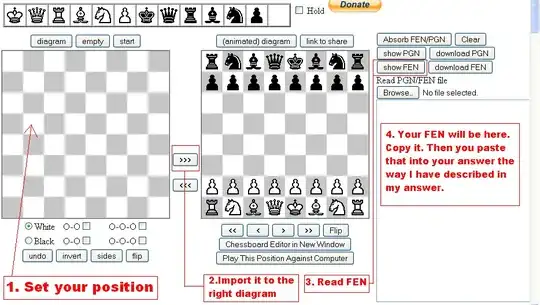
REMARKS:
If you wish to put that FEN in our diagram you paste that code like this:
- Press space bar 4 times;
- Type square brackets (
[]); - Type
fen ""inside the brackets ([fen ""]); - Paste your code inside the
""([fen "Your FEN goes here"]);
If you decide to input variations you need to do this:
- Press enter twice;
- Press space bar 4 times;
- Input moves;
Here is an example:

If you have further question leave a comment and I will help you. Also read this thread.
END OF REMARKS
Hopefully this answer helps you.
Best regards.


AlwaysLearningNewStuff
- 11,944
- 2
- 29
- 57
-
@KurioZ7: Always glad to help. Best regards until next time :) – AlwaysLearningNewStuff Dec 09 '14 at 16:11
-
Position setup does not have the Generate FEN option. – OrigamiEye Mar 18 '20 at 08:37
3
I use the Lichess Board editor. It has drag and drop, and click and place and it provides the FEN to any position.

OrigamiEye
- 189
- 4
3
SCID will do it. Create a position using Edit->Setup Board. There's a text box at the bottom of the setup window with the FEN. Or, if you've been playing against the computer, you can just say Edit->Copy FEN to get the board's current position.

Tony Ennis
- 20,145
- 1
- 44
- 86
2
I´m in a similar matter. But what I tried to have is a fen list, not just a single fen line. That is: having a PGN file, have the complete list of fen, one line per position. If for example the game had 40 moves, I need the 40 positions that ocured during the game.
In fact I found one program that do it: pgn2fen: http://pgn2fen.downv.com/Windows-software-download/pgn2fen It has a bug, it does not make the fen for the last position.

Brian Towers
- 92,895
- 10
- 227
- 372

Luis Babboni
- 21
- 1
1
Python has now a chess module, which is able to parse FEN (among other formats), and also output any position to FEN, EDP, PGN and also SVG format. It is as simple as F = input(); B = chess.Board(F) to read in a FEN. Then you can easily extract information or modify the positions, and write it back to a file using B.fen(en_passant='fen') or B.epd(en_passant='fen', ...); to write back a PGN, use chess.pgn; see chapter "Writing" of the documentation, similar for producing SVG.
You can find more information at:

Max
- 141
- 4