The simple answer is at the end. But to help understand the solution, I will try to be as intelligible as possible. My assumption: "Loopback device" is card #2, device #0 and #1, so in all examples this holds true (e.g. /dev/snd/pcmC2D0pmeans "card 2, device 0, playback"). Your installation may vary, so modify the respective values.
First, I created/modified /etc/modprobe.d/alsa-aloop.conf to have only one card with only one substream (just for simplicity):
user@desk:~$ cat /etc/modprobe.d/alsa-aloop.conf
options snd-aloop index=2 pcm_substreams=1 id=Loopback
After sudo modprobe snd_aloop, aplay -l and arecord -l show
user@desk:~$ aplay -l
**** List of PLAYBACK Hardware Devices ****
.
.
card 2: Loopback [Loopback], device 0: Loopback PCM [Loopback PCM]
  Subdevices: 0/1
  Subdevice #0: subdevice #0
card 2: Loopback [Loopback], device 1: Loopback PCM [Loopback PCM]
  Subdevices: 1/1
  Subdevice #0: subdevice #0

user@desk:~$ arecord -l
**** List of CAPTURE Hardware Devices ****
card 2: Loopback [Loopback], device 0: Loopback PCM [Loopback PCM]
  Subdevices: 1/1
  Subdevice #0: subdevice #0
card 2: Loopback [Loopback], device 1: Loopback PCM [Loopback PCM]
  Subdevices: 1/1
  Subdevice #0: subdevice #0
Now, there is one problem: Both devices of the loopback card are playback as well as record devices. But the function of snd_aloop is to route input in device 0 to output at device 1 and vice versa (see e.g.https://www.alsa-project.org/main/index.php/Matrix:Module-aloop). You can see these in /proc/asounddirectory:
user@desk:~$ ls /proc/asound/card2
cable#0  cable#1  id  pcm0c  pcm0p  pcm1c  pcm1p
where "pcm0c" is capture device 0, "pcm0p" is playback device 0 etc.
So pavucontrol shows (and selects) two loop devices, one playback (hw:2,0) and one record (hw:2,1):
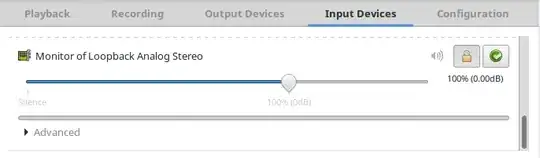
You cannot select the playback device in pavucontrol, so it selects device 0:
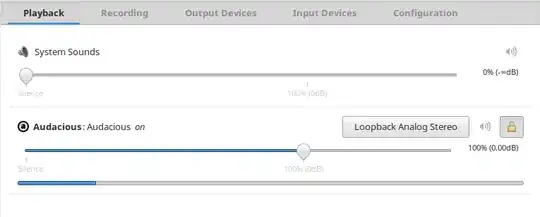
You will see this when loking at the playback device file:
user@desk:~$ lsof | grep /dev/snd/pcmC2
pulseaudi 3314               user  mem       CHR             116,13                 556 /dev/snd/pcmC2D0p
pulseaudi 3314               user   48u      CHR             116,13      0t0        556 /dev/snd/pcmC2D0p
alsa-sink 3314 3320          user  mem       CHR             116,13                 556 /dev/snd/pcmC2D0p
alsa-sink 3314 3320          user   48u      CHR             116,13      0t0        556 /dev/snd/pcmC2D0p
.
.
So this means the capturing of this audio stream has to be done via /dev/snd/pcmC2D1c; if you select loopbackas the input device for flash, it will use /dev/snd/pcmC2D0cinstead (plugin-comeans the plugin container flash is running in):
user@desk:~$ lsof | grep /dev/snd/pcmC2
pulseaudi 3314               user  mem       CHR             116,13                 556 /dev/snd/pcmC2D0p
pulseaudi 3314               user   48u      CHR             116,13      0t0        556 /dev/snd/pcmC2D0p
.
.
plugin-co 5093               user  mem       CHR             116,14                 557 /dev/snd/pcmC2D0c
plugin-co 5093               user   21u      CHR             116,14      0t0        557 /dev/snd/pcmC2D0c
.
.
You may check when explicitly playing sound through /dev/snd/pcmC2D1p, e.g. with
user@desk:~$ aplay -D hw:2,1 test1.wav
Playing WAVE 'test1.wav' : Signed 16 bit Little Endian, Rate 44100 Hz, Mono
Now the flash plugin records sound, and you can see the difference:
user@desk:~$ lsof | grep pcmC2
.
.
aplay     7256               user  mem       CHR             116,15                  558 /dev/snd/pcmC2D1p
aplay     7256               user    4u      CHR             116,15       0t0        558 /dev/snd/pcmC2D1p
.
.
plugin-co 7237               user  mem       CHR             116,14                  557 /dev/snd/pcmC2D0c
plugin-co 7237               user   21u      CHR             116,14       0t0        557 /dev/snd/pcmC2D0c
.
.
So, the task now is: How to have pulseaudio select the device #1 of the loopback card for playback?
Assuming the values from above, you may modify /etc/pulse/default.pa to read
.
.
### Load audio drivers statically
### (it's probably better to not load these drivers manually, but instead
### use module-udev-detect -- see below -- for doing this automatically)
#load-module module-alsa-sink
#load-module module-alsa-source device=hw:1,0
.
.
load-module module-alsa-sink device=hw:2,1
.
.
Be sure to define the statically driver(s) before the dynamic ones.
Now after restart of PA (pulseaudio -k), the loopback output of PA goes to card2, device 1 (device=hw:2,1). To verify:
user@desk:~$ lsof | grep pcmC2
pulseaudi 8584               user  mem       CHR             116,15                  558 /dev/snd/pcmC2D1p
pulseaudi 8584               user   18u      CHR             116,15       0t0        558 /dev/snd/pcmC2D1p
alsa-sink 8584 8585          user  mem       CHR             116,15                  558 /dev/snd/pcmC2D1p
alsa-sink 8584 8585          user   18u      CHR             116,15       0t0        558 /dev/snd/pcmC2D1p
.
.
Thus, your flash recorder is able to record from the output of pulseaudio.
Remark: If you do not want to edit /etc/pulse/default.pa, you can load the module interactively with pacmd load-module module-alsa-sink device=hw:2,1. This will give you a second loopbackdevice in pavucontrol. And if you only want one loopback device, first unload the respective module:
user@desk:~$ pacmd list-modules
.
.
    index: 7
    name: <module-alsa-card>
    argument: <device_id="2" name="platform-snd_aloop.0" card_name="alsa_card.platform-snd_aloop.0" namereg_fail=false tsched=yes fixed_latency_range=no ignore_dB=no deferred_volume=yes use_ucm=yes card_properties="module-udev-detect.discovered=1">
    used: 0
    load once: no
    properties:
        module.author = "Lennart Poettering"
        module.description = "ALSA Card"
        module.version = "8.0"
Look for the index where device-id=2 (here:7), then unload the module (pacmd unload-module 7) and after that load the sink for the loopback (pacmd load-module module-alsa-sink device=hw:2,1).


