12

Is there any software to sync files-folders and software between two PCs? For example if I install program 'A' to my desktop I want to be installed to my laptop as well if I have synchronized these two. I want the same with my files and folders. If I change something to my desktop I want the changes to effect my laptop too(I exclude Ubuntu One as a solution).

Thanks for your time and patience!

regan
  • 754
  • 5
  • 9
el10780
  • 335
  • 3
  • 5
  • 13
  • Its not that simple, thus only a comment: you can install all packages which are on one machine as well on the other one: dpkg --get-selections and apt-get install. For files you can use rsync. However, I do not recommend the first thing with installing all the packages on another computer unless they have the same hardware and same ubuntu versions installed. – Michael K Dec 19 '11 at 15:29
  • possible duplicate of [Best way to backup all settings, list of installed packages, tweaks, etc?](http://askubuntu.com/questions/9135/best-way-to-backup-all-settings-list-of-installed-packages-tweaks-etc) – Eliah Kagan Aug 17 '14 at 21:54
  • keeping in sync is different from backups. backup restores are performed on big trouble, while sync is an ongoing thing. – foo Sep 28 '21 at 17:18

3 Answers3

6

As Michael K pointed out the packages you can keep in sync by doing:

dpkg --get-selections > <file>

Copy the file from source machine to destination using your favorite method then

dpkg --set-selections < <file>
apt-get dselect-upgrade

This way all the packages that were installed on one machine will be installed on the other further the packages that were removed on the source machine will be removed from the destination, so doing that is extraordinarily dangerous especially when syncing desktop to laptop since laptop may require certain drivers that desktop in general will not.

In my experience deploying standardized systems I can tell you that once the base build is put in place the synchronization of the packages is a very very rare thing predicated as Michael pointed out on hardware being identical and most importantly purpose being identical as well.

Karlson
  • 1,609
  • 1
  • 16
  • 24
6

The Ubuntu Software Center has a package sync feature. Click File -> Sync between computers.

For two-way file sync without Ubuntu One, try Unison. Here are some instructions.

regan
  • 754
  • 5
  • 9
5

Although your idea sounds nice, you probably do not want to synchronize everything ,various lock files and .xauthority for example.

You are better off identifying what files or data you want to synchronize.

You can then use any number of tools from rsync to unison.

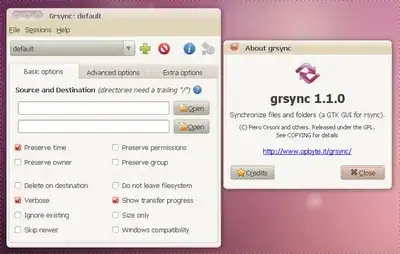
You can use rsync to sycn your data. Both tools have a graphical front end

grsync

See:

Ubuntu wiki Unison

Ubuntu wiki rsync

Panther
  • 100,877
  • 19
  • 193
  • 283