0

I installed the recently introduced Ubuntu 16.04 LTS version directly in my machine and tried installing Google Chrome web browser via Ubuntu Software Installer. I constantly receive the an installation failure message when attempting this.
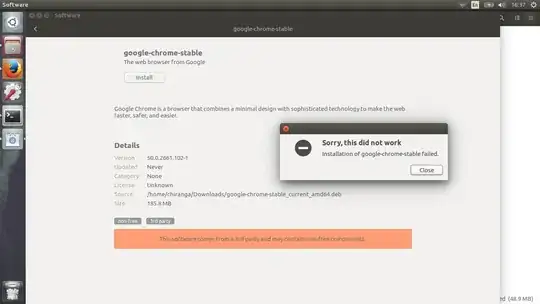
Error message image link.

It has to be noted that Google Chrome worked fine in another PC in which I upgraded the Ubuntu version from 14.04 LTS to 16.04 LTS.

What could be the cause for this issue?

Videonauth
  • 33,045
  • 16
  • 104
  • 120
Chiranga Alwis
  • 113
  • 1
  • 8

3 Answers3

4

You probably need to enable the "universe" repository.

Once you enable it, update your system and you should now be able to install google-chrome-stable.

sudo apt-get update
sudo apt-get install libgconf2-4 libnss3-1d libxss1
Hizqeel
  • 1,887
  • 28
  • 22
  • 24
2

Let me guess the error: Chrome depends on libappindicator1.

I ALWAYS get that when installing Chrome. Good news is the fix is simple:

sudo apt-get install libappindicator1
You'reAGitForNotUsingGit
  • 14,669
  • 9
  • 48
  • 83
2

A simple solution was to install G-debi package manager in Ubuntu 16.04 and download the .deb file to your home. then run command

    $ sudo gdebi <packagename>.deb

and it installed smoothly. There is a GUI way, but I dont know How to use it and running commands is way easier.

VOiD
  • 41
  • 6
  • This answer is an alternative method which should fix the OP's situation. It does not answer his question though, which is, "What could be the cause for this issue?" – David your friend Sep 03 '16 at 16:52
  • Loading Ubuntu store takes longer than it used to. I assume that the OS is not stable about packages – VOiD Sep 03 '16 at 16:56