I cant't access my Hard Drives. Any help would be appreciated. Thanks.
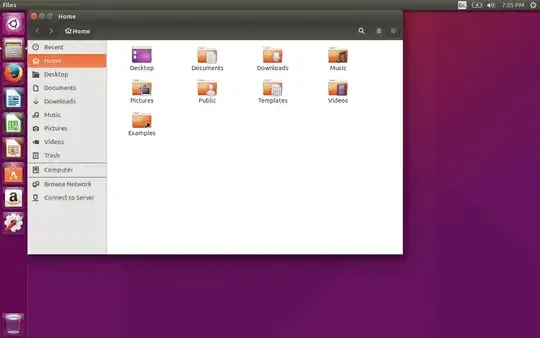
Someone said that its shown. He also sent that image that is attached.
I cant't access my Hard Drives. Any help would be appreciated. Thanks.
Someone said that its shown. He also sent that image that is attached.


Most computers come with one physical hard drive installed in them. If the computer comes with a pre-installed version of Windows, there will be multiple "drives" seen in Explorer, under Computer or This PC, such as Windows (C:), Recovery (D:) and Data (E:). A disc drive might show up as F:.
The "drives" you see here, however, are not actually each individual hard drives. They are called partitions. Partitions are sections of your hard drive and are essentially mini or virtual hard drives. Windows calls these partitions "Disks" or "Drives" so as to not confuse people.
Ubuntu works a little differently than Windows in this regard. Instead of pretending that each partition is its own physical hard drive, Ubuntu recognizes that they are partitions, and names them as such. When Ubuntu refers to a "Drive" or "Disk" (not disc), it is referring to the physical storage medium (the hard drive).
Partition/Drive labeling on Ubuntu is also different from Windows. Physical devices get a letter, but in a different way. For example, C:, D: and E: become sda1, sda2 and sda3. The number refers to the partition number; 1 is the first partition on the drive, 2 is the second, 3 is the third, and so on. If there is more than one drive in the computer, you may see partitions listed as something like:
/dev/sda1
/dev/sda2
/dev/sda3
/dev/sdb1
/dev/sdb2
The letter to the left of the number refers to the physical hard drive. sda is the first hard drive in the hardware order and sdb is the second. It doesn't matter which you plug in first. If your plug a drive into the secondary port on your motherboard, it will be labelled sdb.
When you chose to "wipe disk and install Ubuntu," Ubuntu didn't automatically read your mind and know which partition to erase, it erased the whole hard drive and installed Ubuntu in a new partition that takes up the whole hard drive space, except for a tiny other partition for boot files.
Your file manager doesn't show C:, D:, E: and F: for two reasons. One, Ubuntu doesn't label devices like that. Two, you erased your whole partition, essentially destroying all information on it, before you installed Ubuntu.
Maybe you're thinking that it's stupid for Ubuntu to label stuff so differently from Windows, but Windows is actually the cause for confusion here. Pretty much every other OS, including Mac, lists hard drives in terms of physical devices and partitions, not the unifying and confusing way Microsoft decided on.
Further reading on partitions: http://www.howtogeek.com/184659/beginner-geek-hard-disk-partitions-explained/
