1

I created a small GUI in Tkinter/python:

import Tkinter
import tkMessageBox
import os
top = Tkinter.Tk()
top.geometry("400x250")

def root_login():
    os.system("gksudo su && sudo su")   
    tkMessageBox.showinfo("Login successful!")

def close_window():
    top.destroy()


B = Tkinter.Button(top, text ="Login", command = root_login)
B.pack()

Q = Tkinter.Button(top, text ="Quit", command = close_window)
Q.pack()

top.mainloop()

If an incorrect password is given in the gksudo su dialog, the dialogue still shows "Login successful!".

How do I show that the password input was wrong, instead of "Login successful!". I want to create this window as a login screen for the application I'm building.

Jacob Vlijm
  • 82,471
  • 12
  • 195
  • 299
Ashwin Joshi
  • 155
  • 2
  • 9
  • 1
    For one thing, you really shouldn't use `os.system`. Really, really old fashioned. Also, why would the message window not appear? you do not set a condition for it to *not* appear. This really belongs on SO. – Jacob Vlijm Jan 06 '16 at 09:29
  • I am still learning python and os.system is the only command i could find to execute linux terminal commands. Could you suggest something more useful ? And my question is that after I put a wrong password in gksudo su, it displays a window suggesting that no superuser rights were granted. But after that how do i terminate the main python program ? It jst shows the same message as it shows when i put the right password. Thank You – Ashwin Joshi Jan 06 '16 at 09:32
  • You can use `subprocess` - `subprocess.call("command here")`; you'll need to import it: `import subprocess` – TellMeWhy Jan 06 '16 at 10:08

1 Answers1

3

On the edge of being off-topic, but for the sake of gksudo:

Not sure what you want to achieve, since the GUI does not have any effect on what happens in the terminal :)

Then technically

The problem is that you do not set a condition for tkMessageBox.showinfo("Login successful!") to be executed, so whatever happens in os.system("gksudo su && sudo su"), the next line will be performed.

def root_login():
    os.system("gksudo su && sudo su")   
    tkMessageBox.showinfo("Login successful!")

How to make it work

First, you shouldn't use os.system any more: Really, really old fashioned.

See below for an alternative coding, using subprocess.check_call:

#!/usr/bin/env python
import subprocess
import Tkinter
import tkMessageBox

top = Tkinter.Tk()
top.geometry("400x250")

def root_login():
    try:
        subprocess.check_call(["gksudo", "su"])
    except subprocess.CalledProcessError:
        tkMessageBox.showinfo("message", "OOOOPS...\nWrong password!")
    else:
        tkMessageBox.showinfo("message", "Login successful!")

def close_window():
    top.destroy()

B = Tkinter.Button(top, text ="Login", command = root_login)
B.pack()
Q = Tkinter.Button(top, text ="Quit", command = close_window)
Q.pack()

top.mainloop()

But again, gksudo su does not have any effect, since you run a GUI :)

Explanation

subprocess.check_call(["gksudo", "su"])

...will raise a subprocess.CalledProcessError in case the password is incorrect, and show the message:
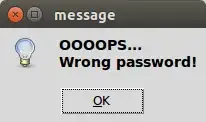
enter image description here

If the password is correct, the message:
enter image description here

will appear.

Note

The try/except/else construction, I did for clarity reasons. The function below does exactly the same, since the function wil "jump" from the line:

subprocess.check_call(["gksudo", "su"])

to

tkMessageBox.showinfo("message", "OOOOPS...\nWrong password!")

in case, and immediately if, the first one raises the subprocess.CalledProcessError:

def root_login():
    try:
        subprocess.check_call(["gksudo", "su"])
        tkMessageBox.showinfo("message", "Login successful!")
    except subprocess.CalledProcessError:
        tkMessageBox.showinfo("message", "OOOOPS...\nWrong password!")
Jacob Vlijm
  • 82,471
  • 12
  • 195
  • 299
  • Thank you for the answer Jacob. Really good work. I understood the use of subprocess. I thought os.system could provide me with further complex commands i would use. – Ashwin Joshi Jan 06 '16 at 14:22
  • @AshwinJoshi See also: https://mail.python.org/pipermail/python-dev/2010-July/102427.html. Also, if you have complex commands, you can also use (e.g.): `subprocess.Popen(["/bin/bash", "-c", "sleep 2 && python do_this && sleep 2 && bash_do_that"])` – Jacob Vlijm Jan 06 '16 at 14:29
  • I need to use sqlite commands on .db files and save the output in .csv files and also i need to scan through a whole lot of files to find .db files and other files. Any idea how to use those ? Thank you for your help!!! :) – Ashwin Joshi Jan 06 '16 at 14:54
  • Can you tell how to add a list of removable media in python GUI list. I need to show a list with my removable SD card. The "df -h" command only shows the list. It cannot be selected , like options of a menu. I need to let the user choose the SDcard as shown in "/dev/mmcblk0p1". After selection i need to copy that device path. – Ashwin Joshi Jan 07 '16 at 12:31
  • @AshwinJoshi Tkinter is not the most sexy interface I think to do this. This http://askubuntu.com/a/377083/72216 is probably the best you can get with Tkinter. You could parse the output into a `zenity` list, https://help.gnome.org/users/zenity/stable/list.html.en, which I regularly do in answers here, like: http://askubuntu.com/a/717796/72216. I switched to `python3/Gtk` in the meantime :). – Jacob Vlijm Jan 07 '16 at 18:32
  • Alright. Thanks. One more thing. Can you help me wid a python code to sort files in a directory according to extensions and put them into folders of that extension name. Like all jpg, png, bmp, etc. in Pictures folder...then all docx, doc, pdf, odt, xlsx, etc. in Documents folder. Something like this. I'd be more than happy to get this code for my application. Thank u in advance!!!!!!! – Ashwin Joshi Jan 08 '16 at 08:56
  • @AshwinJoshi see http://askubuntu.com/questions/516631/group-files-in-some-folders – Jacob Vlijm Jan 08 '16 at 08:59
  • Coooolio.. Thanks man! That could help a lott. :) – Ashwin Joshi Jan 08 '16 at 09:05
  • @AshwinJoshi You're welcome :) – Jacob Vlijm Jan 08 '16 at 09:09