My boot partition is on a SSD, so it doesn't have room for more than about 8 installed kernel versions, and eventually some kernel update will fail to install because my boot partition is full of old versions. There are many questions out there about how to remove old versions (even how to automate the process), but my question is simply this: Why doesn't apt-get autoremove detect and remove them automatically, and is there a way I can make it do so? I mean, apt-get is what installed them anyway, so it knows about them, so why does it choose to leave all old versions around?
Asked
Active
Viewed 4.2k times
60

BlueBomber
- 747
- 1
- 6
- 14
-
3possible duplicate of [Why doesn't Ubuntu remove old kernels automatically?](http://askubuntu.com/questions/590673/why-doesnt-ubuntu-remove-old-kernels-automatically) – Martin Schröder Jun 11 '15 at 08:27
-
1Autoremove *does* remove old kernels under most circumstances. Kernels accumulate because the system does not run autoremove automatically by default. That's a setting in unattended-upgrades, and can be changed. Autoremove cannot remove old kernels when previously-queued apt actions (like installing a new kernel) fail (due to insufficient space). See https://bugs.launchpad.net/bugs/1357093 for a patch to unattended-upgrades that *will* begin removing old kernels automatically. – user535733 Dec 31 '15 at 18:10
3 Answers
43
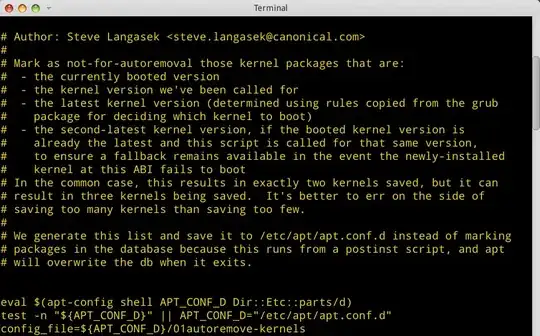
As to answer why , refer to the file /etc/apt/apt.conf.d/01autoremove-kernels
As you can see, apt is told to never autoremove the kernels , as told by another (script) file, /etc/kernel/postinst.d/apt-auto-removal. And here it is:
If you manually install 2 chosen kernels, ie the first and the current one, then apt-autoremove will only ever remove the older versions you didn't manually install, so you will always have those 2 options plus whatever the latest one is.
Update:
In the /etc/kernel/postinst.d/apt-auto-removal there is this part:
if [ "$latest_version" != "$installed_version" ] \
   || [ "$latest_version" != "$running_version" ] \
   || [ "$installed_version" != "$running_version" ]
then
        # We have at least two kernels that we have reason to think the
        # user wants, so don't save the second-newest version.
        previous_version=
fi
So if you compare the output of 01autoremove-kernels file and uname -r you'll realize that the currently running kernel and the most recent before it, are kept to be never removed by that script. There turns out is another file /etc/apt/apt.conf.d/01autoremove, where there is lines:
    APT
    {
      NeverAutoRemove
      {
            "^firmware-linux.*";
            "^linux-firmware$";
      };
  VersionedKernelPackages
  {
        # linux kernels
        "linux-image";
        "linux-headers";
        "linux-image-extra";
        "linux-signed-image";
        # kfreebsd kernels
        "kfreebsd-image";
        "kfreebsd-headers";
        # hurd kernels
        "gnumach-image";
        # (out-of-tree) modules
        ".*-modules";
        ".*-kernel";
        "linux-backports-modules-.*";
        # tools
        "linux-tools";
  };
So you could comment these out, and it will allow you to auto-remove the kernels with apt-autoremove, though remember - do this at your own risk

Wil
- 765
- 6
- 10

Sergiy Kolodyazhnyy
- 103,293
- 19
- 273
- 492
-
1Very interesting! My `/etc/apt/apt.conf.d/01autoremove-kernels` has many lines, but only two versions among all of them: 3.13.0.{39,43}. But `dpkg -l linux-*` lists four versions, 3.13.0.{39,40,41,43}, so something other than `/etc/apt/apt.conf.d/01autoremove-kernels` is keeping those middle versions around, right? – BlueBomber Dec 20 '14 at 00:28
-
-
1TL:DR : `01autoremove` is the file you want, `01autoremove-kernels` is probably just a protection, so that apt doesn't remove currently installed kernel and most recent (just in case newest screws up) – Sergiy Kolodyazhnyy Dec 20 '14 at 00:46
-
1Unless I'm misreading `01autoremove`, it's just protecting against auto-removal of the dependency packages, like `linux-image-extra`. Changing it shouldn't affect whether or not `linux-image-3.16.0-31-generic` gets autoremoved. None of the patterns in it match the package names that we want auto-removed. – Peter Cordes Apr 11 '15 at 09:41
-
I'm wondering if maybe `aptitude` has its own don't-remove-kernels logic, because my autogenerated `01autoremove-kernels` only lists the current and previous (-33 and -34), but -31 was still not getting autoremoved. – Peter Cordes Apr 11 '15 at 09:44
-
Oh, just realized maybe I need to restart aptitude after `/etc/kernel/postinst.d/apt-auto-removal` rewrites `01autoremove-kernels` during the postinst of the newest kernel, installed by the currently-running aptitude. – Peter Cordes Apr 11 '15 at 09:44
-
Update: `aptitude` has its own never-remove-old-kernels logic, and I don't know where that's configured. Things are configured so `apt-get autoremove` will remove all but the current and previous kernel packages, though, and that does work. – Peter Cordes Jul 27 '15 at 19:40
-
I have the same issue but with _linux-headers_. Commenting out `#"linux-headers";` in **/etc/apt/apt.conf.d/01autoremove** didn't work. Does anyone has any suggestions? e.i. `apt-get autoremove` works on kernels but not headers for some reason... – direwolf Sep 10 '15 at 07:04
-
1@PeterCordes Don't remove or comment lines in `/etc/apt/apt.conf.d/01autoremove`. That does not help you in autoremoving old versioned kernel packages, but may have unwanted effects. The file does not protect from autoremoving `linux-image-extra` but packages that match regular expressions in the `NeverAutoRemove` section. – jarno Dec 24 '15 at 12:51
-
2@BlueBomber, the reason why `apt-get autoremove`does not remove the kernels not listed in `/etc/apt/apt.conf.d/01autoremove-kernels`is that those kernels are marked as manually installed; see my [answer](http://askubuntu.com/a/712836/21005). – jarno Dec 26 '15 at 13:55
-
/etc/apt/apt.conf.d/01autoremove does not actually remove anything. It merely identifies packages as *eligible* for autoremoval. Somebody else (the user, unattended-upgrades, cron job, whatever) must still pull the trigger and run autoremove. – user535733 Dec 31 '15 at 18:13
-
I'm wondering when the `/etc/kernel/postinst.d/` scripts run. My case was a failed kernel install because there wasn't enough disk space to build the ramdisk. I couldn't autoremove my older kernels (ended up removing them by hand), perhaps because the scripts didn't run after the failed install. – Brent Baccala Dec 20 '19 at 16:10
13
For me it helped to install latest (X)ubuntu (15.10). In earlier releases kernel packages may be marked as manually installed, at least, if installed by using Software Updater, so that sudo apt-get autoremove --purge can't delete them. There are bug reports concerning the issue: Bug #1175637, Bug #1439769
In earlier release, you could try to mark kernel packages automatically installed by sudo apt-mark auto $(apt-mark showmanual | grep -E "^linux-([[:alpha:]]+-)+[[:digit:].]+-[^-]+(|-.+)$") and run sudo apt-get autoremove --purge thereafter to see, if it makes difference. The command should still not remove kernels packages shown in /etc/apt/apt.conf.d/01autoremove-kernels, but it is safest to run apt-get autoremove with --dry-run option first.
Alternatively, you could use linux-purge to purge old kernels even more selectively or even if they were manually installed.

jarno
- 5,317
- 5
- 49
- 77
-
Oh, the autoremove command tend to remove too many kernels, see [Bug #1440608](https://bugs.launchpad.net/ubuntu/+source/apt/+bug/1440608) – jarno Dec 24 '15 at 18:54
-
2the `apt-mark` did the trick for me, wish I could upvote 10 times :P – Mike Gleason jr Couturier Feb 27 '18 at 17:31
1
Try removing the old kernel packages first, but if the /boot/initrd.img files remain, then this worked for me:
To remove /boot/initrd.img-4.8.0-39-generic
sudo update-initramfs -d -k 4.10.0-37-generic
Remove one initrd.img file at a time.

null
- 1,351
- 2
- 10
- 15