5

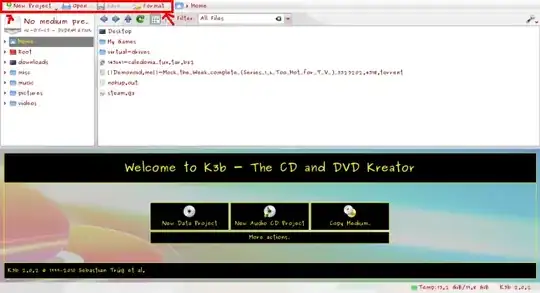
When I open K3b, there is no menubar (that appears directly under the titlebar), only a toolbar.

How do I make the Menubar appear? I've tried tapping F10, Alt, Alt + F. How do I unhide the menubar?

Greg
  • 51
  • 2
  • What distro do you use? Ubuntu or Kubuntu, and 10.04, 10.10, or 11.04? Try to press F8. or if you use unity (Ubuntu 11.04), the menu of the application is showned in the unity bar. – amixr Jul 27 '11 at 13:08
  • I am using Ubuntu 10.04. I tried pressing F8, nothing happens. There is no menubar under the titlebar, only a toolbar. How do I get the Menubar to be shown? – Greg Jul 28 '11 at 11:50

1 Answers1

3

Right now I'm on a Kubuntu 11.04 machine so I don't know how much of a help my methods will be to you but you can try it anyways:

    • Right-click anywhere within the red boundary shown below
    • you should get a context-menu that gives you an option to "configure toolbar"
    • add "show menubar" to the toolbar from "available actions" to "current actions" and than click "okay"
    • from here you should be able to toggle menubar's visibility on and off as you wish (wording of items may differ on your machine)
  1. You can also try "Ctrl + M" modifier key to toggle menubar visibility on and off, but I doubt this will work as it might only be specific to a kde workspace.
enter image description here

13east
  • 1,945
  • 2
  • 18
  • 24
  • Your #2 works for me. It genuinely ridiculous that there is no intuitive way to get the menubar back! – fig Apr 02 '18 at 17:06