The following python snippet should work for you:
#!/usr/bin/env python

import re
import sys
import urllib2

from gi.repository import Gtk, GLib
from gi.repository import AppIndicator3 as appindicator

class MyIndicator:

    def __init__(self):
    # Create Indicator with icon and label
        icon_image = "/usr/share/unity/icons/panel-shadow.png"
        self.ind = appindicator.Indicator.new(
            "MagicNumber",
            icon_image,
            appindicator.IndicatorCategory.APPLICATION_STATUS
        )
        self.ind.set_status(appindicator.IndicatorStatus.ACTIVE)
        self.menu_structure()

    # Menu structure
    def menu_structure(self):
        # GTK menu
        self.menu = Gtk.Menu()
        self.exit = Gtk.MenuItem("Exit")
        self.exit.connect("activate", self.quit)
        self.exit.show()
        self.menu.append(self.exit)
        self.ind.set_menu(self.menu)

        content = urllib2.urlopen('http://askubuntu.com/questions')
        questions = re.search('<div class="summarycount al">(.*?)</div>', content.read())
        self.ind.set_label(str(questions.group(1)), "")

        GLib.timeout_add_seconds(2,self.menu_structure)

    def quit(self, widget):
        sys.exit(0)

if __name__ == "__main__":
    indicator = MyIndicator()
    Gtk.main()
Just replace the url, the 2 second delay and the re.search pattern for your needs.
re.search('(.*)', content.read()) should work if your file only contains the number.
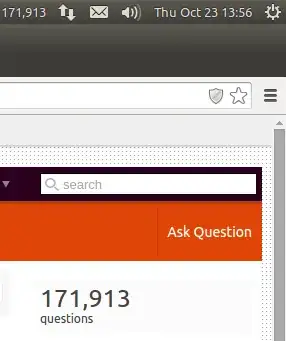
The above code displays the total questions on Askubuntu in your taskbar:
Reference: https://unity.ubuntu.com/projects/appindicators/

