I am using a Windows 7 (64 bit) guest with an Ubuntu 14.04 (64 bit) host. I just recently upgraded to Virtualbox 4.3.16 r95972, although this problem appeared before upgrade--at the very least in the previous version. The Virtualbox extension pack is the latest edition and guest additions is installed on the guest OS.
My problem is that when I put the guest OS into full-screen mode, the Ubuntu system bar remains on top, regardless of where the mouse focus is. There is also a unity-style shadow behind where the Virtualbox mini menu is hiding in the bottom center.
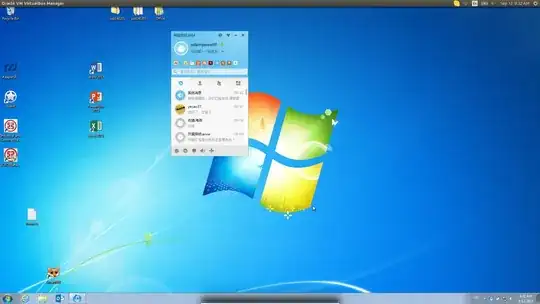
I can't remember exactly when this started happening unfortunately.
I also noticed that on the unity sidebar context menu for Virtualbox, there is now a 3rd item called Qt-subapplication, which I suspect is the Virtualbox mini-menu, and unity treating it as a separate window is why it has the shadow, and potentially why the guest OS window can't capture the fullscreen.
I'm guessing this might be a bug of some sort, but, if it is, I suspect it's a bug in the form of some cool new feature of unity that Canonical is unwilling to change, such that it falls to the Virtualbox developers to comply with the new feature. As such, I don't see it being fixed anytime soon, so my question would be about possible workarounds.
So, anybody have any ideas about how to keep unity from capturing the mini-menu as a separate window and preventing the guest OS from capturing fullscreen?
Thanks!


