I rebooted my computer and after some changes with Ubuntu Tweak on my window manager theme, etc., I came with this problem in my Terminal.
Before the reboot, I could see the things behind the terminal perfectly, but now the transparency seems to be only working with the desktop background (as shown a part in the picture).
How can I solve this problem?
Thanks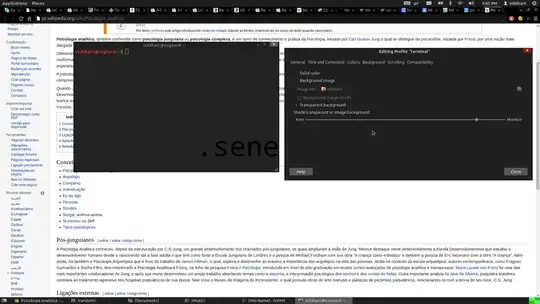
Asked
Active
Viewed 2,684 times
10

muru
- 193,181
- 53
- 473
- 722

ovrwngtvity
- 373
- 6
- 14
-
2You have a nice problem. – Dishank Jindal Jul 27 '14 at 21:02
-
1Same as mine, also searching for the solution. – Dishank Jindal Jul 27 '14 at 21:02
-
1[Dishank] Did you have this problem when upgrading your system to work with a Nvidia graphic card? I got my problem when I did it. – ovrwngtvity Jul 29 '14 at 19:24
-
1not exactly. I didnt notice how it happens. – Dishank Jindal Jul 29 '14 at 19:43
-
[King Shimkus] I am using a screwed theme. Gtk: Bojo-red and Window Theme: Bojo-greyscale. Now I am using Ambience but the problem stills. – ovrwngtvity Jul 30 '14 at 17:24
-
When you reply to someone you have to do `@theirname` - e.g. @kingshimkus (no spaces) ^^^. Otherwise they won't be notified. – Tim Aug 19 '14 at 21:31
-
@KingShimkus yeah, I know it does - I was alerting you that there was a message for you :-) – Tim Aug 20 '14 at 07:27
3 Answers
1
Did you try clicking on edit --> preferences and select the appearance tab and change the background transparent to none (solid color)?


bethnesbitt
- 121
- 10
-
2I tried but this not watch I am looking for. I want to transparency background but it only shows my desktop background but not the layers below it. – ovrwngtvity Jul 29 '14 at 19:21
-
1Well I do know in 14.04 when you go to Edit -> preference -> Appearance tab and change the background to transparency. Under there you can move the slider to create a transparency to suit your needs, as well as, you can change your font to be bigger and bolder. next under the colors tab you can change the Text color, background color, etc... so that you are able to see what you are doing in terminal. Not sure if that was what you where looking for? – bethnesbitt Aug 01 '14 at 15:59
0
Try to override this terminal setting with CCSM (Compiz config settings manager) in opacity, brightness and saturation -> windows specific settings click new and plus button, chose window class and then grab button click on open terminal window and set value e.g 75 for opacity.

EdiD
- 4,327
- 3
- 23
- 40
0
Open a terminal window (Alt+Ctrl+T) and type the following line:
gsettings set org.gnome.metacity compositing-manager true

Nick Weinberg
- 4,555
- 4
- 24
- 30

Ursu Dumitru
- 1
- 1