5

After pressing the physical power button on computer it's shown a 60 second countdown dialogue box:

"This system will be automatically shutdown in 60 seconds"

How can I disable this feature?

The system is: Ubuntu 14.04, 64 bit.

In the background: my little kid tends to press any keys just passing by the laptop, sometimes it's a power button, so the system goes into a shutdown in one minute although it is working and doing something like file downloading. It would be comfortable to be able to adjust the timeout value or just to enable/disable the thing in order to have the same dialogue without countdown timer but awaiting for the reaction from user on the appeared options:
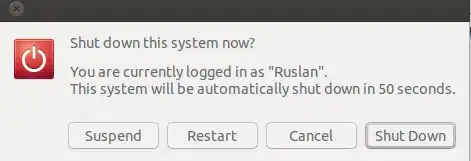
enter image description here

Thanks for any help.

Ruslan Gerasimov
  • 3,767
  • 3
  • 20
  • 22
  • The system is: Ubuntu 14.04, 64 bit. I added to my question. – Ruslan Gerasimov Jul 10 '14 at 06:55
  • 1
    I'm on 14.04.1 64bit and miss exactly that feature :-) I only have a fancy pop up with big buttons Lock, Suspend , Restart , shutdown. Any idea how I can get my 60 seconds timer back? (was working on 12.04) – TiloBunt Aug 09 '14 at 02:05
  • fyi, here my Q how to get the 60 sec timer back http://askubuntu.com/questions/515689/14-04-shutdown-button-miss-60-sec-timer – TiloBunt Aug 25 '14 at 06:55
  • Was this a fresh/new install of 14.04 or an upgrade from 12.04 or even older? – TiloBunt Aug 26 '14 at 03:36
  • @TiloBunt Fresh install of 14.04, but with `gnome-session-fallback` installed. Probably it will bring to your system a 60 sec counter desired by you. – Ruslan Gerasimov Aug 26 '14 at 03:57

1 Answers1

5

If you are on GNOME, there is a gnome-tweak-tool,

sudo apt-get install gnome-tweak-tool

with which you can edit what power button does.

In gnome-tweak-tool you just have click on Power in left panel and you will see something like this:

Gnome Tweak Tool: Power Button Action

n0noob
  • 255
  • 1
  • 10
  • Sorry, for not posting direct image due to my low reputation :(. – n0noob Jul 10 '14 at 10:02
  • 2
    Thank you, but I could not find anything strictly solving the problem of the question in the `gnome-tweak-tool`. Seems it doesn't allow neither to turn the timer off nor to set the time value having the same multiple choice window. However it can give the opportunity to do nothing when the button is pressed so it partially helps in my case. Not what I wanted but anyway +1 for workaround. – Ruslan Gerasimov Jul 10 '14 at 10:20
  • post the image link in answer, I will edit and add it. – Raja G Jul 10 '14 at 10:50
  • @33833 I have just got my reputation bumped up! :) – n0noob Jul 10 '14 at 12:55
  • 3
    I'm using Ubuntu 20.04. I installed the "gnome-tweak-tool" as mentioned but I find that the "Power" section is missing in my case. – Vishwas M.R Oct 23 '21 at 15:34