4

I have this windows PC, and I want to install this Ubuntu physically without VMware. Last time I installed this, I lost up-to 160GB, and it was all of my hard drive. I have 4 drives C:, D:, F: and E:. (on my new HDD with 320GB) where as I had like this on my 160GB too. But it was totally wasted because all the movies, videos, images and data was removed and the whole hard-drive was formatted and was partitioned into one drive. I want to install this Ubuntu OS by not losing any of these drives, and not losing any of the data that I have right now (NO partition, NO removal and No formatting). But I can't figure out how to. Last time I did physical install was on 160GB HDD, and I lost all my data. I don't want to lose data on this new one. The OS was 13, now it's Ubuntu 14.04.

Also, will I be able to hear sounds after installing Ubuntu physically without even installing sound card (Audio Decoder installed)?

Ne Win Thowai
  • 51
  • 1
  • 1
  • 3
  • Before you do anything as drastic as installing a new OS make sure you have a Backup of everything you want to keep. Its not too difficult to install Ubuntu along side Windows but things can go wrong. – Warren Hill Jul 02 '14 at 14:48
  • How many partitions do you have on each hard drive. Windows mixes drive and partitions and calls everything drive. With MBR(msdos) partitioning you can have a max of 4 primary partitions per hard drive. But if you converted drive to dynamic partitions you will have major issues. Post this: sudo parted -l AND: http://askubuntu.com/questions/149821/my-laptop-already-has-4-primary-partitions-how-can-i-install-ubuntu – oldfred Jul 19 '14 at 18:39
  • Related: [“Install alongside” option missing. How do I install Ubuntu beside Windows using “Something Else”?](https://askubuntu.com/questions/163962/install-alongside-option-missing-how-do-i-install-ubuntu-beside-windows-using) – Eliah Kagan Oct 14 '19 at 23:52

2 Answers2

7

You should install Ubuntu on a separate partition so that you won't lose any data. The most important thing is you should create a separate partition for Ubuntu manually, and you should select it while installing Ubuntu.

First create a separate partition for Ubuntu while running Windows (like a partition with more than 10 GB). Also create a small partition for the swap partition (size is equal to your RAM size).

  • You should know the partition sizes you created so that you can identify them easily while installing Ubuntu.

See the below images - I picked them by googling so they won't be same as yours (like partition sizes and number of partitions).

The second important thing is while installing Ubuntu select "Something else".

Enter image description here

It will allow you to select your manually created partition to install Ubuntu onto it.

Now select and edit the partition you created for Ubuntu. Be careful in selecting. Check twice that you selected the correct partition, not some other partition as you may lose data like before.

Enter image description here

Select the format partition, use as mount point as shown in the image. The size is up to you.

After that, select the swap partition, and edit it as shown in the image (size is your choice).

Enter image description here

After that select the "Device for boot loader installation" at the bottom and select the one with /dev/sda at the beginning.

Enter image description here

Now you can select "install now" at the right bottom.

It seems lengthy, but it's really easy once you know this installation.

I hope that helps.

Peter Mortensen
  • 933
  • 2
  • 11
  • 17
Sudheer
  • 5,003
  • 4
  • 24
  • 27
-1

The official installation guide provides this information. Under the heading Installation type

https://help.ubuntu.com/community/GraphicalInstall

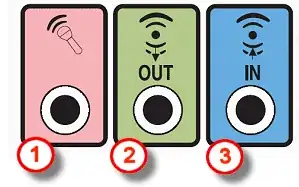
Most motherboards have integrated sound. Check your case for connectors.

Connectors

Captain Giraffe
  • 311
  • 1
  • 4
  • 22