23

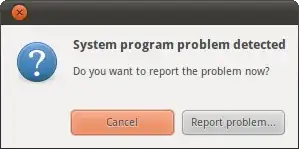
This always shows up a few minutes after I log in:

screenshot

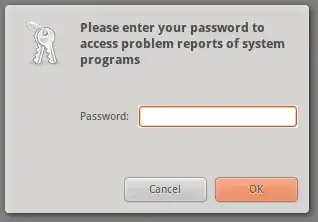
I have no idea what it is. If I click Report problem, it asks for my password:

screenshot

This is exactly what I would do if I wanted to steal someone's password.

Why should I trust it, and what is it going to do next if I comply?

Jorge Castro
  • 70,934
  • 124
  • 466
  • 653
ændrük
  • 75,636
  • 74
  • 233
  • 365
  • possibly duplicate of : http://askubuntu.com/questions/43103/system-always-start-with-system-program-problem-detected-dialog – Eray Jun 08 '11 at 16:57
  • 2
    Good question, it can be abused for Social Engineering. Shouldn't the executed command be visible in that dialog? – Lekensteyn Jun 08 '11 at 17:03
  • @Lekensteyn: `gksu` has an option to replace the command with more user-friendly text, which is a clear social engineering risk. – Flimm Jun 08 '11 at 18:34
  • 2
    I have a sneaking suspicion that you're asking this because you're curious, not because you're really that worried about your password... it allows the bug reporting system `apport` reach your system logs to report a bug. – jrg Jun 08 '11 at 18:39
  • By default apport is turned OFF if you download the normal release and turned on if you use an RC, beta or earlier release. – Rinzwind May 28 '12 at 15:43
  • 1
    Related on [security.se]: [Isn't the Ubuntu's system prompt for my password a bit unsafe?](https://security.stackexchange.com/questions/167412/isnt-the-ubuntus-system-prompt-for-my-password-a-bit-unsafe) – Eliah Kagan Aug 14 '17 at 01:47

2 Answers2

12

You're absolutely right, there is a possibility that this is some other software masquerading as Apport (the bug reporting software).

I wouldn't worry about it though, as this is the expected behaviour of Apport. If you have it enabled and a program crashes, a window similar to this will appear. Sometimes Apport needs to run as root to gather system information and send it to Launchpad.

If you don't want to run this risk, just disable Apport.

If you do decide to trust this prompt, you'll be able to inspect the report and find out which program is crashing on login.

To disable Apport:

  1. Press Alt + F2
  2. Type gksu gedit /etc/default/apport and press Enter.
  3. Replace the line enabled=1 with enabled=0.
  4. Save and exit. You might have to reboot for the setting to come into effect.
Flimm
  • 40,306
  • 22
  • 94
  • 154
  • 2
    Oh, this is Apport? I trust that program. I have now [filed a bug](https://bugs.launchpad.net/ubuntu/+source/apport/+bug/794757) requesting that Apport identify itself before requesting privilege elevation. – ændrük Jun 08 '11 at 21:29
  • funny thing is, I don't even have an apport process in the system monitor when this window pops up. – Christoph Jun 05 '12 at 14:53
  • @Christoph: On my Ubuntu 17.04, while the password dialog is displayed `ps -e |grep apport` includes `/usr/bin/pkexec /usr/share/apport/apport-gtk` – sondra.kinsey Jul 14 '17 at 12:22
2

On terminal :

sudo rm /var/crash/*

this will delete old crash files. And then restart your computer. If still you see this dialog try these :

apt-get update
apt-get upgrade

(these are upgrade your packages with fresh ones) and restart.

Eray
  • 1,820
  • 5
  • 26
  • 35
  • 1
    Why are you telling me to delete my crash reports? This doesn't answer my question at all. – ændrük Jun 08 '11 at 16:52
  • 1
    Your are saying "i'm getting this error" . Maybe that happened after an installation / compilation process . If you can't solve your problem after reading crash reports you can delete them and then try again. Or basically, you can skip this step and update / upgrade directly :) – Eray Jun 08 '11 at 16:55
  • 4
    My "problem" is that I have no indication what this unsolicited password prompt is going to do. I have no reason to suspect that it is in any way related to my package manager. – ændrük Jun 08 '11 at 17:03
  • 2
    Now that I know this prompt was generated by Apport, I'm sure glad I didn't delete my crash reports! That would have been exactly the *opposite* of what I want to do when a crash has been logged. – ændrük Jul 10 '11 at 15:06