30

For about 200 files in a directory I would like to add the String 1_ to the beginning of all filenames.

The filenames are, for example, DATASET_X_Y_Z and the result should be 1_DATASET_X_Y_Z.

I don't know a thing about Shell scripting, but maybe there is a one liner for the terminal.

Zanna
  • 69,223
  • 56
  • 216
  • 327
macydanim
  • 303
  • 1
  • 3
  • 4
  • http://stackoverflow.com/questions/5796615/how-can-i-add-a-string-to-the-beginning-of-each-file-in-a-folder-in-bash – Rinzwind Jun 08 '11 at 07:35
  • @Rinzwind link is about a different question. Macydanim question is about prepending strings to filenames, not to file contents. – j.c Oct 03 '16 at 21:46

3 Answers3

51
  • rename 's/^/1_/' * for renaming all files in the current directory

or

  • rename 's/^/1_/' DATASET* for renaming all files in the current directory starting with DATASET in their name

Explanation: the expression s/^/1_/ says: "replace the beginning of the filename (that means this symbol -> ^)' with 1_".

dAnjou
  • 1,995
  • 1
  • 17
  • 25
27

You can easily rename all the files in current directory typing (assuming you are using bash):

for i in *; do mv "$i" 1_"$i"; done

obviously take it with care; it will remane ALL the files in the current directory that are 'visible' (filename not starting with a '.')

Zanna
  • 69,223
  • 56
  • 216
  • 327
karlacio
  • 1,242
  • 8
  • 9
  • 1
    This is the first correct solution I found, which can be used for appending something like `.csv` to a subset of files, with a changed wild card expression instead of `*`. +1 – Zelphir Kaltstahl Nov 20 '16 at 12:35
  • Wow! Loops on the CLI! This is new. :) – Wachaga Mwaura Jul 27 '19 at 16:26
  • tke it with care indeed if you get the second i wrong: for i in *; do mv "$i" b"$1"; done cheers to your files. you've been warned. (I backed up the folder before trying this. fortunately). – Neil Sep 24 '21 at 22:10
10

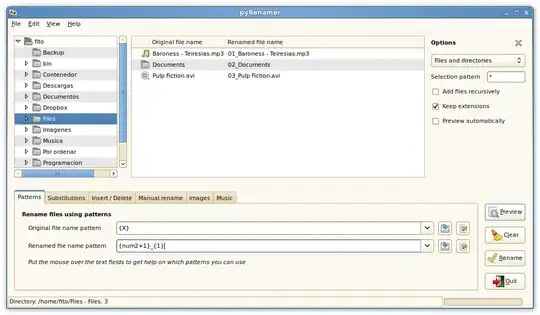
You can use pyRenamer. It can be found in the Ubuntu software center. enter image description here The original file pattern should be {X} and the renamed file pattern should be 1_{1}

Egil
  • 14,002
  • 2
  • 45
  • 54
nickguletskii
  • 4,870
  • 3
  • 22
  • 29