I'm using ubuntu 14.04 (x86).
I was trying to create a bootable dvd disk for Ubuntu 13.04. I have downloaded the image file (.iso) and successfully created a bootable USB using Startup Disk Creator. But when I tried to do the same with a 4.7 GB DVD, the Startup Disk Creator is showing DVD's capacity as 2KB and Free Space as 0.0B. It also shows a message "The device is not large enough to hold this image". 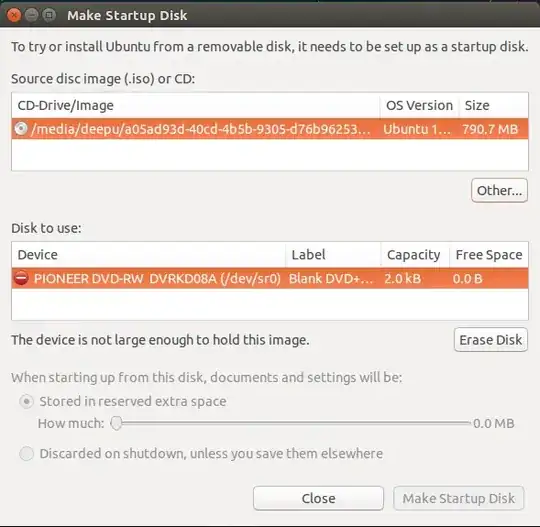
Asked
Active
Viewed 3,234 times
5

Scorp
- 85
- 1
- 6
-
1Try another DVD. Is the one you are using damaged ? Try another burning application, I have always like K3b. – Panther Jun 02 '14 at 16:38
-
I tried with almost 5 new DVDs and with windows I'm able to write the same DVDs. With k3b im able to wirte DVDs, but donno how to make bootable dvd with k3b. – Scorp Jun 02 '14 at 16:48
-
2You just burn the iso with K3b, it is bootable, you do not need to do anything special. If you want to make a custom bootable iso, you would use syslinux or grub2, either will work, but that is a different, more technical question. – Panther Jun 02 '14 at 17:05
-
Thanks @bodhi.zazen that worked!. Even though it didn't solve the issue with my startup disk creator,for time being I can use k3b to burn bootable disks. Thanks a lot. – Scorp Jun 02 '14 at 17:38
-
Glad it worked. I personally find k3b to be the most reliable, others have other opinions. I know it is more a work around rather then an answer, thus posted as a comment. – Panther Jun 02 '14 at 17:43
1 Answers
5
Because the app is only for usb & sd drives, not dvd's
"Startup Disk Creator converts a USB key or SD card into a volume from which you can start up and run Ubuntu"
To burn your iso to disk, right click on it in file manager, and choose Write to Disk.


-
1
-
Well a "disk" certainly isn't a "disc", though for flash media "drive" would be more accurate. Maybe they should name it " Startup Drive Creator'. The source is a bit more accurate "usb-creator-gtk" – doug Oct 10 '15 at 00:09
-
1
-
1