0

I was trying to install Xmame 0.103 on Ubuntu 14.04. I had some problems installing it. It says that

*.c zlib.h: no such file or directory 

I opened that file and I saw that zlib.h file was written in header section. I tried some packages regarding it but all in vain.

What can I do to solve this problem?

Oli
  • 289,791
  • 117
  • 680
  • 835
Faisal Aslam
  • 101
  • 3
  • 14
  • No, I download it from here: [http://www.romnation.net/srv/emulators/75/mame/xMAME-v0-103-for-Linux.html](http://www.romnation.net/srv/emulators/75/mame/xMAME-v0-103-for-Linux.html) – Faisal Aslam May 31 '14 at 15:18
  • Since you are installing from a .tar.bz2 file, it may help to review the answers to [How do I install a .tar.gz (or .tar.bz2) file?](http://askubuntu.com/questions/25961/how-do-i-install-a-tar-gz-or-tar-bz2-file). – karel May 31 '14 at 15:20
  • 1
    I did configure it and then run make command. It is where the problem occurs. – Faisal Aslam May 31 '14 at 15:23
  • sudo apt-get install zlib1g-dev – Tachyons May 31 '14 at 18:49
  • I got another problem. Check this image: https://scontent-a-kul.xx.fbcdn.net/hphotos-xpf1/t1.0-9/10401872_786354618051014_2067290203187043122_n.jpg – Faisal Aslam Jun 01 '14 at 04:33

1 Answers1

1

Step 1; Install MAME:
Open a Terminal (CTRL+ALT+T) and enter the following line in it:

sudo apt-get install mame mame-tools gnome-video-arcade sdlmame sdlmame-tools

Step 2; MAME Configuration:
Start now MAME with this command so that a hidden folder (.mame) is created in your home directory which will contain all emulator settings:

mame

You can now close the emulator. Run this command to create the configuration file for MAME:

cd ~/.mame && mame -cc

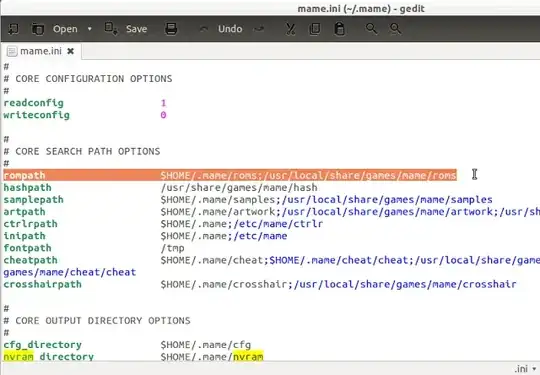
The "mame.ini" file will be created in the ~/.mame folder. Edit now this file with this command:

sudo gedit ~/.mame/mame.ini

In "rompath", you can set your own ROM directory path or leave default paths: enter image description here
Next, create the following directories in the ~/.mame folder:

  • nvram
  • sta
  • roms
  • memcard
  • inp
  • comments
  • snap
  • diff
    You can create them all with this command:

    mkdir ~/.mame/nvram memcard roms inp comments sta snap diff

You can access the rom folder with this command to place your downloaded roms in:

nautilus ~/.mame/roms

As for player controls, you can easily configure them from the main interface of MAME (Configure General Inputs):
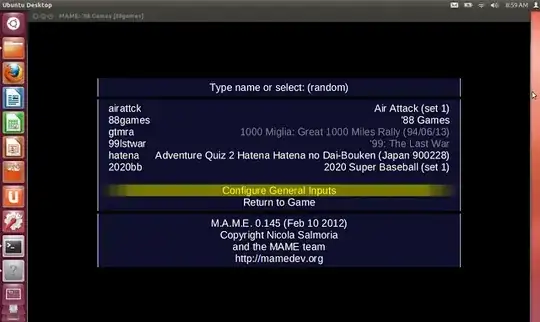
enter image description here

Note: While playing a game with MAME, you can exit fullscreen mode by pressing ALT+Enter.

Korkel
  • 1,158
  • 1
  • 10
  • 26
  • Thanks for that but I want to install 0.103 and not 0.145 or 0.152 which is latest. It is because they don't run old games I have in my computer. I use to run these games on Windows computer but now I want to do the same but latest MAME is not running these old games. It shows some error regarding some images files. – Faisal Aslam May 31 '14 at 15:37
  • Can you give me a error pleas? – Korkel May 31 '14 at 15:38
  • Sure but can't do it right now. I'm using my ant's computer which has Windows 8 installed on it. I will post error as soon as I get back to my computer. – Faisal Aslam May 31 '14 at 15:40
  • Mame error "The selected game is missing one or more required ROM or CHD images" – Faisal Aslam May 31 '14 at 15:40
  • http://www.vg-resource.com/thread-21078.html – Korkel May 31 '14 at 15:42