16

On a relatively new installation, Thunar has become the default file browser simply by using it.

While I can open Nautilus easily enough, I'd rather it remained as the default file browser(especially when I choose to view files in dual pane).

How can I change my default file manager?

Kevin Bowen
  • 19,395
  • 55
  • 76
  • 81
Charles Kane
  • 837
  • 2
  • 7
  • 13
  • you can set your preferred applications in the preferences sub-menu of the gnome menu. – Uri Herrera Jun 06 '11 at 08:06
  • 1
    No you can't. That is a seriously lame and half baked tool which only allows setting Web Browser, Mail Reader, Multimedia Player, Terminal Emulator and 2 Accessibility settings. Why one needs 4 tabs to do 6 things beats me as being design madness. – Charles Kane Jun 06 '11 at 13:20
  • hmm, why don't you get rid of thunar?, other thing you can try is to use ubuntu tweak and chnage there the default file browser – Uri Herrera Jun 06 '11 at 20:02
  • See also: [How to use as default nautilus in XFCE?](http://unix.stackexchange.com/questions/66662/how-to-use-as-default-nautilus-in-xfce) – Wilf Nov 11 '14 at 23:25

6 Answers6

19

Another method to set nautilus as default using GUI :-

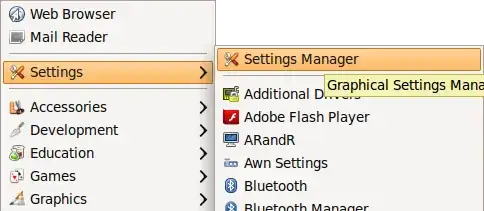
  1. Click on the top-left Xubuntu logo, it will display a menu

  2. Select SettingsSettings manager

    settings manager menu

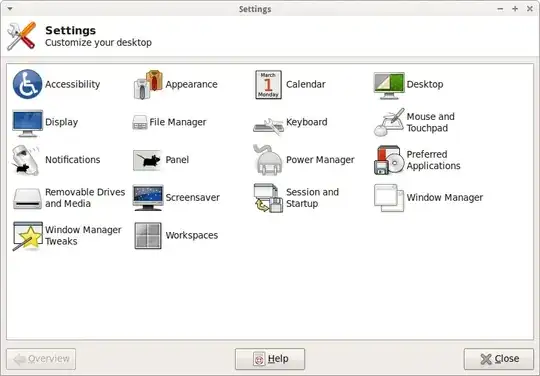
  3. The Settings window will open, Click on the Preferred Applications icon.

    settings manage window

  4. Then click on the Utilities tab and select nautilus from File Manager section

    preferred application window

That's it. Now nautilus becomes your default File manager.

Anwar
  • 75,875
  • 31
  • 191
  • 309
5

I have a simple solution.

Run this command: exo-preferred-applications

I am using Opensuse 11.4 + Gnome 2.32.1

Thunar became default file browser after playing with XFCE, now I back on Gnome. ;-)

Edit: This method has been tested on Ubuntu by Park Jun-Hong and found to work.

Alexander
  • 51
  • 1
  • 1
4

Although convoluted, I believe this link will help you from help.ubuntu.com:

Default File Manager

Check for the secion titled “Changing Your Default File Manager”

ΤΖΩΤΖΙΟΥ
  • 1,220
  • 3
  • 14
  • 27
  • 5
    Whilst this may theoretically answer the question, [it would be preferable](http://meta.stackexchange.com/q/8259) to include the essential parts of the answer here, and provide the link for reference. – Eliah Kagan Jun 25 '12 at 02:44
3

I assume this happens in the same way that it can with Dolphin. The fix (at least for 10.10) is to run a few gconf commands to get things back to normal. I suggest you run the following in a terminal:

gconftool-2 --set --type=string /desktop/gnome/url-handlers/file/command 'nautilus "%s"'
gconftool-2 --set --type=bool /desktop/gnome/url-handlers/file/enabled true
gconftool-2 --set --type=bool /desktop/gnome/url-handlers/file/need-terminal false
Oli
  • 289,791
  • 117
  • 680
  • 835
  • 1
    Nope! I restarted after running the commands but Thunar continues to muscle out Nautilus. Testing things just for a few minutes doesn't show any chages at all. I suppose that is both good and bad! – Charles Kane Jun 06 '11 at 13:35
3

Go to "Preferred Applications." I couldn't find this item on the GNOME menu but was able to find it via Gnome-Do just by writing in preferred applications. Once there go to Utilities tab and select Nautilus from there.

Hope this helps someone later on -- I realise this is an old question.

Eliah Kagan
  • 116,445
  • 54
  • 318
  • 493
quill3033
  • 31
  • 1
1

The best way to stop that problem (because it's an issue that even solved can resurface anytime) is to get rid of Thunar if you use Gnome/Unity and not Xfce.

From my experience I can say that Nautilus and Thunar are not tuned up to be used one beside the other, both trying to take over each-other's business, changing the desktop and behaving like they were in their "normal" desktop environments (as if Thunar is asking for Xfce and Nautilus for Gnome/Unity). Their parallel use might make sense only for testing purposes. I think most combinations of file browsers are ok, but not that one.

  • 2
    I use Nautilus and Thunar side-by-side all the time, without problems. Sometimes Nautilus will try to take over the desktop, but this hasn't caused me any problems and it goes away when I make sure there are no `nautilus` processes running anymore. – Eliah Kagan Jun 25 '12 at 02:46
  • This really isn't an answer. More of a very long comment and should be deleted or moved. – Kevin Bowen Oct 28 '16 at 06:40
  • @KevinBowen - it's also old, just like the question. Are you still having this problem? –  Oct 28 '16 at 07:57
  • 1
    @KevinBowen strictly speaking, it is an answer. It is suggesting that the OP remove thunar altogether. That is, in fact, an answer to the question. – terdon Oct 28 '16 at 10:28