30

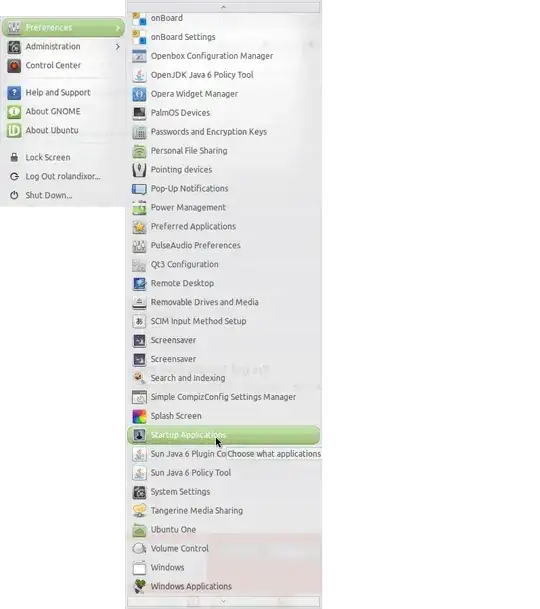
There were a few ppa updates this morning, one of them was Caffeine. It was working fine initially, it does show up in the start up applications list but does not show up in the panel.

I tried removing it and installing it but that didn't do anything. I also figured it could have been my theme and icons, so I set it all to default to no avail.

I think it is Caffeine 2.7, not sure if I was on 2.6 or what. It was an official trusty ppa.

Anyone getting this issue?

I also noticed that Caffeine does function. I have my dim settings at 3 minutes, and when running a YT video in full screen it does not go to screen saver. And when left idle, it goes to screen saver.

JJD
  • 832
  • 4
  • 19
  • 46
LuckyBearing
  • 885
  • 2
  • 9
  • 12
  • 1
    `dpkg -l | grep caffeine` should provide more informations on the package you have installed. You should also provide a link to the PPA you used. For managing PPA you may look at this : http://mrvaykadji.github.io/ppa-tool – MrVaykadji May 19 '14 at 16:50
  • It is 2.7, and the ppa is ppa.launchpad.net/caffeine-developers/ppa/ubuntu – LuckyBearing May 19 '14 at 17:00
  • 1
    There are two bug reports about this so far. This one: https://bugs.launchpad.net/caffeine/+bug/1310069 And one I just added requesting this functionality be re-added as a preference: https://bugs.launchpad.net/caffeine/+bug/1321750 – Sean Fenton May 21 '14 at 13:18

8 Answers8

32

The 2.7 release removes the user interface and manual operation. Caffeine is now fully automatic: When the active window is full screen, Caffeine inhibits desktop idleness.

This has been changed in version 2.8 (released January 15th, 2015), which has:

  • a caffeine program that works as v2.7: desktop idleness is prevented for full screen applications – fully automatic with no UI;
  • a caffeine-indicator program that works as v2.6 and earlier: an icon is shown in the panel that enables/disables desktop idleness;
  • a command caffeinate, that prevents desktop idleness for the duration of a command, e.g. caffeinate steam will prevent the screen saver while steam is running.
JW.
  • 1,376
  • 1
  • 10
  • 13
Tomby
  • 344
  • 3
  • 2
  • 3
    Thanks for the info. Although it would be nice if there was manual operation. Sometimes disabling screen saver when I'm just looking at a webpage for a long time is helpful. So long as it still works. – LuckyBearing May 19 '14 at 21:07
  • 1
    *"automatically enabled/disabled based on fullscreen activity only"* That's unfortunate, because people often want the screensaver disabled even when not fullscreen. – Dennis Jul 05 '14 at 17:35
  • Fully automatic is really great! – cmc Nov 22 '14 at 17:58
  • Fully automatic Caffeine doesn't detect gamepad inputs. If this affects you, please visit https://bugs.launchpad.net/caffeine/+bug/1530544 & click "This bug affects you" – guttermonk Jan 02 '16 at 14:38
6

As this answer states, Caffeine 2.6 and up is fully automatic depending on if your window is fullscreen. The developers removed the manual toggle in the menu bar.

A new fork made by mildmojo called Caffeine Plus brings the manual toggle with the icon in the menu bar back. You can install it manually with the .deb file or via PPA:

sudo add-apt-repository ppa:nilarimogard/webupd8
sudo apt-get update
sudo apt-get install caffeine-plus
LanceLafontaine
  • 190
  • 1
  • 10
5

Fallback to version 2.6 by using another ppa for now. A request to enable the toggle functionality has been made.

sudo apt-get purge caffeine && sudo apt-get autoremove
sudo add-apt-repository --remove ppa:caffeine-developers/ppa
sudo add-apt-repository ppa:behda/ppa
sudo apt-get update && sudo apt-get install caffeine

If it does not work then try following solution.

  1. Install Caffeine from behda ppa. This will resolve dependencies and configure/installs icons, shortcuts...

  2. Get the source file:

    tar -xzvf caffeine_2.6.2.tar.gz -C /path/to/preferred/dir
    
  3. Test:

    cd /path/to/caffeine/dir
    ./bin/caffeine
    
  4. Change startup executable on /usr/share/applications/caffeine.desktop

d a i s y
  • 5,411
  • 9
  • 41
  • 59
vmoreno
  • 51
  • 2
3

As stated by @tomby, the GUI was removed in 2.7.

An option is download the 2.5 version here

Install the required packages:

sudo apt-get install gir1.2-gtk-2.0 libsqlite0 python-kaa-base python-kaa-metadata python-sqlite

Then install the .deb file:

sudo dpkg -i caffeine_2.5_all.deb
d a i s y
  • 5,411
  • 9
  • 41
  • 59
Rael Gugelmin Cunha
  • 6,745
  • 2
  • 34
  • 35
  • 2
    This seems to me the best suggestion, it worked flawlessly. Can't figure out why the developers went down that idiotic path, but so be it: it's their code, after all. – Marco Massenzio Aug 10 '14 at 02:37
  • I totally agree, @Marco. Version 2.5 was a great, simple and perfect idea. Basically, [KISS](http://en.wikipedia.org/wiki/KISS_principle). – Rael Gugelmin Cunha Nov 09 '14 at 12:07
1

Thanks @user10962 ! Your post help me to correct this issue. I definitively uninstall caffeine and replace it by a small script which is runned at startup. You must create before an empty file /usr/sbin/pm-hibernate.gmev.sh (with same right as pm-hibernate) and give rights in your sudoers file to your user to do /bin/mv and /bin/cp as root. It verifies (each minute) if vlc or flashplugin is used before disable screensaver (or blank screen) and hibernate :

#!/bin/sh
sudo /bin/mv /usr/sbin/pm-hibernate_unactived_by_gmev.sh /usr/sbin/pm-hibernate 2> /dev/null
while [ 1 ]
 do
  xset q | grep "DPMS is Disabled" > /dev/null
  rc=`echo $?`
  ps -ef | grep flashplugin | grep -v grep > /dev/null
  rc2=`echo $?`
  ps -ef | grep vlc | grep -v grep > /dev/null
  rc3=`echo $?`
  if  [ $rc2 -eq 0 ] || [ $rc3 -eq 0 ] 
   then
    if [ $rc -ne 0 ]
     then
      sudo /bin/mv /usr/sbin/pm-hibernate /usr/sbin/pm-hibernate_unactived_by_gmev.sh
      sudo /bin/cp -p /usr/sbin/pm-hibernate.gmev.sh /usr/sbin/pm-hibernate
      xset s off -dpms
     fi
   else
    if [ $rc -eq 0 ]
      then
      sudo /bin/mv /usr/sbin/pm-hibernate_unactived_by_gmev.sh /usr/sbin/pm-hibernate
      xset s on
      xset dpms 600 0 900
    fi
  fi
 sleep 60
done
JJD
  • 832
  • 4
  • 19
  • 46
Eddy
  • 11
  • 2
  • Nice workaround, btw you can even check for player state (only while playing), See [How do I stop xscreensaver during movies play?](https://askubuntu.com/questions/445612/how-do-i-stop-xscreensaver-during-movies-play) – user.dz Jun 14 '14 at 19:34
  • FWIW, you could just check for the existence of a 'flag' (say, /tmp/lock.disable) and have two scripts that toggle its existence. This way, you can have a behavior similar to Caffeine (minus the handy icon/menu) and not just be limited to the couple of binaries you check for. – Marco Massenzio Aug 10 '14 at 02:51
1

This bugged me too so I've written a new caffeine application from scratch:

Caffeine screenshot

Installation

First make sure to remove the other caffeine if you have installed it:

sudo apt-get remove caffeine --purge
sudo add-apt-repository --remove ppa:caffeine-developers/ppa
sudo add-apt-repository --remove ppa:behda/ppa

Now you can install:

sudo add-apt-repository ppa:kzar/caffeine
sudo apt-get update && sudo apt-get install caffeine
nohup caffeine &

Feedback + contributions welcome! https://github.com/kzar/caffeine

kzar
  • 199
  • 6
0

For those simply looking for a way to disable the default "sleep/suspend/hibernate after a given amount of time" routine (as is possible with the Caffeine applications on OSX and Windows), I found the following terminal commands do the trick nicely:

# Turn off screensaver
xset s off
# Turn off sleep
xset s noblank
# Turn off suspend, hibernate, etc
xset -dpms

I recommend running these once and seeing if you like the result, then adding these to .xinitrc (or similar) so they're run by default at startup.

user10962
  • 2,489
  • 2
  • 16
  • 12
0

FWIW, I've added a comment to this bug, I would recommend anyone else who is just as annoyed by the recent change to weigh in.

Who knows, we may get back the old, sane behavior :)

For now, as suggested by Rael, installing 2.5 seems to be the only solution.

Marco Massenzio
  • 162
  • 1
  • 8