Suppose that I have a directory with name _file and includes two sub directory like _1 and _2 and on each one I have some text files. I want to search a word like foo in one of these text files. How I can do that? I want to know which text files in the whole directory contain that word?
Asked
Active
Viewed 1.9e+01k times
39

-
the question here shows two options to recursively search a whole directory for the occurrence of strings in textfiles: http://askubuntu.com/questions/460536/list-path-and-filename-where-some-text-used/460603#460603 – Jacob Vlijm May 07 '14 at 12:17
-
Your question is not clear. Do you want to use a terminal command (obviously, but that belongs to the basics of Unix like system learning, you can google that yourself), a given software or what ? – May 07 '14 at 12:19
-
@begueradj I did not now there are any softwares for this. So I asked general;) – Mohammad Reza Rezwani May 07 '14 at 12:26
-
Please accept the answer by @soulsource as this is a minimalized solution, relative to the suggestion of installing extra software. – Kasper Thystrup Karstensen Aug 10 '18 at 06:39
4 Answers
79
If you don't want to install additional software, you can simply use grep in the terminal. To recursively search through directories, you can use the -r option (see man grep for details). The syntax you are looking for is probably:
grep -r "[STRING TO SEARCH FOR]" "[DIRECTORY TO SEARCH]"
So, for instance if I want to search for the string "asdf" in all files in all subdirectories of "/tmp/testdir/" the command looks like this:
grep -r "asdf" "/tmp/testdir/"
The quotation marks are not strictly necessary, but if your string or directory path contains whitespaces, you otherwise would have to mask them using the \ character...

soulsource
- 4,904
- 2
- 24
- 23
-
1I'd like to add that on Xubuntu you don't need to specify the directory if you're looking for text in present working directory. – Akash Agarwal Aug 11 '16 at 07:22
10
- Open a terminal.
- Install
ack-grepby typingsudo apt-get install ack-grep - Change to the directory you want to search under, and type
ack-grep foo. it lists out all the matches in all files under that directory.

Mahesh
- 12,488
- 4
- 44
- 58
-
1After install running `ack-grep soemthing` results error on my Ubuntu Desktop 17. – Nam G VU Oct 10 '17 at 03:17
-
PS: the latest version just using `ack`, instead of `ack-grep`. So, for example, if you want to search `/home/luciano/Desktop/`, it would be, first go to the directory you want to search in, and then `ack /home/luciano/Desktop/`. – bim Oct 28 '22 at 14:54
8
You can use recursive grep with the -l flag to only print the file's name instead of the matched line:
grep -Rl foo .
Or, you can use find:
find . -type f -exec grep -l foo {} +
Or. you can use extglob and normal grep
shopt -s extglob
grep -l foo **/*

terdon
- 98,183
- 15
- 197
- 293
6
Just install gnome-search-tool using sudo apt-get install gnome-search-tool
Search in dash for 'search for files' and launch it.
See image below:
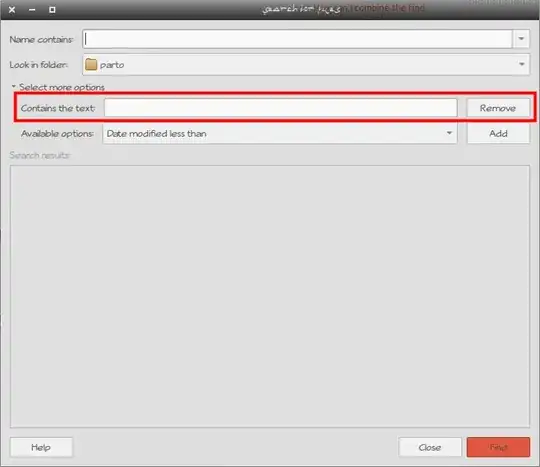
- Leave the 'name contains' section empty.
- Select your folder.
- Unfold the 'select more options' part and choose 'contains the text' and then press add.
- Type here the text you want to search for and click find at the bottom right corner.
Enjoy.

Parto
- 15,027
- 24
- 86
- 114