I have installed Ubuntu 14.04 LTS and I want to make Ubuntu compatible with Arabic language Can you help me please
Asked
Active
Viewed 1.7k times
3


-
1Search for Text Entry in dash. After it opened, choose Arabic as your preferred language. – Avinash Raj May 03 '14 at 01:39
-
**Also:** Check out other questions (and answers) with **arabic** tag, by right-clicking on tag (above). – david6 May 03 '14 at 01:51
1 Answers
6
اذهب إلى (Go to)

افتح (Open)
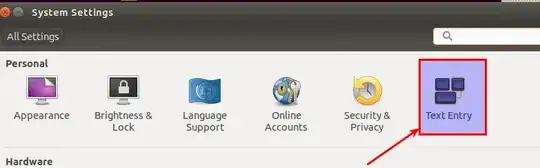
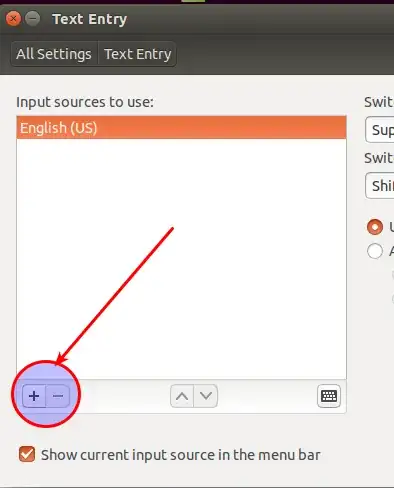
اضغط على علامة الزائد لإضافة لغة (Click on plus sign to add a language)
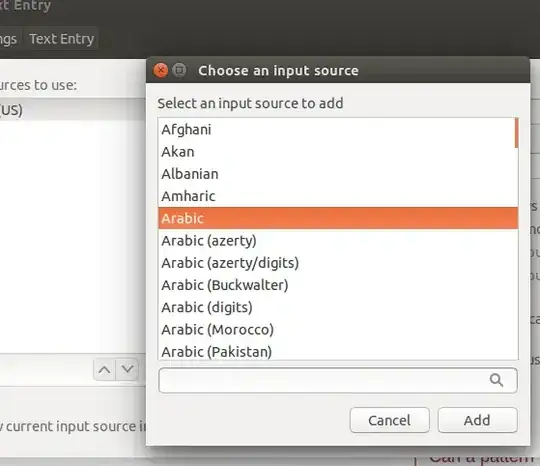
سوف تظهر لك اللغات (List of languages will show up)
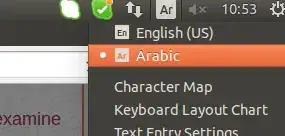
إذا أضفت اللغة العربية سوف تجدها في القائمة الرئيسية الفوقية (If you added Arabic, you find it on the upper list)
إن لم تجد اللغة العربية في المرحلة الرابعة (If you couldn't find it in step 4)
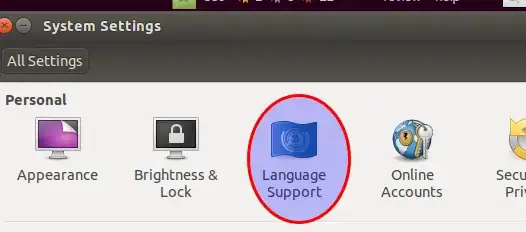
ثم (Done)
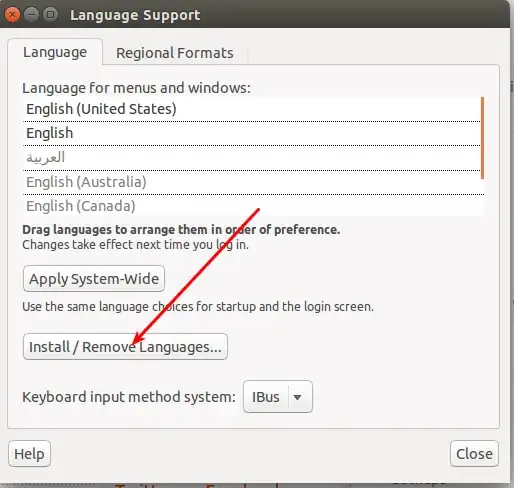
ثم عد إلى المرحلة رقم 2 (Then go back to step 2)

Abdennour TOUMI
- 9,137
- 9
- 44
- 51
-
Nice detailed answer. Ask Ubuntu language is English, so at least provide translation when you are obliged to use a different language. btw OP asked in English so should your answer! – user.dz Apr 09 '15 at 12:22
-
Old post and comment. But this **is** useful in both languages. Although I use Ubuntu in English, it helps to see instructions in both languages. The author is simply going out of his way to be more helpful. – itsols Jul 16 '18 at 13:58