164

I like Unity very much. Recently, I installed Compiz manager and Nautilus Elementary also then tried to Play. During some of my playing around, Unity's clock applet has vanished.

I want to make it show the time again. How can I do this?

Oli
  • 289,791
  • 117
  • 680
  • 835
Dev
  • 1,641
  • 2
  • 11
  • 3
  • Because this question is "protected", I can't add this as an answer, so posting it as a comment: Another possible solution in some cases is to make sure your `~/.profile` or similar isn't setting something like `LANG=C; export LANG`... that broke this for me, *if* I had weekday or date stuff turned on (just time per se it would work). So, I found a way to disable that line of my profile for unity config's run through my .profile, while still setting it normally (per my preference, generally), and that fixed it for me (after logout/in). – lindes Oct 23 '15 at 19:54

7 Answers7

293

Having date and time gone on Ubuntu 13.10 beta, after next reboot, this command solves the problem:

killall unity-panel-service
Lucio
  • 18,648
  • 31
  • 107
  • 190
Maxime
  • 3,039
  • 1
  • 11
  • 3
60

Reinstall indicator-datetime. It should be installed by default, but just in case you have removed it unknowingly, it is best to run the install command again.

sudo apt-get install indicator-datetime

Next, we are going to reconfigure the date time:

sudo dpkg-reconfigure --frontend noninteractive tzdata

Lastly, restart unity.

sudo killall unity-panel-service
Patryk
  • 9,026
  • 27
  • 70
  • 108
36
  1. Click the Ubuntu logo in the top-left.

  2. Search for and open "Time and Date".

  3. Open the Clock tab.

  4. Make sure the box "Show a clock in menu bar" is ticked.
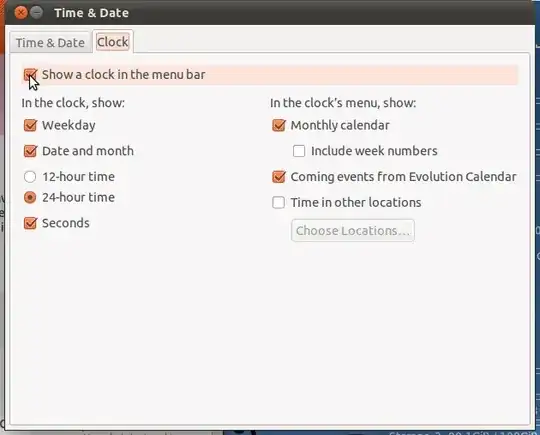
    enter image description here

Also make sure the package indicator-datetime is installed.

Nitin Venkatesh
  • 21,993
  • 11
  • 68
  • 91
  • 43
    Interestingly enough, when what happens on my machine (13.10) this whole tab is greyed out (albeit "Show a clock" is checked). – Waldir Leoncio Nov 28 '13 at 10:52
  • 22
    @WaldirLeoncio when that happens (on 14.04) I found the solution is "killall unity-panel-service". – Stéphane Oct 19 '14 at 18:08
  • 1
    Reinstalling `indicator-datetime` worked for me. I think I accidentally uninstalled it when I removed some `evolution` packages. – User 1058612 Jan 20 '15 at 17:53
  • 1
    Sometimes when ubuntu base is updated and I find that date panel disappears. It will come back when I boot again. But doing what @Stéphane suggested works for me. – eshwar May 06 '15 at 04:47
  • For me this command worked: `pkill -f datetime` – Krisztián Balla Apr 21 '17 at 10:28
19

Double check that indicator-datetime Install indicator-datetime is installed. Go to terminal and type

sudo apt-get install indicator-datetime

Now log out and then back in.

user28525
  • 199
  • 1
  • 3
  • 5
    In my case this was the solution. I had actually removed everything related to Evolution including the Evolution Server and somehow that relates to also removing the indicator-datetime. I simply installed all that again and it worked. – Luis Alvarado Mar 18 '12 at 13:40
  • 4
    OP's requested comment: instead of logging in and out (which is slow, painful, loses your state, and smells of microsoft), you can kill unity-panel-service using `ps -ef | grep unity-panel-service` and `kill ` This will then immediately respawn a new panel service which loads the indicator. – Mochan Dec 31 '12 at 00:25
  • 3
    Thanks for this, in my case I had it installed but a `apt-get purge indicator-datetime` and then and install was needed. – squareborg Sep 16 '13 at 12:59
6

On my computer, Unity shows word "Time" instead of the real time.

On Ubuntu 11 (and above?) /etc/timezone can't be empty (and it was). This wasn't an issue on previous versions.

To regenerate the TimeZone file just do:

sudo dpkg-reconfigure --frontend noninteractive tzdata

It works for me.

smhg
  • 113
  • 6
1

If that doesn't work you can try restoring your defaults.

From your unity session, try re-launching unity like this:

unity --reset
thomasmichaelwallace
  • 2,649
  • 22
  • 17
0

If you not found Date-Time on panel then try to find out on whether its hide or not. If not then try to find out its installed or not.

If you find that Date-Time not install then you just install it. 1. apt-get install indicator-datetime 2. killall unity-panel-service

You not need to Logoff or reset Unnity. Just check on your Desktop's Right Corner.

Neo
  • 49
  • 2