77

I'm getting 100% CPU usage at startup consistently by apport-gtk as shown here.
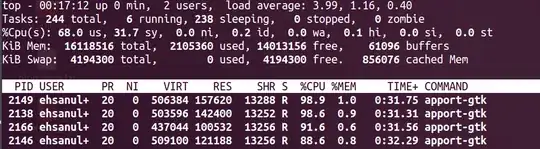
screenshot

According to Apport wiki shouldn't even be running on my machine since it's not a beta version (although I upgraded from 14.04 LTS Beta 2 to the release version).

Finally, I have tried the following to no avail:

  1. Disable apport as described here

    $ cat /etc/default/apport                                                                                       
    # set this to 0 to disable apport, or to 1 to enable it
    # you can temporarily override this with
    # sudo service apport start force_start=1
    enabled=0
    
  2. I've disabled all options in System Settings > Security & Privacy > Diagnostics tab as shown below.

    screenshot

Brief system info:

$ lsb_release -a
No LSB modules are available.
Distributor ID: Ubuntu
Description:    Ubuntu 14.04 LTS
Release:        14.04
Codename:       trusty

$ uname -a
  Linux architect 3.13.0-24-generic #46-Ubuntu SMP Thu Apr 10 19:11:08 UTC 2014 x86_64 x86_64 x86_64 GNU/Linux

I've run out of ideas and am not sure what I can do to fix this issue. Any ideas?

Pablo Bianchi
  • 14,308
  • 4
  • 74
  • 117
ehsanullahjan
  • 873
  • 1
  • 6
  • 6

1 Answers1

103

Take a look and delete all files in /var/crash/:

rm /var/crash/*

I suddenly had the same problem apport-gtk taking 100% on every restart.

Seemed there was a huge (2GB+) bogus crash file in /var/crash/ that couldn't be parsed. After several minutes of waiting I always ended up with this rather mysterious dialog:

This problem report is damaged and cannot be processed. Error('Incorrect padding',)

After I deleted the file in /var/crash/ both issues were gone.

Janghou
  • 5,499
  • 6
  • 43
  • 59
  • Maybe relevant: https://bugs.launchpad.net/ubuntu/+source/apport/+bug/970837 – demel Jul 16 '14 at 19:19
  • 1
    Unfortunately I had to re-install for some reason soon after I posted the question. After the new installation, it's working perfectly fine. If I have to guess, I'd blame it on the fact that my installation was an upgrade to 14.04 from beta 2. I guess that screwed apport somehow. – ehsanullahjan Jul 19 '14 at 10:10
  • 1
    A re-install will clear `/var/crash/*` as well, but to solve the issue a manual clear is much easier. – Janghou Sep 25 '14 at 09:59
  • apport-gtk was taking up 100% of my cpu usage when starting the Atom text editor, and Atom was extremely slow to load or quit. After clearing /var/crash it works perfectly for me – rviertel Oct 19 '16 at 17:08
  • I get intermittent things with apport-gtk taking 100% CPU, maybe it is error reporting but it is driving my laptop crazy. It's like I have headphones on, take my headphones off, and I hear my laptop fans going insane. Maybe this is related to me being a webdeveloper and crashing chrome tabs? Will have to try this answer, but it doesn't happen for me on every startup, it's like after I crash something – Colin D Oct 03 '20 at 00:22