I've heard that apt has a new fancy colour and progress bar feature, but that I have to manually enable it.
How do I do this?
I've heard that apt has a new fancy colour and progress bar feature, but that I have to manually enable it.
How do I do this?

Make a file in: /etc/apt/apt.conf.d:
sudoedit /etc/apt/apt.conf.d/99progressbar
Then add these contents:
Dpkg::Progress-Fancy "1";
And save the file.
Then if your umask was not 0027, (i.e. it might also be 0023), then also set this new file's permissions to 644 (i.e. -rw-r--r--) as follows:
$ chmod 644 99progressbar
(Without this permission correction things like Debian's reportbug will stop working.)
Now enjoy apt progress bars in all their glory:
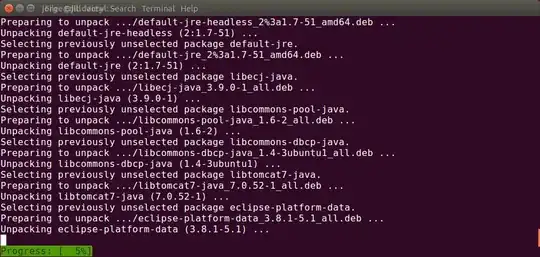
You can use them with these commands for a nice new apt experience:
apt update
apt install
apt upgrade
Run apt by itself for the list of commands. Colors are enabled by default for apt, and do not affect apt-get.
You can also tweak the color of the progress bar by adding this as well:
Dpkg::Progress-Fancy::Progress-Bg "%1b[40m";
The colors are based on ANSI Color codes, look at this chart as a reference.

The -o option allows to change the behavior temporarily. I described it here:
It's just not an apt-get default, but also available for apt-get, run it with
-o Dpkg::Progress-Fancy="1"for example
sudo apt-get -o Dpkg::Progress-Fancy="1" install alpine-pico


In addition to Jorge Castro's excellent answer, you can add an extra line to the /etc/apt/apt.conf.d/99progressbar file:
Dpkg::Progress-Fancy "1";
APT::Color "1";
This will enable the default colors for apt. I found it by accident while reading the apt man page:
The apt command is meant to be pleasant for end users and does not need to be backward compatible like apt-get(8). Therefore some options are different:
The option DPkgPM::Progress-Fancy is enabled.
The option APT::Color is enabled.

