14

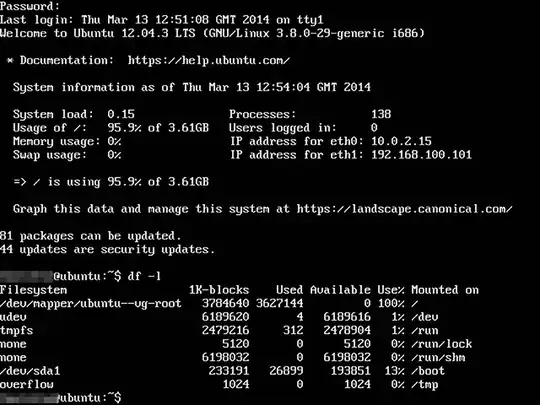
I have just successfully increased my disk size having had help with this question. My set up is Ubuntu Server running in VirtualBox as a web development server. I now have this space:

enter image description here

As you can see /dev/mapper/ubuntu--vg-root is full but I have a a lot more space. How do I go about using the new space to stop disk full errors? I am not even sure where to start looking so any help is great.

beingalex
  • 253
  • 1
  • 3
  • 8
  • possible duplicate of [How do I resize partitions using command line without using a GUI on a server?](http://askubuntu.com/questions/390769/how-do-i-resize-partitions-using-command-line-without-using-a-gui-on-a-server) – Lucio Oct 20 '14 at 00:38
  • 1
    @Lucio I have a similar result, but already used `gparted` on a LiveCD to increase `/dev/sda`, but the `/dev/mapper` root partition is still the same size. There more going on here than needing a resize. – jpaugh Dec 08 '17 at 20:53
  • 1
    you have to resize the root partition /dev/mapper/ubuntu-vg-root – ravery Dec 09 '17 at 08:10

1 Answers1

9

/dev/mapper indicates that you're using LVM; so resizing the physical volume is not enough to resize the logical volume contained within, let alone the filesystem.

To increase the filesystem size, I followed these instructions from ServerFault with success:

  1. First, I increased the physical partition using gparted. This was straightforward, and I assume you've already done that. If you don't have access to a LiveCD, you can increase the size of the physical disk while online, via pvresize, as shown in the linked instructions.

  2. Then I used lvresize to grow the logical volume to fill the physical volume. I used pvdisplay to verify the size of the physical volume, and tried using that size.

     sudo lvresize -L 28.82G /dev/ubuntu-tt-vg/root
    

However, it was too large, so I started with 27G, and kept resizing my partition bigger until I hit the max.

  1. Then, I used resize2fs to grow the filesystem inside the logical volume.

     sudo resize2fs /dev/ubuntu-tt-vg/root 7290881
    

Finding the max here was much easier. If you try a number bigger than the max, it will tell you exactly what the max is.

  1. At this point, df -h should show that your filesystem has grown to the new size.
jpaugh
  • 534
  • 4
  • 23
  • 3
    Nice tip with '*If you try a number bigger than the max, it will tell you exactly what the max is.*', I just went `sudo resize2fs /dev/mapper/kubuntu--vg-root 999999999999` as a result. – compuphys May 06 '20 at 21:19