3

I am trying to create a bookmark that when I right click the Files icon in the Launcher and select the bookmark it will open the desire network shared folder.

Right now it only opens if I have previously opened the shared folder by going through the Browse Network option. What I want is to simply click the bookmark and this will open the network shared folder without the need for having it opened manually.

The shared folder is through Samba: smb://client/stuff/

Here is a screenshot of the Bookmark to Stuff:
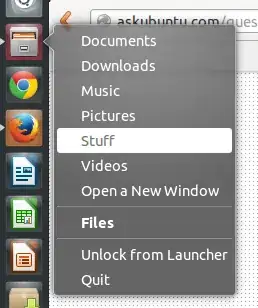
enter image description here

It will only work if I have previously opened the shared folder by going through the Browse Network option in the Files app.

Luis Alvarado
  • 209,003
  • 167
  • 543
  • 707
  • possible duplicate of [Proper fstab entry to mount a samba share on boot?](http://askubuntu.com/questions/157128/proper-fstab-entry-to-mount-a-samba-share-on-boot) – MrVaykadji Mar 04 '14 at 20:44
  • Also look at http://www.ghacks.net/2009/04/19/auto-mounting-a-samba-share-in-linux/ – MrVaykadji Mar 04 '14 at 20:45

1 Answers1

6

A link to a network folder will only work immediately if it is mounted automatically at startup; you need to edit fstab, create a folder to mount the network folder in and set credentials.

I am trying to find a good manual, will post it back...

OK, couldn't find it, but it is not that complicated:

  1. Install cifs-utils.
  2. create a folder to mount the network share into (can be in your personal folder)
  3. create the credentials file: gksu gedit /root/.cifscredentials, add the following:

    user=your_username
    password=your_password
    
  4. add a line to fstab, to give you an impression, this is mine: the first section is the network share, the second is the folder you created to mount the share into

    //192.168.0.104/werkmap_documenten/documenten_Jacob /home/jacob/Netwerkmap cifs auto,iocharset=utf8,uid=jacob,gid=users,credentials=/root/.cifscredentials,file_mode=0775,dir_mode=0775 0 0
    

I hope I did not forget anything, but I think not. Good luck!

Jorge Castro
  • 70,934
  • 124
  • 466
  • 653
Jacob Vlijm
  • 82,471
  • 12
  • 195
  • 299