I have just downloaded install_flash_player_linux.11_x86_tar.gz from the Adobe website. How do I install this package or any other package not found in the Ubuntu Software Center.
I have used sudo apt-get install ubuntu-restricted-extras.
Rebooted and flash is not working.
Asked
Active
Viewed 2.7k times
3


4 Answers
1
Try running
sudo apt-get update
after enabling the restricted repository but before running
sudo apt-get install ubuntu-restricted-extras

Aditya Kashi
- 63
- 1
- 10
0
You can install the flash player package as part of Ubuntu restricted extras:
sudo apt-get install ubuntu-restricted-extras
This will install Flash player, along with proprietary video codecs, fonts, etc.
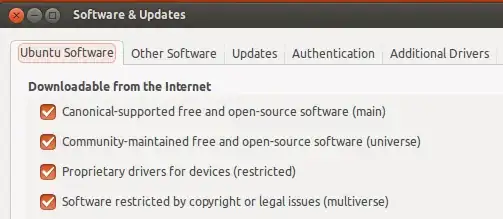
Make sure these reposotories are enabled in 'Software & Updates':

Wilf
- 29,694
- 16
- 106
- 164
-
1I have tried all you suggested and flash dose not work – kane Feb 22 '14 at 10:18
-
have you tried other browsers? Chrome, Firefox, etc? – Wilf Feb 22 '14 at 10:31
-
This does not work for Firefox 29 – lefterav May 02 '14 at 12:05
-1
try flash player in software Center and install it , it works for me . on chromium and firefox both.

Mohammad_Hosseini
- 813
- 2
- 13
- 25
-1
Chrome has flash preinstalled.
For firefox and other browsers Extract the file you downloaded and place the file into /usr/lib/mozilla/plugins
or just use sudo apt-get install flashplugin-installer -y

user251046
- 307
- 2
- 7