Short of rebooting, how can I release and renew my DHCP lease? It would be useful to know a GUI and terminal method.
I'd especially like to know if there is a means to do this without requiring admin privileges.
Short of rebooting, how can I release and renew my DHCP lease? It would be useful to know a GUI and terminal method.
I'd especially like to know if there is a means to do this without requiring admin privileges.

To renew your dhcp lease at the terminal:
sudo dhclient -r; sudo dhclient

In my case I had to specify which card to renew:
Note: you might want to join the two on one line, as otherwise you might lose the remote connection you're on after the first!
First release the current IP address:
sudo dhclient -r eth0
then renew the IP address
sudo dhclient eth0
.. or do them together to avoid losing connection:
sudo dhclient -r eth0 && sudo dhclient eth0

In the network drop-down selector of the system tray you can press the network you are already connected to. This will make NetworkManager ask for a new lease from a DHCP server.
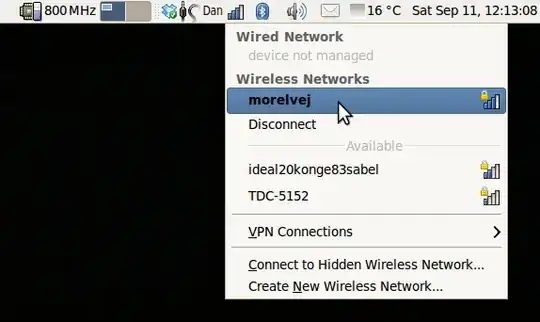
This also works for wired networks, but I don't think it works for PPP connections (mobile broadband).


If you're on a systemd based-version of Ubuntu without a GUI (i.e. server version) then this is the way to renew the DHCP lease:
sudo systemctl restart systemd-networkd
Note: If you're connected via the interface whose DHCP lease you're renewing you may get disconnected, unless you're connected via a statically configured interface or the console.

This works on Ubuntu 12.04 LTS:
sudo service network-manager restart
When I do that, Network Manager asks for a new DHCP lease.
I prefer this to manually (re)starting dhclient because I've had problems by stale dhclient processes (ones not managed by Network Manager) spontaneously and incorrectly reconfiguring my network settings at random points when it's least convenient.

Maverick comes with nmcli, a command line interface to the network manager.
I can't see a simple way of telling it to renew a lease, but running:
nmcli con
Gets you a connection list, and running:
nmcli con down id 'Connection Name'
nmcli con up id 'Connection Name'
Takes the connection down and back up. It may be possible to do something similar with the device instead.
The connection list seems to include all connections, so this will probably work with PPTP and VPN connections too.

How you renew the DHCP lease depends on the DHCP client the system is using.
Since 16.04, Ubuntu has used Netplan- a high-level abstraction- to set the networking gears in the renderer: directive in the config file /etc/netplan/fileName.yaml.
Where renderer: NetworkManager, restart NetworkManager to renew the lease
sudo service network-manager restart
Where renderer: networkd, then dhclient is used to renew the lease
sudo dhclient -r; sudo dhclient
As a general rule at the time of this writing:
Server versions of Ubuntu use systemd-networkd to control the networking in netplan
Desktop versions of Ubuntu use NetworkManager.
Obviously if you're a SysAdmin handling systems others have implemented, they could have changed the value of renderer to change the default, so worth checking the netplan config file to validate which system is authoritative.

Having just upgraded to Maverick Meerkat Beta 1, something broke in my standard, vanilla eth0 configuration which I've not debugged yet. The quick and dirty workaround has been
sudo dhclient
which notices that there was a (possibly dead) client already and obtains a new lease:
There is already a pid file /var/run/dhclient.pid with pid 2436
killed old client process, removed PID file
Internet Systems Consortium DHCP Client V3.1.3
Listening on LPF/eth0/00:1a:92:24:9c:85
Sending on   LPF/eth0/00:1a:92:24:9c:85
Sending on   Socket/fallback
DHCPDISCOVER on vboxnet0 to 255.255.255.255 port 67 interval 3
DHCPREQUEST of 192.168.2.2 on eth0 to 255.255.255.255 port 67
DHCPACK of 192.168.2.2 from 192.168.2.1
bound to 192.168.2.2 -- renewal in 118389830 seconds.
This isn't a fix, just a hack. I'll follow-up when I figure what went bad.

Lacking this specific capability via nmcli, I believe the best CLI solution is to release and kill the dhclient instance managed by NetworkManager, rather than starting a new one. NM will then bring it back up again automatically, avoiding having to restart the entire NM infrastructure.
sudo dhclient -v -r -pf /run/sendsigs.omit.d/network-manager.dhclient-eth0.pid
-v - make verbose-r - release and shut down-pf - pid file of NM's instance
You can release dhcp or dhcpv6 by picking dhclient-xxxx.lease or dhclient6-xxxx.lease
ex.
sudo dhclient -lf
/var/lib/NetworkManager/dhclient-8c3bf569-fa6e-33d7-becb-a4095f8137c0-eth1.lease
-r -v eth1
sudo dhclient -6 -lf
/var/lib/NetworkManager/dhclient6-6657588-f38e-45fd-b88d-6145401fae5e-eth1.lease
-r -v eth1

