2

I followed these steps to install xdebug on ubuntu

Download Latest XDebug Source file
Unpack package, run: tar -xvzf  xdebug-2.2.3
Run: cd xdebug-2.2.3
Run: phpize
Run: sudo apt-get install g++-multilib
Run: CFLAGS=-m32 CPPFLAGS=-m32 ./configure
Run: make
Copy .so file to folder with extensions, run: sudo cp modules/xdebug.so /opt/lampp/lib/php/extensions/no-debug-non-zts-20090626
Edit /opt/lampp/etc/php.ini and add the line just before [Data] line, run: sudo gedit /opt/lampp/etc/php.ini
zend_extension = /opt/lampp/lib/php/extensions/no-debug-non-zts-20090626/xdebug.so
Restart web server, run: sudo /opt/lampp/lampp restart

But after restarting xampp i'm getting error

Failed loading /opt/lampp/lib/php/extensions/no-debug-non-zts-20100525/xdebug.so: /opt/lampp/lib/php/extensions/no-debug-non-zts-20100525/xdebug.so: undefined symbol: zend_execute_ex

I donot know what i did wrong ?

PHP version

php version
-----------
PHP 5.5.3-1ubuntu2.1 (cli) (built: Dec 12 2013 04:24:35) 
Copyright (c) 1997-2013 The PHP Group
Zend Engine v2.5.0, Copyright (c) 1998-2013 Zend Technologies
    with Zend OPcache v7.0.3-dev, Copyright (c) 1999-2013, by Zend Technologies

phpize
------
Configuring for:
PHP Api Version:         20121113
Zend Module Api No:      20121212
Zend Extension Api No:   220121212
Braiam
  • 66,947
  • 30
  • 177
  • 264

3 Answers3

3

Xdebug is in Official Ubuntu Repository

When you install a package by using compiling methods it is too difficult. You should have sound knowledge in computing.

Ubuntu is not such difficult. In windows, when you right click on .exe file and select Run, you can install a application easily. Likewise in Ubuntu the equivalent for the .exe are .deb. If you right click a .deb file and select Open with Software Center, you can install the Software easily.

In Ubuntu, you don't need to find applications (.deb) files everywhere in internet. Most of the trusted Freely available applications are in a "Pool" called Ubuntu Official Repository". When you request for install needed software, Ubuntu will download and install automatically ( If that software is in that pool). You need to do this request From the application Software Center. You have to open the application and search in it's search bar for the needed Software, select it and click on Install( Software Center has a copy of the "pool". So it knows available applications).

Other method to request for the needed applications to be install is run a command in Terminal. Command is

sudo apt-get install [PACKAGE1] ]PACKAGE2] ...

This will download the requested packages (.deb files) from the pool and install by itself. So it is so easy to install Applications in Ubuntu.

Xdebug is in the "Pool" or the Official Ubuntu Repository. You have to install following packages to get it.

php5-xdebug debhelper php5-dev binutils dh-apparmor dpkg dpkg-dev file html2text man-db perl po-debconf dh-make autoconf automake libssl-dev libtool php5-common shtool ucf libc6 php5-cli

So to install them, you need to enter the command :

sudo apt-get install php5-xdebug debhelper php5-dev binutils dh-apparmor dpkg dpkg-dev file html2text man-db perl po-debconf dh-make autoconf automake libssl-dev libtool php5-common shtool ucf libc6 php5-cli

Or you can Open the software Center and search and select each package and click on install.

But use the command is so easy. You just need to right click and Copy this command and then right click on terminal prompt and Paste. Then press Enter.

To configure Xdebug to work with php5 you need to do the followings:

In Terminal run:

 gksudo gedit /etc/php/apache2/php.ini

In the resulting empty document add following lines: *

zend_extension="/usr/lib/php5/20121212/xdebug.so"
xdebug.remote_enable=1
xdebug.remote_handler=dbgp
xdebug.remote_mode=req
xdebug.remote_host=localhost
xdebug.remote_port=9000

Save and Close the file.

Then run:

sudo /etc/init.d/apache2 restart
  • This is only for Ubuntu 13.10. For 13.04 zend_extension= line should be zend_extension="/usr/lib/php5/20100525/xdebug.so". For 12.10 zend_extension="/usr/lib/php5/20100525/xdebug.so" and for 12.04 zend_extension="/usr/lib/php5/20090626/xdebug.so".
  • thank for help but you put so much in one command.will you explain it ( i'm ubuntu beginner )? after run that command i got `Package phpapi-20100525 is not available, but is referred to by another package. This may mean that the package is missing, has been obsoleted, or is only available from another source E: Unable to locate package libc6-udeb E: Package 'phpapi-20100525' has no installation candidate E: Unable to locate package phpapi-20100525+lfs E: Couldn't find any package by regex 'phpapi-20100525+lfs' ` – Ravinder Kumar Dec 30 '13 at 08:36
  • what is `undefined symbol: zend_execute_ex` in my error string ( above in question ) – Ravinder Kumar Dec 30 '13 at 09:26
  • There was a problem in package list. I corrected it. Run it again. Copy from here and paste on terminal and enter. You need to be online. –  Dec 30 '13 at 13:33
  • do i need to edit any file like `xdebug.ini` and `php.ini` ?after run that command i'm getting same error. – Ravinder Kumar Dec 30 '13 at 15:36
  • was that installation ok? –  Dec 30 '13 at 16:10
  • I dont know that how to use `xdebug`. But if the installation is successful, `xdebug.ini` is in the `/etc/php5/mods-available/xdebug.ini` folder. Follow [this](http://stackoverflow.com/a/5504262) answer to use it. –  Dec 30 '13 at 16:19
  • If i install xdebug by ubuntu repository then i got error `wrong ELF class: ELFCLASS64` otherwise following step ( in my question ) i got error `undefined symbol: zend_execute_ex`. Thank for your support but i'm still at same position – Ravinder Kumar Dec 30 '13 at 16:53
  • You may need to make the changes in the file as i mentioned in the link. Try. Sorry. I'm afraid. –  Dec 30 '13 at 16:55
  • let us [continue this discussion in chat](http://chat.stackexchange.com/rooms/12235/discussion-between-ravs-and-dumindu-mahawela) – Ravinder Kumar Dec 31 '13 at 13:13
  • sorry. power failure –  Dec 31 '13 at 13:18
  • thanks buddy i installed xdebug and happy with it. +1 for help – Ravinder Kumar Jan 05 '14 at 09:19
1

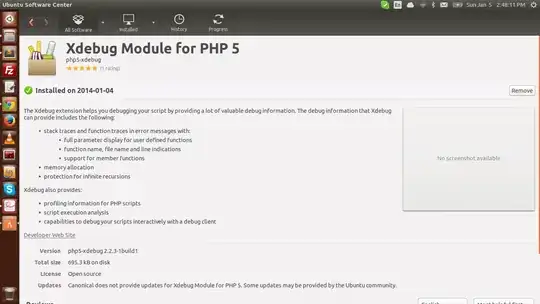
I do not know it is an answer or not.but after so much debugging and suggestion by @Braiam i found that my xampp is 32bit, so i installed 64 bit xampp on my 64 bit ubuntu 13.10. which solve my all problems related to xdebug installation on ubuntu os. ( i installed xdebug from ubuntu software center. ) enter image description here

1

In case this helps someone else. I had this issue because I had 2 versions of PHP on my system. /usr/bin/php was the old version, and /usr/local/bin/php was the new version.

I removed the old and symlinked to the new:

rm /usr/bin/php

ln -s /usr/local/bin/php /usr/bin/php