12

I have a GUI application that needs to call a daemon (written in Python) with superuser privileges. I would like to do this without prompting the user for a password.

Since the daemon is a script, I can't set the SUID bit directly. I could write a C wrapper for this, but I'd rather not reinvent the wheel, especially when a mistake on my part could lead to the system's security being severely compromised.

What I'd normally do in this situation is to add a line in /etc/sudoers that allows users to execute the daemon as root without a password, using the NOPASSWD directive. This works fine from the command line. However, when I do this from the GUI, a pkexec dialog pops up asking for the user's password. It seems that on Ubuntu, calls to sudo from the GUI are somehow being intercepted by pkexec.

Is there a clean way around this? I'd really rather not have to deal with the hassles of a setuid script.

Chinmay Kanchi
  • 891
  • 2
  • 10
  • 20
  • About what application do you speak? – Radu Rădeanu Dec 10 '13 at 08:14
  • Any GUI app. When a GUI app attempts to run `sudo somecommand`, the dialog box that pops up is a `pkexec` password dialog, regardless of whether there is a sudoers policy allowing the execution of the program. – Chinmay Kanchi Dec 10 '13 at 08:20

1 Answers1

16

It's improper to say that: "It seems that on Ubuntu, calls to sudo from the GUI are somehow being intercepted by pkexec". pkexec doesn't have much in common with sudo. In contrast with sudo, pkexec does not grant root permission to an entire process, but rather allows a finer level of control of centralized system policy.

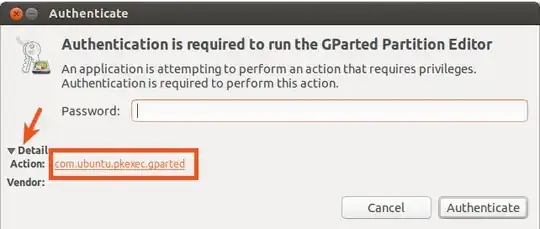
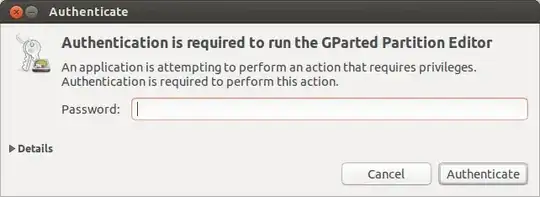
Now, if you want to run a GUI application without being asked by a password by pkexec, this is not difficult to be done. Let's take for example GParted. When you open it, you will see the following dialog window asking you by a password:

gparted authenticate

Click Details and the dialog window will look now like:

gparted authenticate - details

From here all you have to do is to open /usr/share/polkit-1/actions/com.ubuntu.pkexec.gparted.policy file using for example the following command:

gksu gedit /usr/share/polkit-1/actions/com.ubuntu.pkexec.gparted.policy

and change the following lines:

      <allow_any>auth_admin</allow_any>
      <allow_inactive>auth_admin</allow_inactive>
      <allow_active>auth_admin</allow_active>

with the followings:

      <allow_any>yes</allow_any>
      <allow_inactive>yes</allow_inactive>
      <allow_active>yes</allow_active>

Save the file and close it. Next, when you will open GParted you will not be asked for a password anymore.

guntbert
  • 12,914
  • 37
  • 45
  • 86
Radu Rădeanu
  • 166,822
  • 48
  • 327
  • 400
  • Yes, pkexec does indeed intercept calls to sudo. Let me see if I can build a minimal example of this behaviour. – Chinmay Kanchi Dec 10 '13 at 10:18
  • I can't replicate this in a simple app, it might only happen in some very specific situations and I don't have the time to trace the bug. I'm going to accept your answer. Cheers. – Chinmay Kanchi Dec 10 '13 at 10:33
  • @ChinmayKanchi Let's be more clear. I will take for example again `gparted`. When you run from terminal `sudo gparted`, you run `/usr/sbin/gparted` file with root privileges. When you start `gparted` from the GUI, you start in fact `gparted-pkexec` (you can verify this inside `/usr/share/applications/gparted.desktop` file) which is `/usr/bin/gparted-pkexec` that is a shell script whose purpose is to run the following command: `pkexec "/usr/sbin/gparted"` which is equivalent with `pkexec gparted`. So, nothing to do with `sudo`. And this command you should use in terminal, not `sudo gparted`. – Radu Rădeanu Dec 10 '13 at 10:52
  • 1
    @ChinmayKanchi `sudo` should be used only for shell apps, not GUI apps. See `man sudo` and `man pkexec` in this sense. – Radu Rădeanu Dec 10 '13 at 10:53
  • Yes, I am aware of both of your points. My situation is that I have a GUI app (written by me) that attempts to launch a shell program (a daemon, also written by me) using sudo. For some reason, doing this results in pkexec getting invoked instead of sudo, which means that any sudo policies I've created for the daemon get ignored. – Chinmay Kanchi Dec 10 '13 at 10:59
  • changing in /usr is recommended. do i n /etc – Anwar Sep 02 '16 at 19:13
  • I don't have this "Details" button on Ubuntu 18.04. – Mr. Clear Feb 22 '22 at 08:22