Is it possible to open a new tab in the current terminal with some commands?
Asked
Active
Viewed 2.7e+01k times


10 Answers
131
If you just want to open a new tab
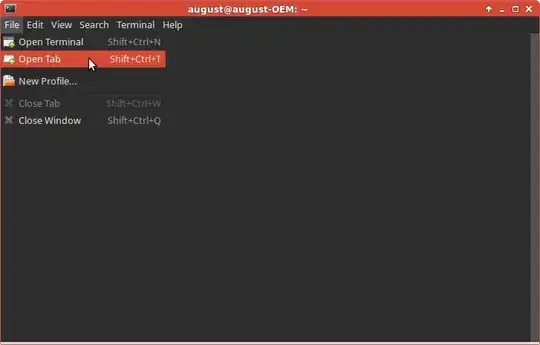
To open a new tab in the current opened terminal you can press SHIFT+CTRL+T. Alternatively, use the top level menu, which shows the keyboard shortcut (see screenshot below)
If you want to do it from the command line
Install xdotool - a program that lets you simulate keyboard input (among other things).
sudo apt-get install xdotool
then type in the terminal:
xdotool key ctrl+shift+t
That will simulate pressing the key combination, and open the new tab in the terminal.


-
1Great answer, really easy to follow. How would one make a shortcut for switching to the next/previous tab? This would help immensely. – programstinator Sep 15 '14 at 12:24
-
What window theme are you using? Really like it – xoner Feb 06 '15 at 08:37
-
Thats I am not using right now. Its long ago. not sure I didnt remember the name.@xoner – Raja G Feb 08 '15 at 05:38
-
@Goran_Mandic I found it is now possible with SHIFT+CTRL+arrow key. – llrs May 26 '15 at 13:14
-
@Goran_Mandic you can also use alt + a number to switch between terminal tabs. like if you have three tabs they would be 1,2,3 from left to right. alt + 1 would open the leftmost tab. – user137717 Aug 27 '15 at 20:13
-
1There is no need for xdotools. ctrl+shift+t opens a new tab in the default ubuntu terminal with no modifications necessary. – user137717 Aug 27 '15 at 20:13
-
For me it is not a satisfying "command line" option if evetually the solution fakes a GUI input instead. This is at best a workaround, with the ill effect that it eases the desire for a real command line solution like: `gnome-terminal --add-new-tab`. Also a key press combination is not a command line – humanityANDpeace Aug 29 '16 at 10:35
-
5@user137717 the question does ask for a command line, not a keyboard shortcut, therefore you need `xdotools`. – humanityANDpeace Aug 29 '16 at 10:37
-
hwo to switch between tabs in terminal – Indrajeet Gour Sep 15 '16 at 19:31
-
can be open a new tab using command without using `xdotools` – Prakash P Nov 03 '17 at 17:10
-
Ubuntu 20.04 users will face an issue to install xdotool. https://askubuntu.com/questions/378558/unable-to-locate-package-while-trying-to-install-packages-with-apt. follow the steps mentioned in to install xdotool. – Shah Vipul Aug 21 '22 at 07:50
80
In Gnome Terminal Emulator just use Ctrl+Shift+T
You can check and change this and other key combinations in Edit menu.

24
in the terminal the shortcut key is
Ctrl + Shift + T
this shortcut can also be edited

Sylvain Pineau
- 61,564
- 18
- 149
- 183

iec2011007
- 518
- 2
- 6
- 12
-
7that is not a command line solution, but a keyboard shortcut. – humanityANDpeace Aug 29 '16 at 10:36
-
1
-
4
20
New tab Ctrl + Shift + T
Close tab: Ctrl + Shift + W
Switch tab: Ctrl + Pg Up and Ctrl + Pg Dn
Move tab: Ctrl + Shift + Pg Up and Ctrl + Shift + Pg Dn

kaxi1993
- 535
- 7
- 9
5
Huh, I do this to fork a build process. package.sh builds and uploads docker images - so I prefer them to overlap. gnome-terminal has some command line options to make new tabs:
#!/bin/bash
BRANCH=${1?choose an environment e.g. stage, demo, production}

if [ -x "$(command -v gnome-terminal)" ]; then
  # run in parallel for gnome-terminal
  gnome-terminal \
  --tab --working-directory=`pwd` --command "zsh -is eval './package.sh app1 $BRANCH'" \
  --tab --working-directory=`pwd` --command "zsh -is eval 'sleep 75  && ./package.sh app2 $BRANCH'" \
  --tab --working-directory=`pwd` --command "zsh -is eval 'sleep 150 && ./package.sh app3 $BRANCH'" \
  --tab --working-directory=`pwd` --command "zsh -is eval 'sleep 225 && ./package.sh app4 $BRANCH'" \

else
  # run one at a time for bash
  ./package.sh app1 $BRANCH
  ./package.sh app2 $BRANCH
  ./package.sh app3 $BRANCH
  ./package.sh app4 $BRANCH

fi

Michael Cole
- 813
- 8
- 22
-
This is the best answer. No need for installing extra tools and simulating keystrokes – Flemming Funch Jan 12 '23 at 19:26
3

Philippe Delteil
- 1,628
- 1
- 17
- 31

chenkai
- 31
- 1
-
6Please, provide a more detailed answer, include more specific commands and not just link to another solution. – Philippe Delteil Apr 03 '19 at 14:42
1
If you want to open a new tab to a specific directory:
Set the shortcut to Switch to Last Tab in your terminal Preferences.
Put the shortcut to the command below.
gnome-terminal --tab --working-directory=$HOME/path/to/the/dir; xdotool key <Switch to Last Tab shortcut>
Make sure you have xdotool installed.

M Imam Pratama
- 214
- 1
- 10
1
The way i usually want to do this is when i start typing cd some/directory/to-switch-to and then i realize i would much rather open that directory in a new tab. This function will open a new tab in the same directory if no path is specified, and in the specified directory (absolute, home-relative, or current directory relative) if one is supplied, with much credit to @wolcen.
tcd() {
  if [ -d ${PWD}/$1 ]; then
    gnome-terminal --tab --working-directory=${PWD}/$1
  else
    gnome-terminal --tab --working-directory=$1
  fi
}
Usage example:
tcd some/directory
Now if i've finished typing a cd command i can press ctrl+a and t and ENTER to instead open the directory in a new tab with just a few keystrokes.

mlncn
- 213
- 1
- 8


0
There is no universal way on *Nix to open new Window(s) or Tab(s) on and execute bash command(s), on all the different distros and flavours out there: Gnome, KDE, XWindows, Windows Terminal (WSL), MacOS and the list goes on.
Each window manager and flavour comes with its own Terminal / Console app, and they all have different command line arguments, behaviours and quirks.
As far as I know, the closest you can get are:
neWin: Windows WSL & KDE Konsole
Opens multiple new Window(s) or Tab(s) on Windows Terminal (WSL) or KDE Konsole and optionally executes bash command(s).
Works as-is in both KDE Linux and WSL, with no code changes. Example:
$ npm i -g newin

$ newin
# open a new window, waiting for input command

$ newin --workdir '~/myproject' 'npm start:watch' 'npm test:watch'
# executes the first command on a new window and the second on another one.
Disclaimer: I am the author of neWin - looking for help to add more flavors!
wttab: Windows WSL & Powershell only
Programmatically open Windows Terminal tab or windows
$ npm i -g wttab
$ wttab --window --workdir '~/myproject' 'ls -all'
# executes the command on a new window
ttab: MacOS & gnome-terminal only
Similar to wttab "a CLI for Unix-like platforms that programmatically opening a new terminal tab/window in one of the following terminal applications, optionally with a command to execute". Unfortunatelly, Ttab has no plans to add support for other platforms.
$ npm i -g ttab

$ ttab ls -l "$HOME/Library/Application Support"
# Open a new tab and execute the specified command before showing the prompt.

NotTheDr01ds
- 15,380
- 6
- 51
- 79

Angelos Pikoulas
- 101
- 3