8

I have an interesting issue with Ubuntu. I have a laptop that has one jack for line in/microphone and line out/headphones.

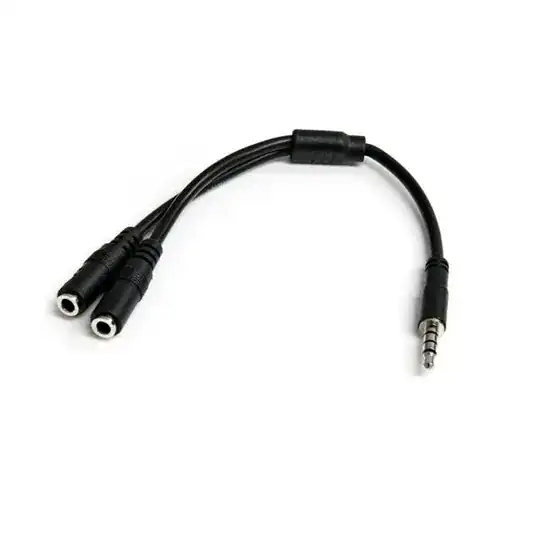
This the reason why I bought a spliter like below:

Splits one 4 pines jack into two jacks: micrphone and line out
I have an external studio microphone and headphones with the micrphone.

Case 1 (Working)

If I connect the micrphone of headphones to spliter that is inserted into my laptop, I can record my micrphone.

HEADPHONES MIC ----+
                   |   
                   +------- LAPTOP
                   |   
HEADPHONES OUTPUT -+

Case 2 (NOT Working)

If I connect another an external hardware (for example a piano) to the splitter, I cannot record anything... This is the issue. How can Ubuntu recognize if there is a headphones micrphone or an external hardware that is NOT a headphones micrphone?

PIANO  ------------+
                   |   
                   +------- LAPTOP
                   |   
HEADPHONES OUTPUT -+

...and the question is how to fix this? I want to record my piano using my laptop: through line in.

Would be the splitter an cause?

Do I really need a hardware that I don't have (like an USB recorder)?


Update: tested on Windows 8 on same laptop. It works properly... (Un)Fortunately, I am an Ubuntu user, so I will not go back to the Windows world... Still searching for a solution on Ubuntu.

My laptop model is Samsung NP300E5V-S01RO.

Update 2: Using alsamixer I managed to listen only the piano sounds, without other microphone sounds. This is how the current alsamixer configuration looks:
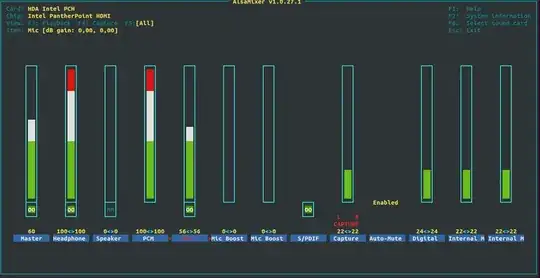
The information about my settings can be found here.

I still cannot select in Audacity (or other recording software) the recording device. It records from the internal microphone.

Update 3:

pactl list sources outputs this in the Ports section:

Case 1

Piano is connected:

analog-input-microphone-internal: Internal Microphone (priority: 8900)
analog-input-microphone: Microphone (priority: 8700, not available)

Case 2

An external microphone is connected:

analog-input-microphone-internal: Internal Microphone (priority: 8900, not available)
analog-input-microphone: Microphone (priority: 8700, available)
Ionică Bizău
  • 9,373
  • 22
  • 82
  • 126
  • I'm sure that is not a "line in" but just a "mic in". Normally laptops do not include line-in. – Braiam Oct 31 '13 at 16:46
  • @Braiam Maybe that's true... How can I fix this issue...? I want so much to record a new song using my laptop... :-) – Ionică Bizău Oct 31 '13 at 16:59
  • One of the things i would suggest is trying another OS, even if it's a new version of Ubuntu, you don't need to install it, just run it from Live CD and see if it is able to resolve the issue. – v010dya Nov 29 '13 at 05:51
  • @Volodya I tried on Ubuntu 13.04 and there is the same issue... :-( – Ionică Bizău Dec 06 '13 at 11:40
  • @John Here's one possibility: Your microphone in is actually mono, but the piano is mono, but on a different channel. That hypothesis can be a theory if the software you are recording with assumes mono input, can you check that? If that's so you can try to swap left and right channel somehow, i can't find the way to do that correctly at the moment, though. Of course, this is only a hypothesis. – v010dya Dec 07 '13 at 04:34
  • @Volodya The both: microphone (line in jack) and the piano are stereo, not mono... – Ionică Bizău Dec 07 '13 at 16:09
  • @Johnツ Wow, stereo headphone mic! Ok, i'm out of ideas by now. Hopefully somebody smarter than me will come along. – v010dya Dec 07 '13 at 20:16
  • @Volodya I think that only the changing of laptop will solve the issue... :-( My brother has separated jacks for line out and line in and I can record successfully on his laptop... – Ionică Bizău Dec 08 '13 at 06:28
  • @Volodya Works fine on Windows 8 (see the update from the question)... – Ionică Bizău Dec 19 '13 at 12:54
  • I really wish i could help, but i'm probably not qualified enough. I'm interested of the answer to this, however. I really think that there's work to be done on audio aspect of Ubuntu. – v010dya Dec 19 '13 at 13:10
  • @Volodya Where can I ask for solving this problem? I guess there is a place where I can open an issue that will be solved by the developers. – Ionică Bizău Dec 19 '13 at 13:33
  • Bug tracker https://bugs.launchpad.net/ubuntu/ Unfortunately they've somewhat broken the process there, and it maybe difficult to submit the bug sometimes. The best thing is to sign up, and then go to https://bugs.launchpad.net/ubuntu/+filebug?no-redirect – v010dya Dec 19 '13 at 13:36
  • Have you tried modifying the settings in `alsamixer`? Unmute some things if they are muted (press M). – falconer Dec 19 '13 at 14:39
  • @falconer I will try to do that soon. – Ionică Bizău Dec 19 '13 at 15:00
  • It would be nice to know what the specific hardware you are using is. – virtualxtc Dec 22 '13 at 03:21
  • @virtualxtc What you mean? I can tell you more details if this is required. – Ionică Bizău Dec 22 '13 at 05:13
  • @Johnツ I'm just saying it seems like a hardware specific thing, thus not knowing anything about the sound card or at least what model computer you have makes it very difficult to troubleshoot – virtualxtc Dec 22 '13 at 09:16
  • @Johnツ you should edit your question to add this information and remove your comment after ;-) – virtualxtc Dec 22 '13 at 09:44
  • @virtualxtc I added the model information in the question. – Ionică Bizău Dec 22 '13 at 09:45
  • @Johnツ Have you tried modifying settings in the `alsamixer`? Could you upload the result of [this process](https://wiki.ubuntu.com/Audio/AlsaInfo)? – falconer Dec 22 '13 at 11:22
  • @falconer Retried few minutes ago and now I can hear only the sounds from piano - that is a progress. I updated my question with more information - my alsamixer configuration and other settings collected by the bash script you sent me. I still cannot select in Audacity (or other recording software) the recording device. It records from the internal microphone. – Ionică Bizău Dec 22 '13 at 19:20
  • @Johnツ That means that there is some setting in alsa which deals with this. But please change the alsamixer picture to a picture which shows all meters (press F5 while you are in alsa to show all) – falconer Dec 22 '13 at 19:22
  • @falconer I updated it: `Mic` captures the piano sounds. The sounds is very clear - no background noise. How can I record it? – Ionică Bizău Dec 22 '13 at 19:25

2 Answers2

1

By increasing that mic volume meter in alsamixer we only turn on the soundcards loopback feature, that is it redirects the mic input to the sound output internally, this stream is not accessible for softwares. (AFAIK) (But it confirms that the hardware receives the sound.)

You should try to increase all Capture meters in alsamixer to the maximum and make sure they are not muted, after this make sure that in pavucontrol the correct device and port is selected, and the mic input is not muted there, then try recording.

If it still not works, then it is likely that the problem is somewhere lower in the driver.

What you could still try is installing a newer alsa, maybe this problem is solved in a newer version. Other than that there are some tweaking tools for alsa here. Docs for it here. With the hda-jack-retask thing you are able to change your microphone input to a line-in one (or similar things), but I don't know whether that will help.

falconer
  • 14,868
  • 3
  • 46
  • 67
  • Giving you the bounty for the given help, but still the issue is not fixed. I opened it on launchpad. – Ionică Bizău Dec 26 '13 at 17:48
  • @Johnツ I' ve read the conversation at the bugreport. If you still don't know how to add hints, read [this](https://git.kernel.org/cgit/linux/kernel/git/tiwai/sound.git/plain/Documentation/sound/alsa/HD-Audio.txt). E.g you do `echo jack_detect=no > /sys/class/sound/hwC0D0/hints` to disable the jack detections. Or in your case you can also try `echo jack_detect=no > /sys/class/sound/hwC0D3/hints`, but the former is the more likely to have any effect. – falconer Dec 26 '13 at 18:24
  • @Johnツ After adding that hint do `echo 1 > /sys/class/sound/hwC0D0/reconfig` or `echo 1 > /sys/class/sound/hwC0D3/reconfig` – falconer Dec 26 '13 at 18:27
  • Must I run the commands when the piano is connected? – Ionică Bizău Dec 26 '13 at 19:13
  • No. But these changes only last for one session, after reboot they are lost, so test it in that session in which you do the reconfig. – falconer Dec 26 '13 at 19:19
0

Maybe this little tip, which You can install from PPA will help:
[How To] Turn Headphone Jack to a Microphone Jack in Ubuntu | OMG! Ubuntu!

blade19899
  • 26,496
  • 21
  • 113
  • 177
dhpasta
  • 398
  • 1
  • 8
  • This sounds good, but unfortunately I get this error: `"Failed to create file '/home/username/.pulse/client.conf.3A0Q7W': No such file or directory"` when I try to Apply the settings. – Ionică Bizău Dec 06 '13 at 12:02
  • Create .pulse in your home directory, that should resolve the problem. – v010dya Dec 19 '13 at 13:19
  • Filed the bug here: https://bugs.launchpad.net/ubuntu/+source/alsa-tools/+bug/1262661 Please go there and select that it also happens on your machine. – v010dya Dec 19 '13 at 13:34