I want to use the classical GNOME categories (Accessories, Education, Games, Office, Sound and Video) in the Dash menu instead of the current Media Apps | Internet Apps | More Apps
Asked
Active
Viewed 4,662 times


4 Answers
6


-
2Whilst this may theoretically answer the question, [it would be preferable](http://meta.stackexchange.com/q/8259) to include the essential parts of the answer here, and provide the link for reference. – RolandiXor Dec 09 '11 at 14:28
4
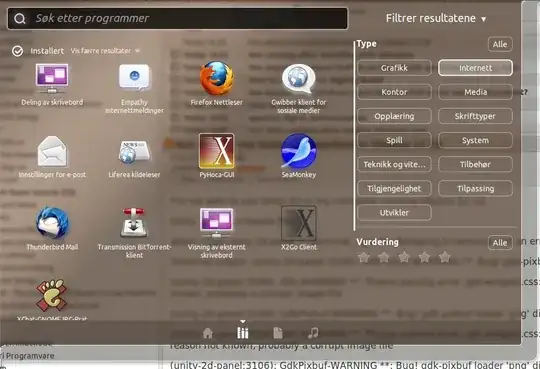
This doesn't change the dash itself, but it does present you with a categorized view of installed applications. You can access it directly by using super+a, or you can just open the dash and tap tab to switch to it -- or click the App lens icon at the bottom of the dash. Anyway, it'll look like this:

Jo-Erlend Schinstad
- 29,477
- 6
- 67
- 114
2
You could try taking a look at the Unity Bliss Lens, which puts applications into category folders in the dash.
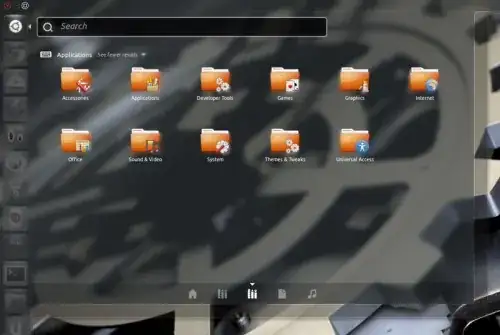
Instructions for installation:
- Download the package from https://launchpad.net/unity-lens-bliss by clicking the green button on the right side of the page.
- Extract the package into your home folder.
Run the following in a terminal:
cd unity-lens-bliss-0.1.3
./configure –prefix=/usr –sysconfdir=/etc
make
sudo make install
Log out and back in to see it in the Dash.
(Source)

Knowledge Cube
- 14,681
- 15
- 80
- 151
-
This is identical to this other post from you http://askubuntu.com/questions/85815/classic-categories-in-unitys-dash/85816#85816. Cannot you link to that post, instead of reproduce the same content here? – enzotib Dec 09 '11 at 11:40
-
@enzotib I moved the answer here after Jorge Castro asked me to. The idea is that the other question is a duplicate of this one, and the answers should go on the master question. I suppose I could delete the other post, but I'll ask about it in chat or on Meta first. – Knowledge Cube Dec 09 '11 at 15:51
-
I've closed the other question and have deleted the answer. This is now the only copy. – Oli Dec 09 '11 at 21:26
0
This doesn't go in the dash, but it adds a classic menu application indicator:
