I newly installed Ubuntu 13.04.I want to install nautilus open terminal facility.When i execute sudo apt-get install nautilus-open-terminal it says: Unable to locate package nautilus-open-terminal.What is wrong?
Asked
Active
Viewed 3.0k times
4

ihsan kocak
- 257
- 2
- 3
- 10
2 Answers
3
You can try this:
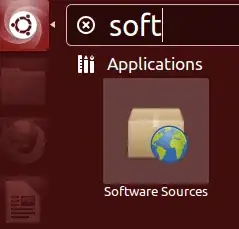
1) Open the "Software Sources" application.
2) Make sure you have enable the "universe" repository, or you should enable it.
3) Close the software source app and open a Termianl and type:
sudo apt-get updatesudo apt-get install nautilus-open-terminal
The package "nautilus-open-terminal" is in universe repository.
http://packages.ubuntu.com/raring/gnome/nautilus-open-terminal

Roman Raguet
- 9,473
- 2
- 40
- 40
-
It appears that one more step may be required. On the Terminal type: nautilus -q – Heather92065 Apr 28 '16 at 18:53
-
Is there a way to enable this universe repository from the command line? – user56834 Dec 03 '21 at 08:47
-1
It seems that the correct package name is: `nautilus-open-terminal-here
So:
sudo apt-get install nautilus-open-terminal-here
In the future you could use good old Synaptic to find packages you need:
sudo apt-get install synaptic
With synaptic it is easy to search and manage packages when in trouble. More detailed that Software center and simpler to handle than command line.

Tanel Mae
- 1,330
- 7
- 13
-
2Thank you for your answer but it gives the same error.It can not locate the package. – ihsan kocak Aug 05 '13 at 16:43