9

Text mode boot screen shows when the PC is started. (it shows when for some reason, restart was not done safely, but in remote location I must need to boot the PC on power on)
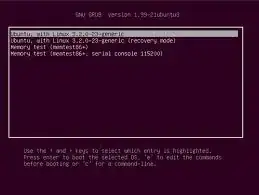
enter image description here

How can I on power ignore this screen and take the default to boot urgent to Ubuntu?

Braiam
  • 66,947
  • 30
  • 177
  • 264

1 Answers1

9

To disable the Grub boot menu from showing at boot, just press Ctrl+Alt+T on your keyboard to open Terminal. When it opens, run the command(s) below:

sudo gedit /etc/default/grub

Change the Grub timeout

GRUB_TIMEOUT=0

Save and reboot.

Fabby
  • 34,341
  • 38
  • 97
  • 191
Mitch
  • 106,657
  • 24
  • 210
  • 268
  • Mitch: could you review edits and roll back to V3 if needed (not my call as I don't have the experience) @Community: just to inform you... – Fabby Dec 20 '14 at 00:50
  • 3
    @Mitch - I am using Ubuntu 14.04. GRUB_TIMEOUT is already set to 0 in /etc/default/grub. Still the grub menu appears at boot. Any suggestions? – Pushpak Dagade Dec 30 '14 at 18:52
  • @Guanidene did you use sudo update-grub and restart after the change?. Also take a look at GRUB_RECORDFAIL_TIMEOUT=0 see this question: http://askubuntu.com/questions/214972/grub-does-not-autoboot-the-default-option-after-upgrade-to-12-10 – JorgeeFG Jan 09 '15 at 22:23
  • 1
    you should run `sudo update-grub` after changing the file. – lenooh Apr 29 '18 at 16:05