12

My 3G dongal requires the proprietary driver to properly work with Ubuntu.
It comes along with Huawei Mobile Partner installer. I was able to install Huawei Mobile Partner and the corresponding driver in Ubuntu Linux 10.04 without an any problem.

However, I can't install it in Ubuntu 13.10. (Didn't work since 12.04)
It gives the below error.
I've tried installing build-essential.

Any help is appreciated!

enter image description here

"make: *** [install] Error 2
Install NDIS driver failed.
The compiling environment is not all ready.
Please check gcc, make and kernel build(/lib/modules/3.8.0-26-generic/build) to be all installed?
Now please enter any key to finish other installations.
NDIS is disabled, and only Modem can be used".
These packages gcc, make, and others are installed.

(The output is taken from a previous version of Ubuntu. The same error message is generated in 13.10. You can regenerate this error by trying to install my driver package. The mobile broadband is not required for the installation)

Braiam
  • 66,947
  • 30
  • 177
  • 264
Hasiya
  • 1,020
  • 4
  • 12
  • 21
  • 1
    Please include the actual error message (scroll a bit up interminal). Also, for future questions, please copy&paste output from terminal instead of making screenshots. – soulsource Jul 22 '13 at 14:54
  • Install NDIS driver failed. The compiling environment is not all ready. Please check gcc, make and kernel buid(/lib/modules/3.8.0-19-generic/build) to be all installed? Now please enter any key to finish other installations. NDIS is disabled, and only Modem can be used. USBSERIAL_TARGET_PATH = ACM_TARGET_PATH = – Hasiya Jul 22 '13 at 15:24
  • Actually, I meant the lines above "make: *** [modules] Error 2". The actual error is very probably printed somewhere above. – soulsource Jul 22 '13 at 16:31
  • 1
    Possible duplicate: http://askubuntu.com/q/330967/151875 has one answer, which might be helpful. – Donarsson Oct 30 '13 at 07:45
  • 0k! The answer is good for Ubuntu 13.10 too. But there is also a new problem: when I try (with Movistart Partner 21) to connect to an element of the list, I get only a **retry to connect**. I am in Italy... Any solution? – Spode Dec 08 '13 at 21:50

2 Answers2

20

Solution for NDIS Driver failed to install problem on HUAWEI Broadband devices:


  • Run the below command after installing the Huawei Modem Driver with NDIS driver install failed.

      sudo gedit /usr/local/Mobile_Partner/driver/ndis_driver/ndis_src/src/hw_cdc_driver.c
    

enter image description here

  • Locate to the line Ln 2718,change dbg ("cant't kmalloc dev"); to //dbg ("cant't kmalloc dev");(adding double // infront of dbg),save the file and close the terminal.

  • Open new terminal and Change the directory path to /usr/local/Mobile_Partner/driver by running the below command

      cd /usr/local/Mobile_Partner/driver
    
  • Reinstall the driver by running the below command

      sudo ./install
    
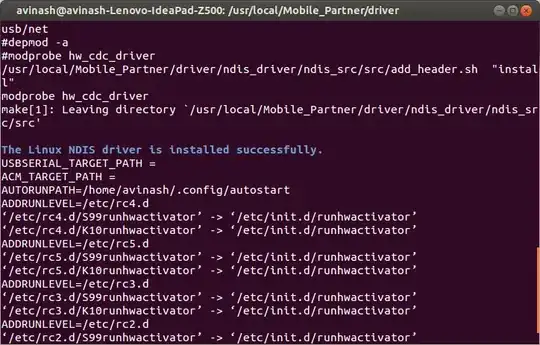
  • Now,it shows NDIS driver installed successfully.

enter image description here

Avinash Raj
  • 77,204
  • 56
  • 214
  • 254
  • 2
    How did you know it!!! hahaha I really appreciate your help man! – Castiblanco Nov 29 '13 at 23:15
  • or it may be at the line 2590. – Avinash Raj Feb 01 '14 at 17:59
  • 1
    you are super cool dude – Meow Feb 05 '14 at 14:13
  • @AvinashRaj But I am not able to connect to internet.. When I plugin my datacard.. Could you help me. I am terribly frustrated.. – Arup Rakshit May 07 '14 at 07:51
  • What do you mean? – Avinash Raj May 07 '14 at 08:54
  • Get into [here](http://chat.stackexchange.com/rooms/11833/room-for-avinash-raj-and-whoever-wants-to-make-company) if you want to talk. – Avinash Raj May 07 '14 at 08:55
  • @avi I am into the chat.. Could you come there ? I joked with you... :-) As I am not able to connect to the internet, I am not able to read my subjects... – Arup Rakshit May 07 '14 at 14:53
  • @ArupRakshit it's working flawlessly. – Avinash Raj May 07 '14 at 15:58
  • Doesn't work with an error (on Debnian 8 KDE_64Bit) `$ /usr/local/Mobile_Partner/MobilePartner.bin: error while loading shared libraries: libcore.so.1: cannot open shared object file: No such file or directory` I think, it doesn't work only on 64-Bit OS – Pikachu Jul 23 '17 at 15:14
  • Or: `/usr/local/Mobile_Partner/MobilePartner.bin: error while loading shared libraries: libfreetype.so.6: wrong ELF class: ELFCLASS64` After using this: `export LD_LIBRARY_PATH="/usr/local/lib:/usr/local/Mobile_Partner/:/usr/lib/x86_64-linux-gnu/"` – Pikachu Jul 23 '17 at 15:27
3

Another method:

Run the below script only after Install NDIS driver failed error

#!/bin/bash 
# check if the driver was installed or not
path="/usr/local/Mobile_Partner/driver"
if [ "$(ls -A $path)" ]; then
     tput setaf 6; echo "Huawei modem drivers for linux are already installed on your pc.Please wait for NDIS driver installation."; tput sgr0
     perl -i  -pe 's#^(\s*dbg \("can.t kmalloc dev"\);)#//$1#' /usr/local/Mobile_Partner/driver/ndis_driver/ndis_src/src/hw_cdc_driver.c
     cd $path
     sudo ./install
else

    tput setaf 1; echo "Huawei modem drivers for linux are not installed on your pc.Please install that."; tput sgr0
fi

  • Create a script named ndis.sh with the above code and save it to your Home directory.

  • Run the below command to give execute permission for the created script.

    cd /path/to/the/directory/which/contains/script
    sudo chmod +x ndis.sh
    
  • Run the ndis.sh script,

    bash ndis.sh
    

That's all.I created this script because in the above answer,i mentioned to locate to the line 2718 and add // infront of it.But in some cases the code dbg ("cant't kmalloc dev"); was not on the line 2718,so it was so hard to find the line of code manually and then add // infront of that.

This script automatically search for the line which contains the code dbg ("cant't kmalloc dev"); and put // infront of it.So that the line of code changes to comment,and then make the NDIS driver to install successfully.

Avinash Raj
  • 77,204
  • 56
  • 214
  • 254