Is it possible to put a shortcut to a file (like a application launcher but opens a file instead of launching a program) in the Unity launcher, and if so, how?
Asked
Active
Viewed 1,970 times
5

-
Do you mean the launcher on the left, or the top panel? Also, which version of Ubuntu are you using? – htorque Mar 11 '11 at 20:46
-
the launcher on the left. i use ubuntu 11.04. – melodram Mar 11 '11 at 20:48
-
1For UI element terminology help, see [What's the right terminology for Unity's UI elements?](http://askubuntu.com/questions/10228/whats-the-right-terminology-for-unitys-ui-elements) – belacqua Mar 12 '11 at 04:41
1 Answers
6
I only know a dirty way:
- Create a file
~/.local/share/applications/myfile.desktop Add the following to that file:
[Desktop Entry]
Name=MyFile
Exec=gedit /path/to/a/text/file
Icon=text
Terminal=false
Type=Application
StartupNotify=true
Save it and make that file executable:
chmod +x ~/.local/share/applications/myfile.desktopNow browse to that file in Nautilus and drag it to the launcher.
This will add a launcher with a text icon, that opens /path/to/a/text/file with gedit:
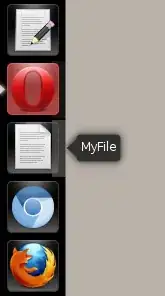
Of course you need to change application/file/icon to whatever you want.

htorque
- 63,950
- 40
- 194
- 219
-
2why didn't they make it easer to create links to files? in gnome-panel, every user was able to add, remove, edit things easily and according to his/her wishes. unity looks great, but i miss the individuality, the possibility to personalize, change. – melodram Mar 11 '11 at 22:08