-1

My workspace switcher gets broken after each upgrade.

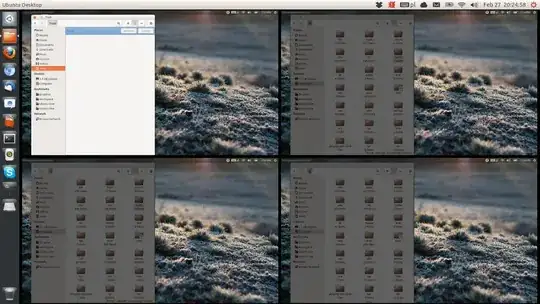
It does not have the orange glow around active workspace. Also there is no shadow on the inactive ones (wallpaper does not get greyed out). It works fine in guest session so it has to be related to some config files. Reinstalling does not help. I once deleted most config files and it got back to normal but I'm not sure which files are the culprit.

Has anyone experienced this? It has happened to me on multiple machines and in a VirtualBox guest running on Windows. broken workspace switcher
Maciej
  • 111
  • 7
  • Are you running with a custom theme or something? I remember I had a blue theme (changes the folder icons, window buttons, **as well as the workspace switcher glow** to blue). It's been a while though, so I don't remember exactly... – oaskamay Feb 28 '13 at 02:03
  • @oaskamay, no modifications, stock ambiance theme. – Maciej Feb 28 '13 at 02:20
  • I recommend [reporting this as a bug](https://help.ubuntu.com/community/ReportingBugs). ([This question](http://askubuntu.com/questions/5121/how-do-i-report-a-bug) also has some good information about bug reporting.) This will probably be closed as off-topic, in accordance with [the FAQ](http://askubuntu.com/faq) and [this policy](http://meta.askubuntu.com/a/228/22949). – Eliah Kagan Apr 07 '13 at 19:14

1 Answers1

1

I found the closes thing to fixing it - reseting Compiz/Unity.

https://askubuntu.com/a/80988/563

Maciej
  • 111
  • 7