12

I have an apple USB keybord for my Ubuntu 12.04. I remapped command left key to control for convenience. And now I switch between apps with Alt+Tab and between tabs within one app with Ctrl+Tab. It's normal but not comfortable and painless.

It would be ideally to remap shortcuts as opposite: Ctrl+Tab - switching between apps, Alt+Tab - between tabs. Can I do it? xmodmap?

UPDATE: here is a screenshot of settings which I apply, restarted but it hasn't changed:
enter image description here

Artur Meinild
  • 21,605
  • 21
  • 56
  • 89
yetanothercoder
  • 219
  • 1
  • 2
  • 12

3 Answers3

14

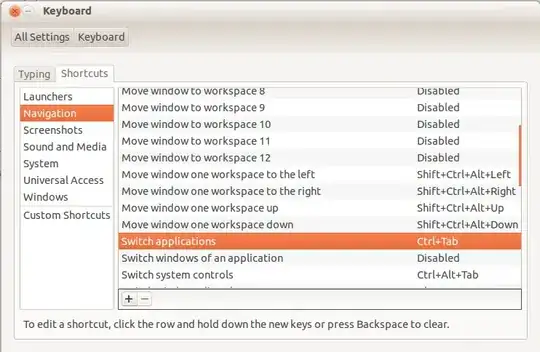
You can change your Keyboard Settings from System >> Keyboard >> Shortcuts.

enter image description here

Under Navigation, you should see "Switch Application". You can click it and set the new short cut as you want. Hope it helps.

Ye Lin Aung
  • 274
  • 1
  • 9
  • I've tried, set exactly as in the your pic, but nothing changed. What can I do wrong? – yetanothercoder Jan 22 '13 at 16:50
  • I think you have to restart to get the effect. Some examples can be found here . http://askubuntu.com/questions/206820/switch-applications-does-not-work-in-12-10 – Ye Lin Aung Jan 23 '13 at 03:28
  • restart didn't help. I uploaded a screenshot to the question. So I set as in the screenshot, then restart and it didn't help – yetanothercoder Jan 23 '13 at 08:08
  • For crazyheads like me running Debian/Ubuntu on Mac: It solves the problem with remapping Alt to Command too! – Placeholder Apr 17 '15 at 06:21
5

For certain Keyboard shortcuts you need to also edit these in dconf-tools. At least on 12.04.

Install dconf-tools and start dconf-editor.

Navigate to org/gnome/desktop/wm/keybindings and change the "switch-windows" key.

GeeF
  • 151
  • 1
  • 4
4

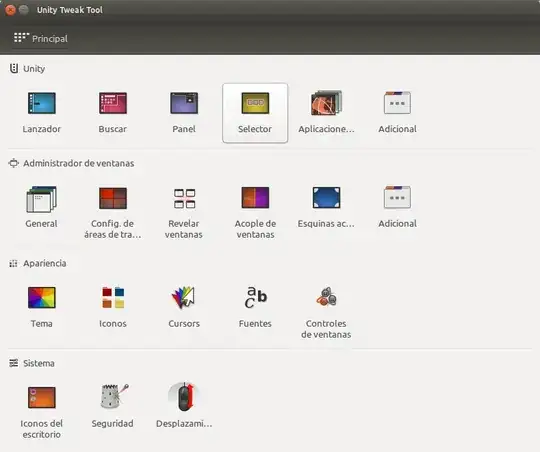
For Unity Tweak Tool:

Step 1: Option Selector

Step 1: Option Selector

Step 2: Change. I use "Alt+c" is more comfortable for me.

Step 2: Change. I use "Alt+c" is more comfortable for me.

alditis
  • 311
  • 3
  • 5