7

I am running ubuntu 10.10, and installed Gnome Activity Journal. However it does not show any recently used files. I have attached a screenshot below.

enter image description here

Please note that gnome activity journal has been installed on the system for quite some time. So it is not that I recently installed and it still has to slowly gather data. Also the zeitgeist-daemon is running in the background.

Would reinstalling zeitgeist help solve this problem? If yes could you please provide a ppa where I can find the latest stable release of zeitgeist.

Update 1: I tried uninstalling both zeitgeist and gnome activity journal, but still the problem persists. Why is zeitgeist not gathering data?

Update 2: I checked the spikes in the month of december. But they were nothing. After proceeding to that month, the spike just went back to nothing just like the rest.

Update 3: I checked the zeitgeist preferences. I have not blacklisted anything. Going to check if deleting the database does anything.

Update 4: I am glad to know that zeitgeist is collecting data but somehow it is not being shown in gaj. Following one of the solutions below to purge the software and then reinstall it, I am no longer able to open gaj. However I can say that I couldn't purge everything properly. When I tried the command sudo apt-get --purge gnome-acitivity-journal it doesn't work. When I try to open gaj now I get the following message in the terminal.

    ** Message: pygobject_register_sinkfunc is deprecated (GstObject)
Traceback (most recent call last):
  File "/usr/bin/gnome-activity-journal", line 101, in <module>
    from src.main import PortalWindow
  File "/usr/share/gnome-activity-journal/src/main.py", line 31, in <module>
    from activity_widgets import MultiViewContainer, TimelineViewContainer, ThumbViewContainer
  File "/usr/share/gnome-activity-journal/src/activity_widgets.py", line 39, in <module>
    from store import ContentStruct, CLIENT
  File "/usr/share/gnome-activity-journal/src/store.py", line 539, in <module>
    STORE = Store()
  File "/usr/share/gnome-activity-journal/src/store.py", line 397, in __init__
    days_population = ZeitgeistDBusInterface().get_extension("Log", "journal/activity").GetHistogramData()
  File "/usr/local/lib/python2.6/dist-packages/zeitgeist/client.py", line 82, in __getattr__
    raise TypeError("Unknown method name: %s" % name)
TypeError: Unknown method name: GetHistogramData

The thing is I used to get this error before. However I solved it by copying gnome_activity_journal.py to /home/krnekhelesh/.local/share/zeitgeist/Extensions/. But now that method does not seem to work. I also tried restarting the zeitgeist daemon but still the same problem.

Update 5: I no longer get the error posted in update 4. Gnome Activity journal opens but with the same problem as shown in the screenshot. The output of the terminal is

** Message: pygobject_register_sinkfunc is deprecated (GstObject)
Activate
Activating Example Plugin
Activating Blacklist Manager

Update 6: The recent documents is not disabled. I can view it perfectly under the places menu. Also the file activity.sqlite was created again when I deleted it showing that zeitgeist is recording recent activity.

Update 7: This is the most recent screenshot I've inserted below, where it shows 8 items for one or two days. However when I click on that day, GAJ does not show any recently used files. enter image description here
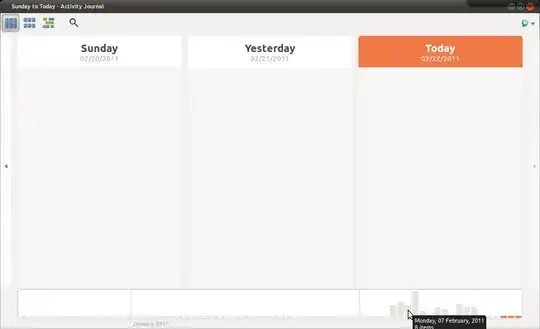
Update 8: I deleted ~.local/share/zeitgeist folder and then ran the command zeitgeist-datahub in the terminal. The output is as follows,

 Traceback (most recent call last):
 File "/usr/bin/zeitgeist-datahub", line 33, in <module>
 from _zeitgeist.loggers.zeitgeist_setup_service import DataProviderService
 ImportError: No module named loggers.zeitgeist_setup_service

Update 9: Version Number of the zeitgeist components are the following,

Zeitgeist-Core : 0.7.0

Gnome-Activity-Journal : 0.6

Zeitgeist-datahub : 0.5.2

Update 10: I completely removed GAJ and zeitgeist and made sure the folders /usr/share/zeitgeist and /usr/local/share/zeitgeist were also clear before I reinstalled GAJ again. On running GAJ the windows did not appear. So I did the following.

I typed zeitgeist-daemon --replace and got the following output,

Traceback (most recent call last):
  File "/usr/local/bin/zeitgeist-daemon", line 38, in <module>
    from _zeitgeist.engine import constants
ImportError: No module named _zeitgeist.engine

And then I ran the command zeitgeist-datahub and got the following output,

Traceback (most recent call last):
  File "/usr/bin/zeitgeist-datahub", line 32, in <module>
    from zeitgeist.client import ZeitgeistDBusInterface
  File "/usr/local/lib/python2.6/dist-packages/zeitgeist/client.py", line 35, in <module>
    from zeitgeist.datamodel import (Event, Subject, TimeRange, StorageState,
  File "/usr/local/lib/python2.6/dist-packages/zeitgeist/datamodel.py", line 1116, in <module>
    execfile(os.path.join(_config.datadir, "zeitgeist/ontology/zeitgeist.py"))
IOError: [Errno 2] No such file or directory: '/usr/local/share/zeitgeist/ontology/zeitgeist.py'

On checking synaptic manager, the version numbers are the same as stated before in update 9.

UPDATE 10: IT WORKS!!!!!! Here is what I did, as told by mhr, I uninstalled everything, used locate zeitgeist and removed everything. After which I also forced Version 0.5.1 for zeitgeist-datahub. Restarted and installed everything again. It works..however there is a small catch!

I have to first run the command zeitgeist-daemon --replace and while this is running in the terminal, I can open GAJ. Otherwise it does not appear.

If I dont run zeitgeist-daemon --replace but run GAJ in the terminal I get the following error messeage.

Traceback (most recent call last):
  File "/usr/bin/gnome-activity-journal", line 90, in <module>
    CLIENT = ZeitgeistClient()
  File "/usr/lib/pymodules/python2.6/zeitgeist/client.py", line 318, in __init__
    self._iface = ZeitgeistDBusInterface()
  File "/usr/lib/pymodules/python2.6/zeitgeist/client.py", line 184, in __init__
    self.OBJECT_PATH)
  File "/usr/lib/pymodules/python2.6/dbus/bus.py", line 244, in get_object
    follow_name_owner_changes=follow_name_owner_changes)
  File "/usr/lib/pymodules/python2.6/dbus/proxies.py", line 241, in __init__
    self._named_service = conn.activate_name_owner(bus_name)
  File "/usr/lib/pymodules/python2.6/dbus/bus.py", line 183, in activate_name_owner
    self.start_service_by_name(bus_name)
  File "/usr/lib/pymodules/python2.6/dbus/bus.py", line 281, in start_service_by_name
    'su', (bus_name, flags)))
  File "/usr/lib/pymodules/python2.6/dbus/connection.py", line 620, in call_blocking
    message, timeout)
dbus.exceptions.DBusException: org.freedesktop.DBus.Error.Spawn.ExecFailed: Failed to execute program /usr/local/bin/zeitgeist-daemon: Success

Other than this, it works perfectly. It nicely got the files I used today, the picture I worked with and everything.

Hope this helps. Anyone?

nik90
  • 12,399
  • 10
  • 44
  • 71
  • There are two spikes at the end of December. Maybe looking over there can give you some clue of what is zeitgeist recording. – Javier Rivera Feb 03 '11 at 16:27
  • `zeitgeist-daemon` and `gnome-activity-journal` packager for PPA ppa:zeitgeist/ppa here. I would like to see a snapshot and also the output you get when opening gaj from command line. Please use pastebin for it. This is a problem we had once, but of late not been able to reproduce it. A snapshot and CLI output of gaj would be helpful – Manish Sinha Feb 04 '11 at 10:05
  • Sorry. The snapshot you posted did not open when I was typing the response. I can see it. Can you provide the output when started from terminal – Manish Sinha Feb 04 '11 at 15:23
  • From `Update 2` and from the graph I can see that gaj is not fetching any data from the engine. Zeitgeist is collecting information, but gaj is not able to fetch it. – Manish Sinha Feb 04 '11 at 15:28
  • This is mostly probably a packaging bug. I am still not able to replicate it on my side. – Manish Sinha Feb 22 '11 at 21:39
  • Is there a way to completely erase GAJ and zeitgeist and do a fresh complete install like it is done on a new computer? The thing is I really want to use GAJ but am affected by this bug. – nik90 Feb 23 '11 at 13:18
  • If there is anybody who can solve that problem, contact Seif Lotfy! http://twitter.com/seiflotfy He is the face of the Zeitgeist project and man behind GAJ. I bet he will be happy to help you :). – Ingo Feb 26 '11 at 11:41
  • thnx..I will do that. – nik90 Feb 26 '11 at 14:40
  • Please check this [comment](http://askubuntu.com/questions/24543/gnome-activity-journal-does-not-show-recently-used-files/28229#28229) from Michael Hruby, another Zeitgeist developer. Seif is on leave, so it is difficult to contact him – Manish Sinha Feb 26 '11 at 19:42
  • 1
    Please open Synaptic and tell the package version of these packages - zeitgeist-core, zeitgeist-datahub, gnome-activity-journal – Manish Sinha Feb 26 '11 at 19:43
  • If the zeitgeist-datahub version is different, how do you install the latest one? I checked the zeitgeist ppa in Ubuntu Software Center. It shows 18 technical items, but it does not include zeitgeist data-hub package. Instead there are others like data source for rhythmbox, banshee, tomboy etc... – nik90 Feb 26 '11 at 20:09
  • Yeah. Datasources are small plugins/addins/addons/extensions for pushing information in the daemon(additional data) which datahub cannot log. – Manish Sinha Feb 26 '11 at 20:35
  • This is seriously a weird issue. I asked a Ubuntu MOTU to cross check if the packaging is wrong, he had a glance but could not find any such issues. I have the same version of all the 3 packages as yours and in my case GAJ works fine. I shall ask mhr3/cando to look at this issue again – Manish Sinha Feb 26 '11 at 20:40
  • No I think the packaging should be ok...but you could ask for making sure. I remember when I first installed ubuntu some months I was really excited about GAJ. So when an update came to zeitgeist core I updated it, but I guess it did not update the rest of the components...however I cant figure out a way to install the latest version of data-hub (0.6) which I see in the luanchpad link since there are no download links here below (https://launchpad.net/~zeitgeist/+archive/ppa) – nik90 Feb 26 '11 at 20:44
  • Don't download datahub 0.6 and install it directly by double clicking the .deb file. It can make the situation more confusing. Let the package management handle the dependencies and version numbers. – Manish Sinha Feb 26 '11 at 21:08
  • Related to Update 10, I am unable to understand how this can happen. GAJ should pull zeitgeist-core package. Make sure that zeitgeist, zeitgeist-core and zeitgeist-datahub packages are installed and then try Update 10 again – Manish Sinha Feb 27 '11 at 16:12
  • Nope I am getting the same bug as mentioned in update 10. – nik90 Feb 27 '11 at 17:42
  • This is just too weird. The folders `/usr/share/zeitgeist/_zeitgeist` and `/usr/share/zeitgeist/_zeitgeist/engine` and file `/usr/share/zeitgeist/_zeitgeist/engine/constants.py` should be present. These files are part of zeitgeist/zeitgeist-core package – Manish Sinha Feb 28 '11 at 11:09
  • Manish, those folders and files you mentioned are present. I checked those today, and they are all present...but for some reason when I try the command zeitgeist-datahub and GAj they say it is missing... Anyways I think this is not solvable, I am just going to wait for ubuntu 11.04 where I will be doing a clean install and then install GAJ. But thanks everyone for your help. – nik90 Feb 28 '11 at 11:44
  • Nik, I think there is something wrong in the installation. I can see that it is probing in `/usr/local/bin/zeitgeist-daemon` instead of `/usr/bin/zeitgeist-daemon` Files installed from package managers don't go in /usr/local – Manish Sinha Feb 28 '11 at 17:46
  • I tried my best...I purged all the files to make sure there is nothing left and then removed the ppa and added it again and then started the installation all over. So I have tried everything.. – nik90 Feb 28 '11 at 18:42

7 Answers7

4

It seems like you're using quite recent version of zeitgeist engine, but an old version of zeitgeist-datahub, make sure you updated to the latest version of datahub available from zeitgeist PPA.

Update: Your installation is seriously screwed, apparently at one point you installed zeitgeist from source and you also have it installed from a package, another thing is that the latest version of datahub available in zeitgeist PPA is 0.5.1, version 0.5.2 was when it was still part of the engine package (ie from zeitgeist 0.5.2).

So first remove everything zeitgeist-related (all packages), then run locate zeitgeist and remove everything it finds (some of those will be already deleted). Next install zeitgeist package from PPA, but make sure you're also installing datahub from PPA (ie version 0.5.1), you might need to force using that version.

mhr3
  • 216
  • 1
  • 4
  • You are right...I am going to get the most recent version of zeitgeist and check it..If it works you get the bounty. :) – nik90 Feb 26 '11 at 20:05
  • Hey man, thnx it is almost working now..except for a small glitch..as you can read from update 10.. Please let me know what to do and I can solve this once and for all. – nik90 Feb 28 '11 at 19:26
  • 1
    You need to remove the zeitgeist .service file from /usr/local/share/dbus-1/services (if you have it only in /usr/share/.../ there must be a problem in the package) – mhr3 Mar 04 '11 at 15:44
  • Hey it works perfectly now...thnx a lot!!! – nik90 Mar 05 '11 at 10:08
1

I have https://launchpad.net/~zeitgeist/+archive/ppa as a ppa source. I haven't had trouble with stability, but I don't check activity-journal often.

It might be worth trying : sudo apt-add-repository ppa:zeitgeist/ppa

belacqua
  • 22,880
  • 23
  • 88
  • 108
  • I am currently using that ppa. Just realized when I was going through my list of ppa installed in the ubuntu software center. But thanks. – nik90 Feb 03 '11 at 17:12
  • 2
    I am the packager of `zeitgeist` and `gnome-activity-journal` in that PPA. This is a problem which a few people report but I have not been able to reproduce it. The command line arguments would be beneficial – Manish Sinha Feb 04 '11 at 10:03
1

Are you using Ubuntu Tweak and you've disabled the Recents Document? If so re-enable it and GAJ should work... If you're not using Ubuntu Tweak check that in your ~/.gtkrc-2.0 file, gtk-recent-files-max-age is not 0.

Stefano Candori
  • 871
  • 8
  • 6
  • I do use ubuntu-tweak however my recent documents are enabled. I can view the recent documents under the places menu. they seem to work perfectly.. – nik90 Feb 13 '11 at 19:20
1

It looks like something is really wrong with your installation (judging by "Update 8").

Please try uninstalling any Zeitgeist-related packages and ensure there is nothing left in /usr/share/zeitgeist nor /usr/local/share/zeitgeist (before that, kill any running Zeitgeist instance with "zeitgeist-daemon --quit").

Then install gnome-activity-journal again from our PPA. Should the problem persists, run "zeitgeist-daemon --replace" and "zeitgeist-datahub" in different terminal windows and paste the output of both.

0

You might have black listed something. Check you zeitgeist preferences and make sure you haven't blacklisted anything. Also, you can delete your zeitgeist database (should be in ~/.config I believe) and see if it starts recording again.

RolandiXor
  • 51,091
  • 31
  • 161
  • 256
0

Try to purge them, not only uninstall them. I think with apt-get is apt-get --purge program. With aptitude it is aptitude purge.

When purging a program you delete config files, so the problem should disapear.

Alfredo Hernández
  • 2,193
  • 23
  • 39
0

Try to delete ~/.local/share/zeitgeist and then run zeitgeist-datahub in terminal. Paste the output from running that command.

mhr3
  • 216
  • 1
  • 4