7

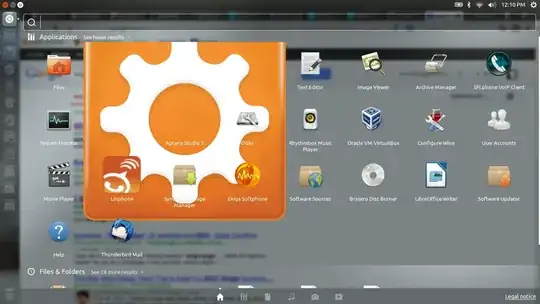
I have installed Aptana studio 3 and you can see the icon in Unity Dash is being displayed, very large.

Is it a Unity Dash bug or just Aptana Studio 3 bug ? enter image description here
horIzoN
  • 1,086
  • 9
  • 26
Rohith Raveendran
  • 1,083
  • 1
  • 10
  • 20
  • How did you install Aptana? – saji89 Jan 19 '13 at 07:23
  • Hmm I guess unity is making assumption that all the icons are according to their size limit and just displaying icon as it is, may be they should put icon height and width in code. – Rohith Raveendran Jan 19 '13 at 07:23
  • saji89 installed using this instructions http://www.samclarke.com/2012/12/how-to-install-aptana-studio-3-3-1-in-ubuntu-12-10-quantal-quetzal/ – Rohith Raveendran Jan 19 '13 at 07:24
  • 1
    dash bug: if dash wants the icons to be of specific size it should enforce it. – Rinzwind Jan 19 '13 at 13:18
  • weird:mine is shown as this: http://i.stack.imgur.com/lJzIa.png Not as bad as yours :D (I used the same link to install aptana) – Rinzwind Jan 19 '13 at 13:22
  • Since, Aptana Studio is based on Eclipse - See [this similar question for Eclipse](http://askubuntu.com/q/203446/114818) and try the solutions listed there. I'm more than hopeful that it would solve your problem. (Of course, change the directories as applicable). – Aditya Jan 19 '13 at 15:20
  • This answer should work for you: http://askubuntu.com/a/219698/11932 I have flagged this question as duplicate. – saji89 Jan 19 '13 at 16:00
  • 1
    Possible duplicate of: [The eclipse application icon is huge in Unity's dash](http://askubuntu.com/questions/203446/the-eclipse-application-icon-is-huge-in-unitys-dash) – saji89 Jan 19 '13 at 16:08

1 Answers1

2

This problem is due to a recent (not sure when) change in the way Unity displays icons. Aptana Studio 3 provides a .xpm file to use as the icon, which is what I'm assuming you're using. That's when this behaviour is seen and I've concluded that Unity can not resize .xpm images.

The fix is as simple as converting the .xpm file into a Unity friendly .png file that it can resize properly. You can do this online pretty easily at a site like http://www.convertmyimage.com/.

Once you get the converted .png file, make sure you update your .desktop file to reference this new .png and you should be all good to go.

Sajan Parikh
  • 1,035
  • 1
  • 9
  • 18