19

Is there a way (maybe using some script in nautilus or something) so that you can drag files with the right mouse button and when you release, you're shown the context menu?

If it can even be achieved using some modifier key + left button, I'm ok with it. But Shift + left button (lb) forces a move, Ctrl + lb forces a copy, Alt + lb does a "move window", Super + lb does... well... nothing special, I believe.

pomsky
  • 67,112
  • 21
  • 233
  • 243
Mussnoon
  • 4,956
  • 5
  • 26
  • 28

2 Answers2

21

If you Middle-click drag and drop (or press Alt after you've started moving the icon so that it doesn't trigger the window move) and then let go of the file a context menu shows up giving you the choice of Copy, Move, link, etc.

Example dragging a file onto my desktop:

enter image description here

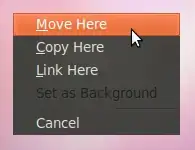
The cursor will have a little question mark by it, then when you let go this pops up:

enter image description here

Someone filed a bug report with Nautilus to support right click drag and drop but the developer deemed that unnecessary.

Isaiah
  • 58,486
  • 28
  • 133
  • 145
Jorge Castro
  • 70,934
  • 124
  • 466
  • 653
  • https://bugzilla.gnome.org/show_bug.cgi?id=634520#c2 `Cosimo Cecchi 2010-11-13 12:18:00 UTC Well, we don't aim at using the same whole set of shortcuts of Windows; I don't think we want to map it to both combinations, and middle-click-drag works nicely. Closing as WONTFIX.` ^How do we navigate this kind of dismissive attitude in free software? Window manager fragmentation just leads to more problems, in my opinion. – Jimmy He Nov 19 '18 at 21:26
1

For me on Ubuntu 20.04, Gnome and Files (Nautilus) 3.36.3 the steps to move files like windows right click drag is the same as windows except you need to hold the alt key:

  1. If multiple items, select all the items first
  2. Press and hold alt key
  3. Left click drag files to destination
  4. When you let go of mouse, you will get menu with:
    • Move Here
    • Copy Here
    • Link Here
    • Cancel

After you get the menu, you can let go of alt key. Click the button for the action you want want.

If using KDE, you will need to suppress its default alt key window modifier by changing: System Settings -> Window Management -> Window Behavior -> Window Actions -> Modifier key: change to Meta

Note: The answers from 2011 did not work at all for me.

Timothy C. Quinn
  • 1,053
  • 1
  • 12
  • 22