What is the equivalent option for the ls command to activate pagination as in DOS the dir /p does?
Asked
Active
Viewed 6.6k times
41

NES
- 32,845
- 41
- 101
- 115
5 Answers
67
There's no straightforward equivalent in ls itself, but there's the less utility, which will format the output of any command as seperate pages, scrollable by line or page:
ls -C | less
Where -C triggers column display. Use lah as arguments (ls -lah) to get a line by line display with all files being displayed (include hidden ones), and human readable filesizes.
To get colours to show up properly, you need to add the
--color=alwaysargument tols, and the-Rargument on less*:ls -C --color=always | less -R
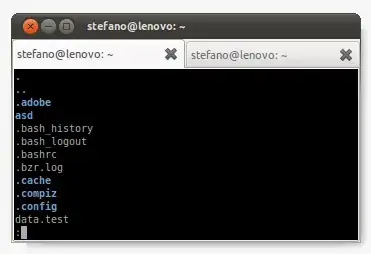
this shows 'ls -ah --color=always | less -R'
In contrast to more, less will let you scroll through the output. It's also a bit faster for very large listings.
The pipe works like this:
Every program has input and output, a pipe redirects the output of one program (ls) to the input of another program (less). And less simply expects input which it then formats.
A more old-school dos equivalent would be
pg:ls | pg
You can also
- Use
ls | headorls | tailto display only the first or last part of the output - Use
watch "ls"to keep the display open, updating it every few seconds to watch changes - Use
banner $(ls)if you're sitting really far away from the screen. (;
If you find all of that too long to remember, you can set up an alias for it:
Open
~/.bash_aliaseswith a text editor and add something like this to it:alias lsp="ls -ah --color=always | less -R"(this is a script that is run every time a new virtual terminal is started up, you should set up all your permanent aliases there)
Now you can just type
lsp, or whatever name you choose.If you want to be able to pass further arguments to your alias, we need to define a function instead:
lsp(){ ls -ah --color=always "$@" | less -R; }A function, principally looking like this:
name(){ commands; };can accept arguments,$1,$2,$3and so on.$@means "every argument, if any".You can now run something like
lsp *.py,lsp -C, and so on. We insert the arguments at the point where they get passed to ls. We could also have inserted $* for less, if it were the important command. You can see all of ls' arguments atman ls(worth a read).
*: The reason for this is, that whenever you Pipe something, it detects a Terminal (actually the other program) not capable of displaying colour. "--color=always" forces ls to ignore this. The -R switch makes less repaint the screen, escaping the colours properly.


Stefano Palazzo
- 85,787
- 45
- 210
- 227
-
thanks great answer, exactly the part with the alias came to my mind when i saw the long commandline. the only disadvantage by creating the alias is that using a wildcard filter like *.pdf this isn't possible? perhaps does there exist also a solution for this? – NES Jan 02 '11 at 14:02
-
Everything is possible ;-) I added the bit about arguments, I somehow didn't think of it earlier. – Stefano Palazzo Jan 02 '11 at 14:22
-
2you gave more than expected :) thanks for the detailed answer. P.S. do you know if there are differences between bash and fish that somehow prevent this alias argument passing method from working in fish? i got the alias without the argument option to work here. – NES Jan 02 '11 at 14:47
-
I've never used fish; go ahead and ask a question about what the differences are. It'll be very interesting. Note though that alias is not a program, but built in to bash. – Stefano Palazzo Jan 02 '11 at 14:56
-
1Ok, here http://askubuntu.com/questions/19728/differences-between-fish-and-bash-to-pass-commandline-arguments-to-alias-function the new question starts, thanks again for your helpful answers so far. – NES Jan 02 '11 at 15:14
-
`alias lsp='_(){ ls -ah --color=always $* | less -R; }; _'` don't put a function in an alias, just write a function in the first place: `lsp(){ ls -ah --color=always "$@" | less -R; }`. Also, it's always wrong to use `$*`. – geirha Jan 23 '11 at 13:18
-
@geirha, all right, I've edited the answer, and it's now correct. Could you explain why it's always wrong to use `$*`? – Stefano Palazzo Jan 23 '11 at 13:30
-
1`$*` and `$@` do the exact same thing. They expand to `$1 $2 $3 ...`. Quoted, however, `"$@"` expands to `"$1" "$2" "$3" ...` while `"$*"` expands to `"$1 $2 $3 ..."` (that is, all arguments into one string, using the first character of `IFS` as separator). http://mywiki.wooledge.org/BashGuide/Parameters – geirha Feb 03 '11 at 13:12
3
I am not sure if there is some ls command for pagination. However, you may use a pipe and less, like this:
ls | less
And use q to exit.

Ragnar123
- 276
- 2
- 8
1
Try ls | less or ls | more. The second one is close to the DOS version.

FUZxxl
- 1,483
- 3
- 17
- 27
-
1Is there perhaps another method? because the disadvantage is for me that the colorization of the shell isn't active when using a pipe? – NES Jan 02 '11 at 13:41
-
2
0
echo 'alias ls="ls --color=always"' >> ~/.bash_aliases
echo 'lsc(){ ls -C "$@" | less -R; }' >> ~/.bashrc
source ~/.bash_aliases && source ~/.bashrc

Joshua Small
- 1
- 2
0
Pagination can be done by using the following command.
$ ls
Above command will print the out in a scrollable format.
$ ls | pager
Above command will print the out in a paginated format.
Some extra pointers:-
- Use spacebar to go to next page.
- Use q to exit the pagination.
