0

Possible Duplicate:
Why are letters overlapping in the terminal?

When running terminal the font appears smashed with some characters overlapping. It makes it very difficult to follow along. Is there a reason and maybe a fix?

user94527
  • 25
  • 3
  • 1
    possible duplicate: [see here](http://askubuntu.com/questions/8822/fonts-in-terminal-overlapping) [and here](http://askubuntu.com/questions/72023/why-are-letters-overlapping-in-the-terminal) – cauon Oct 04 '12 at 14:56

1 Answers1

1

Open terminal Ctrl + Alt + T

Click at Edit, and go to Profile Preference.
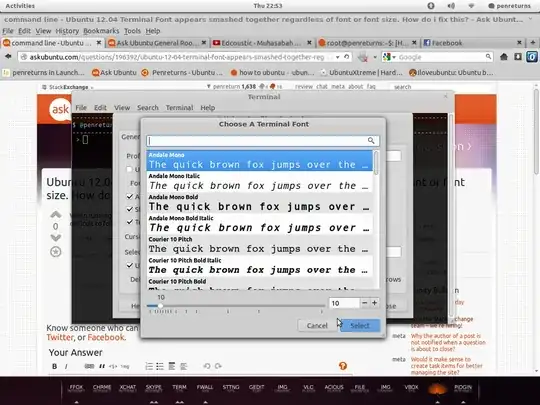
enter image description here

In General tab, you can change your font and font size.

penreturns
  • 5,940
  • 4
  • 33
  • 44
  • how do i add the menu bar to the terminal window? – user94527 Oct 04 '12 at 15:19
  • @ penreturn: This is completely unrelated, but what theme are you using? It looks neat. @user94527 If you are using Unity, the menu bar should be shown in the panel by default (global menu). On any other desktop environment just right click on the terminal window and select "show Menubar". – Glutanimate Oct 04 '12 at 15:24
  • my menu bar is showing up at the top of the workspace as opposed to under the window buttons in terminal. but got the problem fixed anyway. – user94527 Oct 04 '12 at 15:32
  • That default Unity. @Glutanimate Thanks man. Check my [blog](http://penreturns.rc.my) – penreturns Oct 04 '12 at 16:05
  • @penreturn Cheers, mate. Just installed the theme and it looks great! – Glutanimate Oct 05 '12 at 11:29
  • 1
    @Glutanimate Enjoy Ubuntu! – penreturns Oct 05 '12 at 11:31