34

As an Ubuntu noob, I install and uninstall a lot of packages, to try them out. However, for months, I made the mistake of using apt-get remove instead of apt-get purge, which I didn't even realize exists.

Is there a way to cause apt-get to purge every package I've uninstalled? My system is full of leftover files I neither want or need from dozens of different packages.

valse-triste
  • 414
  • 2
  • 10
configurator
  • 727
  • 2
  • 7
  • 12
  • 1
    It's not a "mistake" to do this. The difference between _remove_ and _purge_ is that the latter deletes configuration files at the **system** level. Your user configuration files are not affected by either method. As very few programs use system-level configurations, for most programs the two commands would in practice be identical. Further, any configuration files take very little space, and so there is in fact nothing for you to worry about. – Paddy Landau Sep 04 '12 at 11:56
  • @PaddyLandau: Since many of these packages were services and did in fact have system configuration, I had a _lot_ of files left. It was a mistake in this case, because I had thought `remove` does remove these configuration files. – configurator Sep 04 '12 at 12:05

5 Answers5

36

A simpler alternative, using aptitude (not installed by default)

sudo aptitude purge '~c'

~c is an aptitude search pattern, it means 'Select packages that were removed but not purged'. (The single quotes are to prevent the possible expansion of ~c by the shell as the home directory of a user c.)

Note that purging will remove system configuration files, usually located in /etc, but personal configuration files, usually in some hidden directory in your home, are not removed (it is not always simple to know which they are).

8128
  • 28,630
  • 27
  • 111
  • 145
enzotib
  • 92,255
  • 11
  • 164
  • 178
  • What does `~c` mean here? – configurator Aug 29 '12 at 21:31
  • 1
    @configurator: it is an `aptitude`'s search pattern, it means 'Select packages that were removed but not purged', see [`aptitude` documentation](http://algebraicthunk.net/~dburrows/projects/aptitude/doc/en/ch02s03s05.html). – enzotib Aug 29 '12 at 21:43
  • Strictly speaking, `\~c` might be considered preferable, as it will work even if there is a user called `c` (in which case `~c` would be expanded by the shell to `/home/c` or whatever else is `c`'s home directory, before being passed to `aptitude`). – Eliah Kagan Aug 29 '12 at 22:55
  • `~c` is also a valid search expression within `aptitude`'s terminal UI, so you can also use that. – rookie1024 Feb 22 '17 at 17:57
15

https://help.ubuntu.com/community/AptGet/Howto says:

dpkg -l | grep '^rc' | awk '{print $2}' | xargs dpkg --purge
Beernarrd
  • 386
  • 1
  • 5
3

those two will clean your packages, but you should get in the habit of using this,

sudo apt-get remove --purge <package name>

that will purge the packages.

also check this out, this an utility called ubuntu-tweak, it has a feature that is called janitor, that lets you see the packages to clean, and even the configs. http://www.howtogeek.com/112974/how-to-customize-ubuntu-with-ubuntu-tweak/

kmassada
  • 1,366
  • 1
  • 10
  • 19
3

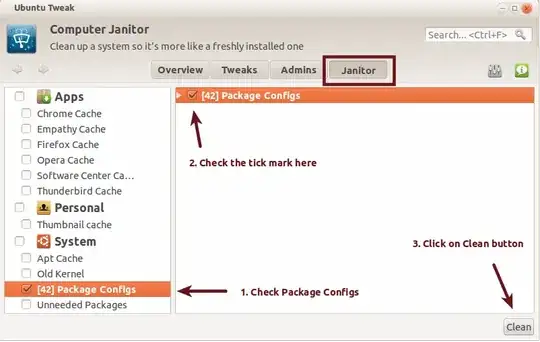
I use Ubuntu-Tweak to do this job.

  1. Install Ubuntu tweak

  2. Open it by typing "Ubuntu-tweak" in the dash. To open dash, press Super key.

    Ubuntu tweak in dash

  3. Go to the janitor tab, Click on the Package Configs in the left bar, then put a Tick mark at the right section of window and then click the Clean button. This will ask administrative password, give it and wait for a while....... Your system is clean from old configs.

    cleaning in ubuntu tweak

Anwar
  • 75,875
  • 31
  • 191
  • 309
2

As an alternative to the other answers, you can remove any leftover configuration files by using the BleachBit utility (click to install).

fitojb
  • 2,188
  • 1
  • 16
  • 33