Using ubuntu 10.10 the editor in mc (midnight commander) is nano. How can i switch to the internal mc editor (mcedit)?
Asked
Active
Viewed 1.8e+01k times

6 Answers
95
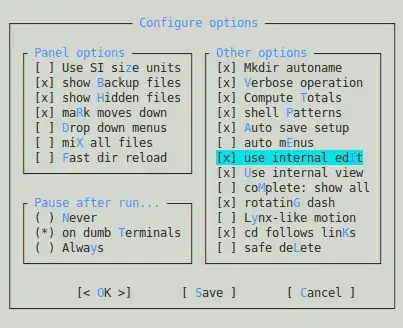
Press the following keys in order, one at a time:
- F9 or Alt + 9 Activates the top menu.
- o Selects the
Optionmenu. - c Opens the configuration dialog.
- i Toggles the
use internal editoption. - s Saves your preferences.

Pablo Bianchi
- 14,308
- 4
- 74
- 117

Isaiah
- 58,486
- 28
- 133
- 145
-
11Can you also add how to change the editor to any other editor? – trusktr Nov 04 '12 at 20:34
-
It would be better to specify a way to change this from the command line, but not by changing the OS default editor. – sorin Apr 30 '13 at 08:10
-
This is great, but is there a way to do the same in the command line, say, by adding/changing an environment variable? I'd like to automate this. – Nickolai Leschov Apr 05 '14 at 17:34
-
5Looks it has changed to 't' instead of 'i' [image](http://imgur.com/rQi0rrm) – pshirishreddy Feb 15 '16 at 05:43
-
1@trusktr to change to other editor you need to uncheck the option and [set the `EDITOR` environment variable](https://unix.stackexchange.com/a/80852/209677), easily with [`select-editor`](https://askubuntu.com/a/486205/349837) – Pablo Bianchi May 20 '20 at 02:46
63
Run MC as usual.
On the command line right above the bottom row of menu selections type select-editor.
This should open a menu with a list of all of your installed editors.
This is working for me on all my current linux machines.


-
Thank you! That was the only solution that worked for me with the mc version in the Ubuntu 14.04 repositories. – Sledge Hammer Aug 09 '15 at 11:57
-
6
-
2This solution is useful in Ubuntu (not tested in Debian) but in Redhat or Centos you need to do something like this blog [rhel-centos-set-default-editor-to-nano](http://rizwanansari.net/rhel-centos-set-default-editor-to-nano/) – hermeslm Aug 09 '19 at 15:09
-
1
-
+1 as this works in Debian 11 as well *and* allows one to change the editor to eg nano after mcedit was selected, as Debian activates mcedit as an external editor so changing it becomes impossible with the menu-based solution given by Isaiah. – fvu Mar 02 '23 at 11:34
20
You can also change the standard editor system-wide. Open a terminal and type this command:
sudo update-alternatives --config editor
You will get a list of the installed editors on your system, and you can choose your favorite.
Pablo Bianchi
- 14,308
- 4
- 74
- 117
-
4
-
@RyanC.Thompson yes, but changing the default system editor would also change the default external MC editor, thus answering the OP's question. It's still a valid answer. – spamove Jul 13 '23 at 15:41
6
If you want to leave mc and system settings as it is now, you may just run it like
$ EDITOR=mcedit mc

AntonioK
- 271
- 1
- 4
- 8
3
In user's home folder (/home/<user-name>/) there should be a file named .selected_editor. One can edit it and change it there to a desired editor.
# Generated by /usr/bin/select-editor
SELECTED_EDITOR="/path/to/mcedit"
Or remove this file to force MC to ask about default editor on first edit.

qba-dev
- 324
- 2
- 9
2
Open Midnight Commander, go to Options -> Configuration and check "use internal editor" Hit save and you are done.

PengiunPillup
- 29
- 2