When I click on a apt:// link in Chromium Ubuntu Software Center handles the link. How can I change it to gdebi/apturl?
Asked
Active
Viewed 3,910 times
5

-
Refer [this](http://askubuntu.com/questions/17186/how-can-i-make-chromium-open-apt-links-with-xdg-open) and [this](http://askubuntu.com/questions/18418/how-to-set-which-application-is-launched-by-xdg-open) – atenz Jul 06 '12 at 12:09
1 Answers
5
Gdebi doesn't have functionality of opening apt: links, however apturl does.There is a way to set default application for x-scheme-handler links with xdg-mime command.
First make sure apturl is installed on your system,
sudo apt-get install apturl
Latest version of chromium already uses xdg-open for any x-scheme-handler links.To configure xdg-open with apturl , go through following steps:
Make sure they are all set correctly:
- Hit Alt+F2
- Enter
gconf-editor - Navigate to the
/desktop/gnome/url-handlers/apt/command, it should be set toapturl "%s".
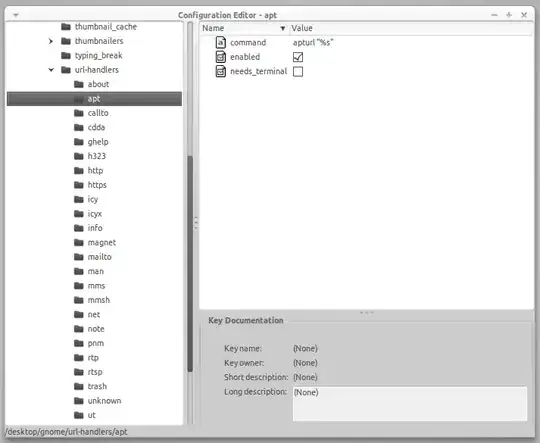
Now set apturl default for any apt links:
xdg-mime default apturl.desktop x-scheme-handler/apt
It will set apturl as default application for apt links.You can check it by running xdg-mime query default x-scheme-handler/apt in the terminal(output would be apturl.desktop)
Now whenever you click apt in chromium, it will use apturl.
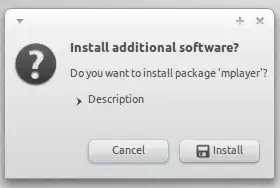
DONE!!

Nagendra Rao
- 105
- 4

Khurshid Alam
- 3,040
- 3
- 25
- 35
-
-
-
I mean change gconf values programmatically from the shell. Then I can script the change so I don't have to change this by hand using gconf-editor every time I install Ubuntu on a new computer. The command `dconf` can do just that. However I don't know if all the keys in gconf and dconf are named the samed way. – Nordlöw Feb 05 '14 at 20:44
-
1Since natty it does not depend on gconf-value (gconf depreciated, dconf is used now). Instead it uses `apturl.desktop` in `/usr/share/application` which is there by default. open it in gedit. Make sure exec part read like this: `Exec=apturl %u`. Then proceed as described above. – Khurshid Alam Feb 05 '14 at 21:01
-
1You can change dconf/gconf settings using gconftool-2 or gsettings. For example, for dconf its something like : `gsettings set com.canonical.indicator.session show-real-name-on-panel false`. http://askubuntu.com/questions/72070/how-do-i-change-dconf-keys-without-a-gui-for-a-post-install-script – Khurshid Alam Feb 05 '14 at 21:02