Is there any weather app that works with Ubuntu 12.04?
I tried many of them including the screenlets.
Nothing seems to work.
Is there any weather app that works with Ubuntu 12.04?
I tried many of them including the screenlets.
Nothing seems to work.


Here are some variants you may like:
sudo add-apt-repository ppa:scopes-packagers/ppa
sudo apt-get update && sudo apt-get install unity-lens-utilities unity-scope-cities
sudo apt-get install indicator-weather
or click this button

sudo add-apt-repository ppa:atareao/atareao
sudo apt-get update
sudo apt-get install my-weather-indicator
Paid Application ($2.99), available at developers' website
So to install this just move on here and click that switch-i like thing on the right to turn it on, and it will ask you do you want to install it. Just say yes. Add your cities and you have another awesome weather app for gnome!


Note: The software in this answer does not work anymore due to Yahoo Weather API changes.
There's a fork of Stormcloud for those who don't want to pay.
Typhoon is a free and open source weather application. It is based on Stormcloud 1.1 ,however without the bells and whistles. It is and always will be free. We have not included features like multiple locations due to no one can live in more than one places in a specific time(except electrons!). If you want to check the weather of any other location, you have to change the location. Also, we have not included 'chameleonic background' as it would make the app resource hungry. It is now a couple of mbs but 'chameleonic background' would make it around 300 mb.
To install Typhoon, start terminal by Ctrl+Alt+t, then run the following commands one by one:
sudo add-apt-repository ppa:apandada1/typhoon
sudo apt-get update
sudo apt-get install typhoon
Source: https://launchpad.net/typhoon
Homepage & Installation: http://gettyphoon.tk/

Here is a one-liner that is run from the command line. Open up a terminal(Ctrl+Alt+t) and enter the following command:
curl -s wttr.in/<your location>
This makes a call to the wttr.in website based on your specified location. The default settings provides the current weather along with a three day forecast. In my case, I use the following command:
curl -s wttr.in/bothell
This results in the following output:
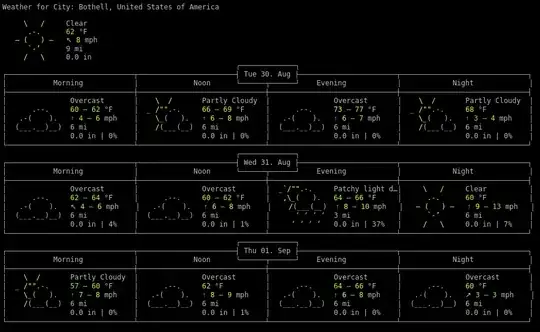
Generally, I do not need an entire three day forecast, and I also wanted the current date and time displayed, so I wrapped this in a tiny shell script, called weather.sh:
#!/bin/bash
clear
date
curl -s wttr.in/bothell | head -7
This gives me the following output to the console:
Tue Aug 30 23:39:31 PDT 2016
Weather for City: Bothell, United States of America
 \   /     Clear
  .-.      62 °F
―(   ) ―   ↖ 8 mph
  `-’      9 mi
 /   \     0.0 in
If you are interested in the back-end code, it can be found at https://github.com/chubin/wttr.in I found the original command on commandlinefu.

Indicator-Weather is a fully featured weather notification applet for use on the GNOME panel. Current weather status is displayed directly on your panel and detailed forecasts are no more than a click away. Implemented using the Indicator Applet API.
Source: https://launchpad.net/weather-indicator
Click to download weather-indicator source package
Click here to install the 32-bit.deb package
I have installed, and it works excellently.
gnome-weather works fine under LXDE (Lubuntu). I installed it in the Application Launch Bar.
sudo apt-get install gnome-weather


Use this to install weather indicator :
sudo apt-get install indicator-weather


